7 Free AI Tools for Students in India (2026) - That Actually Work
Aditya Kachhawa

Quick Start (For the Skimmers)
| If You Need... | Best Free AI Tools |
|---|---|
| Better revision & memory | NotebookLM + Anki |
| Cleaner writing & projects | Grammarly + SciSpace |
| A presentation fast | Gamma — open it today |
| Voice-based note capture | AudioPen |
↔️ Scroll horizontally to see all columns
All free to start. The two-tool recommendation at the bottom will take 5 minutes to set up.
It's 11pm. Exam Tomorrow. You've Read the Same Page Four Times.
You understood it in class. You've been staring at your notes for two hours. But nothing is sticking and you know it.
This is not a focus problem. It's a method problem.
Across India, most students are using AI the same wrong way: open a chatbot, paste a question, copy the answer, submit, forget. Meanwhile, a quieter group is using lesser-known tools that actually match how memory works tools for organizing notes, retaining concepts for weeks, building credible projects, and writing clean English even when you think in Hindi.
They're spending the same hours. They're just not wasting them on passive re-reading.
This list covers 7 free AI tools for Indian students in 2026 no ChatGPT, no Gemini, no Perplexity. By the end, you'll know exactly which two to start with this week and why they'll actually work when exams hit.
One Rule Before We Start
Green zone --> smart and safe:
- Using AI to explain tough concepts in simpler language
- Turning rough notes into organized summaries, then actually studying from them
- Getting an essay structure, then writing it entirely in your own words
Red zone --> risky and pointless:
- Copy-pasting answers you can't explain in viva
- Submitting text full of words you'd stumble over out loud
- Letting AI do the whole project while you stay clueless
Use these as assistants, not replacements. That mindset is also what means you can defend your work in viva which is where students who copy-paste get quietly destroyed.
Why Most Students Study Wrong (The Science in 60 Seconds)
Before the tools here's why this specific list works, and why your current habits probably don't.
German psychologist Hermann Ebbinghaus mapped what's now called the Forgetting Curve: without review, people forget roughly 50% of new information within a day, and up to 90% within a week. That chapter you read last Tuesday? Most of it is already gone.
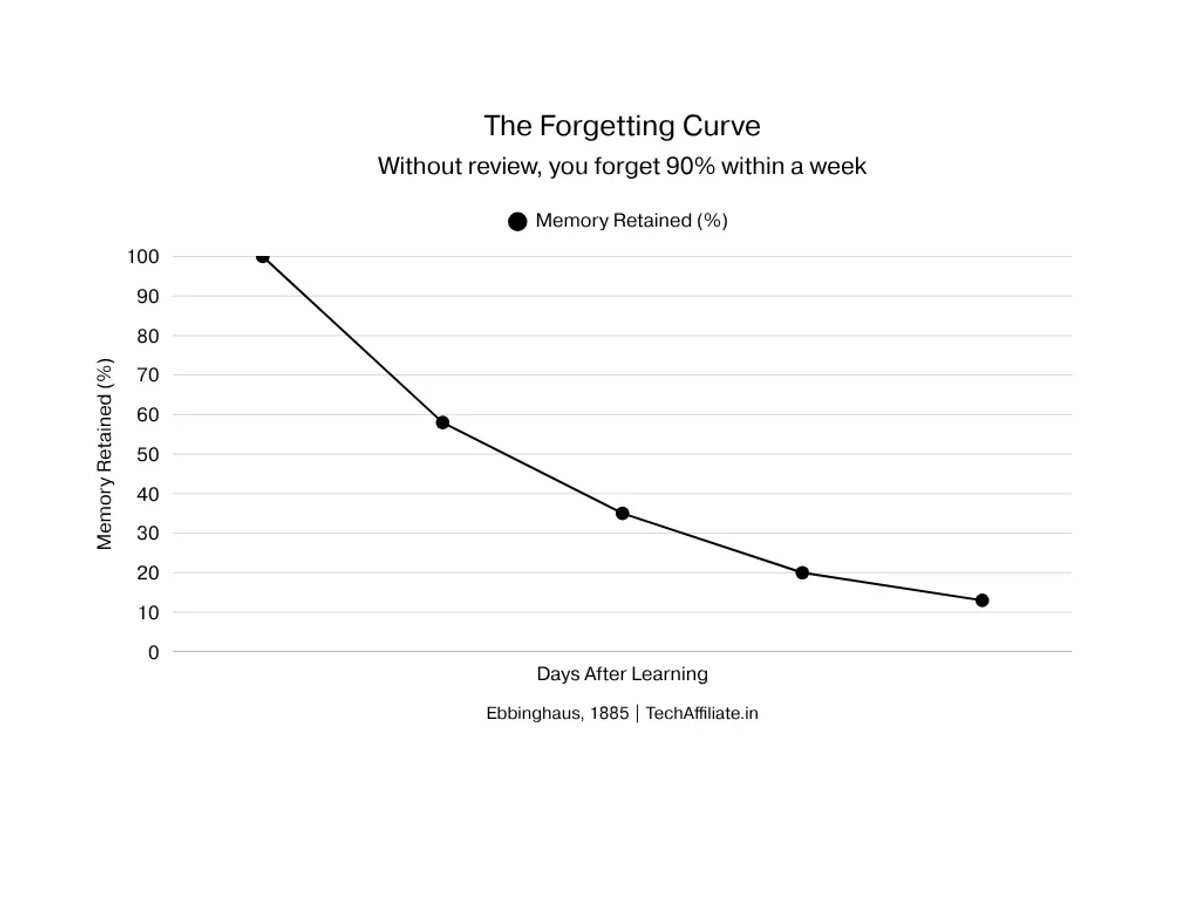
Two techniques directly fight this curve:
Spaced repetition reviewing material at increasing intervals, right before you'd forget it. Your brain consolidates the memory each time it's retrieved under mild pressure.
Active recall forcing your brain to retrieve information rather than just re-read it. Research published in Psychological Science found students using active recall outperformed passive re-readers by up to 50% on later tests not because they were smarter, but because the technique was better.
Every tool on this list either implements one of these techniques directly or removes the friction that stops you from using them consistently. That's not marketing copy that's the actual reason they work.
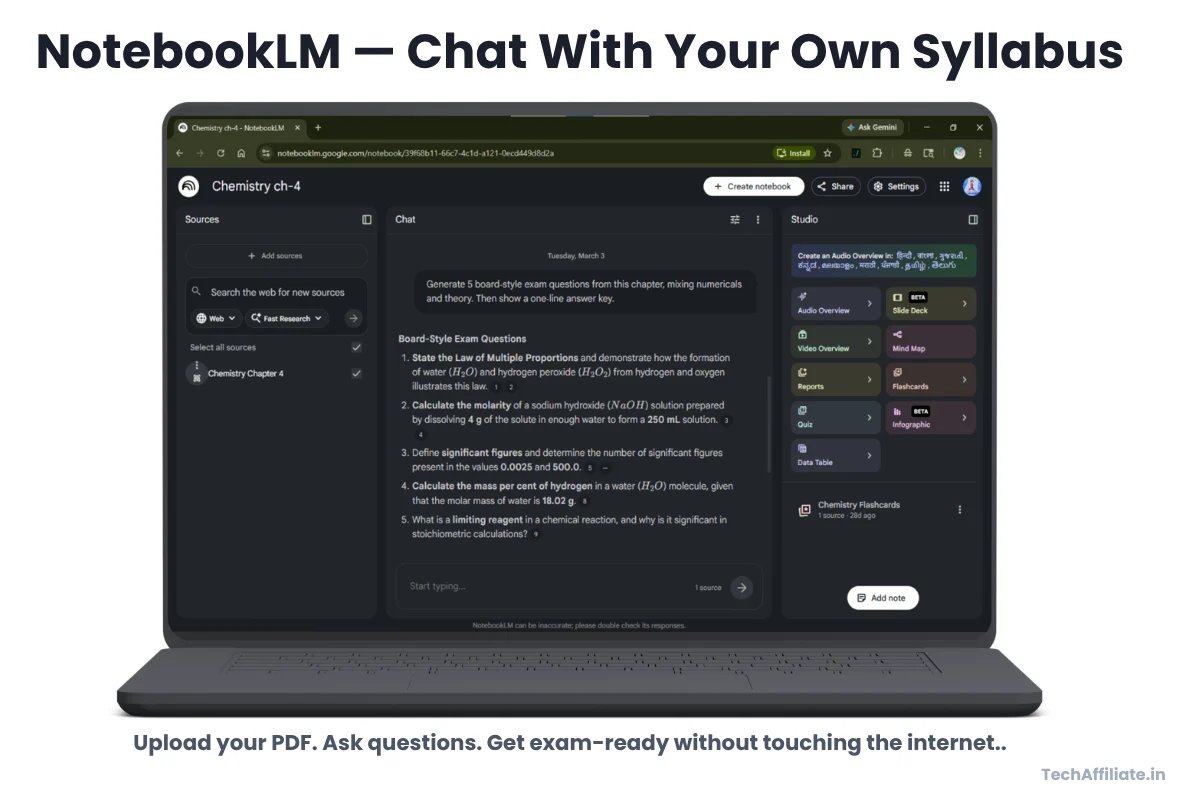
1. NotebookLM --> Study Your Exact Syllabus, Not the Whole Internet
The notes and PDF brain that almost no one in your class is using yet.
What it is: A free Google tool where you upload your own PDFs, textbook chapters, or coaching notes then chat with that specific material. It doesn't pull from the internet. It answers only from what you gave it. Think of it as a study partner who has actually read your exact syllabus not some generic Wikipedia version of the topic.
Why students ignore it: Everyone assumes "Google AI = Gemini" and stops there. NotebookLM is completely under the radar in India right now which is exactly why it's worth your time before everyone else catches on.
Use it this week:
- Upload a Physics or Chemistry chapter and ask: "Give me 10 exam-style questions with short answers."
- Paste messy class notes and ask: "Organize these into chapter-wise bullet points for quick revision."
- Before any exam: "Summarize this chapter in under 200 words key concepts and formulas only."
Real scenario --> Priya, BTech 2nd year, Pune: Digital Electronics unit test in 4 days. Had attended 3 of 8 lectures. She uploaded her friend's notes PDF into NotebookLM, asked for a 15-question quiz, answered without looking, noted what she got wrong, repeated over two evenings. Scored 74% her best unit test result that semester. The tool didn't study for her. It forced retrieval instead of passive reading. Active recall in action.
Pro tip: If English is a barrier, ask for a "Hinglish-style explanation." NotebookLM also has an audio feature that turns your notes into a two-person conversational discussion surprisingly effective for commutes or revision while lying down.
2. Anki --> The App That Rewires How You Remember
Used by the world's toughest exam qualifiers for 15+ years. Still underused in India.
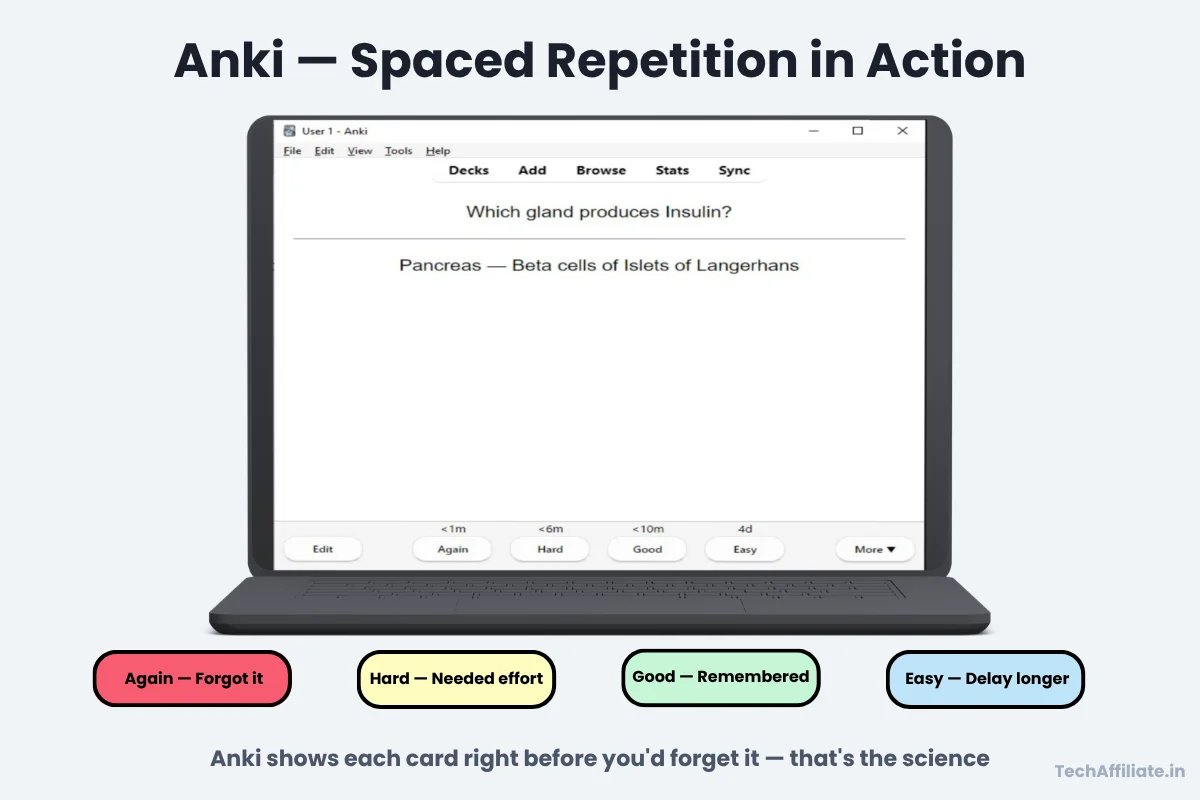
What it is: A free flashcard app built on spaced repetition showing cards at precisely calculated intervals so your brain retains information long-term instead of cramming and forgetting. It's been the primary study tool for USMLE (US medical licensing) candidates for over a decade specifically because the content volume is too large to cram and the cost of forgetting is too high.
Why students ignore it: The interface looks dated. They open it, feel nothing, uninstall within a week. Big mistake and here's the specific reason why.
When you re-read notes, your brain recognizes the content. That recognition feels like learning. It isn't. In an exam, you're not asked to recognize you're asked to retrieve. Anki forces retrieval every single session. The uncomfortable moment of trying to remember before seeing the answer is precisely what builds the memory. That discomfort is not a problem. That discomfort is the learning.
Use it this week:
- Paste your formula sheet into any AI tool and prompt: "Convert each formula into question-answer flashcard format." Import the output into Anki.
- Make cards for: definitions, dates, Polity/SSC facts, programming syntax, biology terms, exceptions to rules you always mix up.
- 15–20 minutes daily at a fixed time replaces the same time spent scrolling.
Real scenario --> Arjun, NEET aspirant, Chennai: Endocrine System was his weakest Biology chapter 40+ hormones, their glands, and functions. He used an AI tool to convert his NCERT notes into 60 Anki cards in one session, then reviewed daily for 6 weeks. In his mock test, Endocrine System went from his lowest-scoring chapter to his most consistently correct. No extra study hours. Just better distribution of the same hours.
Pro tip: Don't card everything only what you keep forgetting. One focused deck used daily for 30 days outperforms five all-nighters of panic revision every time. Ebbinghaus proved it in 1885. Your exam results will confirm it.
3. StudyFetch --> Stop Guessing What to Study. Let the AI Decide.
Solves the daily "I don't know where to start" paralysis.
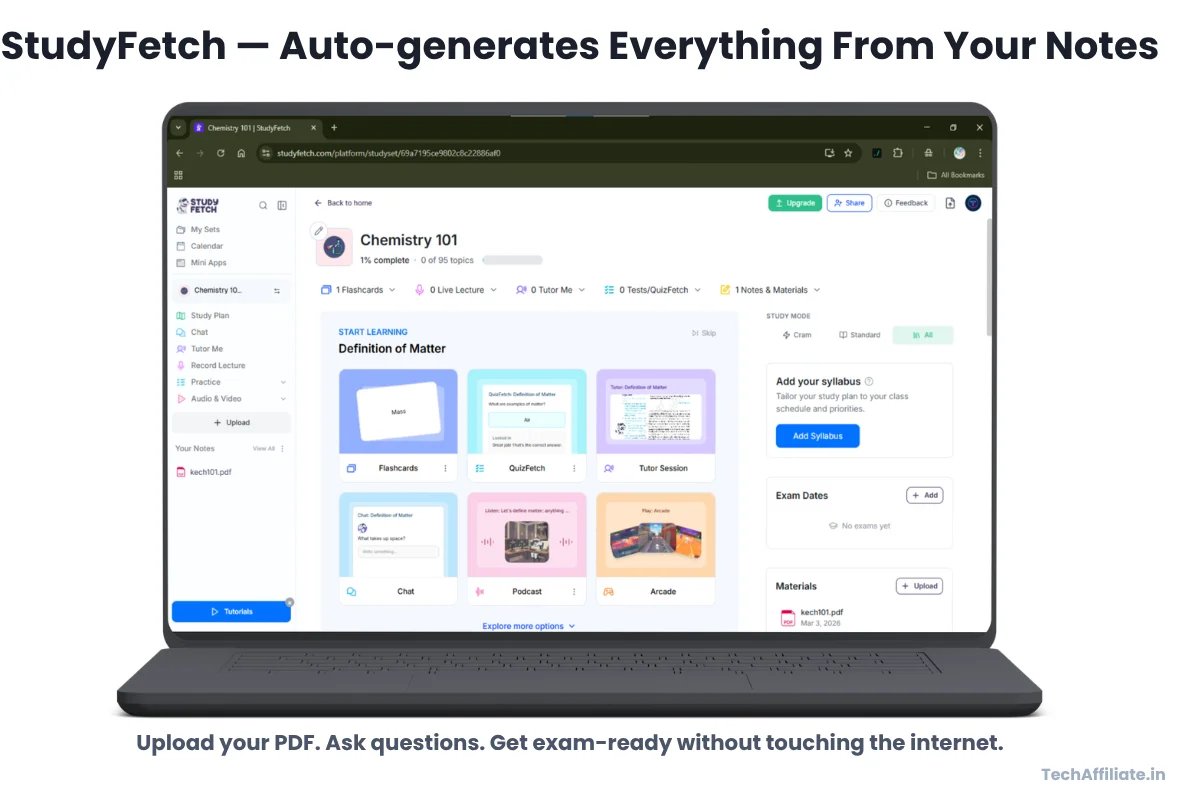
What it is: Upload your notes or textbook and StudyFetch automatically creates flashcards, quizzes, and revision sessions then tracks what you get right or wrong and adjusts what it shows you next. After a few sessions, it knows your weak areas better than you do.
Anki vs StudyFetch --> One Honest Comparison
| Anki | StudyFetch | |
|---|---|---|
| Card creation | Manual or AI-assisted import | Fully automatic |
| Works offline | Yes | No |
| Customization | High | Low |
| Best for | Students who want full control | Students who want zero setup |
| Low-end phone | Lightweight app | Browser-based |
| Cost | Completely free | Free tier |
↔️ Scroll horizontally to see all columns
Simple rule: Patchy internet or old phone → go with Anki. Want everything automated with no setup → go with StudyFetch. Pick one and stay consistent switching between both every week defeats the purpose.
Use it this week: Feed in one chapter per day for one week. By day seven you have a complete, adaptive revision set. Use quiz mode for 10 minutes before sleeping. For JEE, NEET, or SSC with genuinely massive syllabus adaptive revision isn't a luxury. It's the only approach that scales.
Pro tip: One subject, one chapter, one week. Build it slowly like a machine you can trust. A revision system built over 30 days beats a panic session built in 3.
4. SciSpace --> Make Your Project Look Like You Actually Researched
For college students who are tired of submitting work that embarrasses them.
What it is: An AI platform for finding, reading, and understanding academic research papers. Highlight any confusing paragraph, graph, or formula the AI explains it in plain language. It also suggests related papers and generates rough literature summaries you can build from.
Why it matters: Most college students write "literature reviews" by copying three lines from the top Google result and wrapping them in slightly different words. SciSpace lets you engage with actual peer-reviewed research while keeping it understandable even without a research background. The jump in quality is immediately visible to any professor who reads more than two student reports per year.
Who benefits most:
- BCA/BTech students writing final-year technical projects
- BSc students doing research-based assignments or mini-dissertations
- BA/BCom students whose professors have started recognizing "according to various studies online" as filler
- Anyone who needs a citation more credible than a random blog post
Use it this week:
- Search your project topic, pick 2–4 papers, read AI-assisted summaries instead of struggling through dense academic English alone
- Generate a rough literature overview, then rewrite every key point entirely in your own words
- Paste a confusing methodology section or graph and ask: "Explain this like I'm in second year."
Real scenario --> Kavya, MCA final year, Hyderabad: Her project was on ML-based crop disease detection. She found three relevant IEEE papers on SciSpace, used the AI to understand the methodology sections, wrote her literature review by paraphrasing what she genuinely understood. Her project guide called it the most well-referenced literature review he'd seen from an MCA student. She spent 2 hours. Her classmates spent 4 and had shallower references.
Combine with NotebookLM: NotebookLM for your personal notes and textbooks. SciSpace for external research papers. Together they cover your entire project research workflow and it holds up in viva.
Pro tip: Never paste AI-generated summaries directly into your report. Understand it first, write it yourself. That also protects you when your guide asks follow-up questions.
5. Grammarly + QuillBot --> When Your Ideas Are Right but Your English Isn't
Fix your writing without losing your voice or your meaning.
What they are: Grammarly catches grammar, punctuation, and clarity issues as you write. QuillBot rephrases awkward sentences and restructures ideas more naturally. Together, they're a polish layer that runs over your own draft not a replacement for it.
Why Indian students specifically need this: Many students think in Hindi or a regional language and translate into English for assignments. The ideas are correct. The knowledge is solid. But the phrasing sounds like a literal translation and that costs marks even when the content deserves better. These tools fix the expression without touching the thinking underneath.
Use them this week:
- Write your assignment draft in your own rough English first imperfect is fine, even expected
- Run it through Grammarly to catch grammar, punctuation, and unclear phrases
- Where a sentence still sounds awkward after Grammarly, use QuillBot to find a cleaner version
- For SOPs, scholarship applications, and emails to professors this combination creates a visible difference in how your writing lands
Real scenario --> Rohit, BCom 3rd year, Nagpur: Business communication assignment due in English. He drafted it in Hindi first, then translated himself rough but genuine. Ran it through Grammarly, fixed 23 issues. Used QuillBot on 4 sentences that still sounded off. Final draft read confidently and clearly. No AI-generated content only AI-polished writing. His professor complimented the clarity. Rohit knew exactly what he'd written and why.
One non-negotiable rule: Always start with your own draft. These are polishing tools, not ghost-writing tools. When either app suggests a fancy word you wouldn't use in natural conversation ignore it. Simple and clear English always outperforms impressive-sounding English that doesn't quite land.
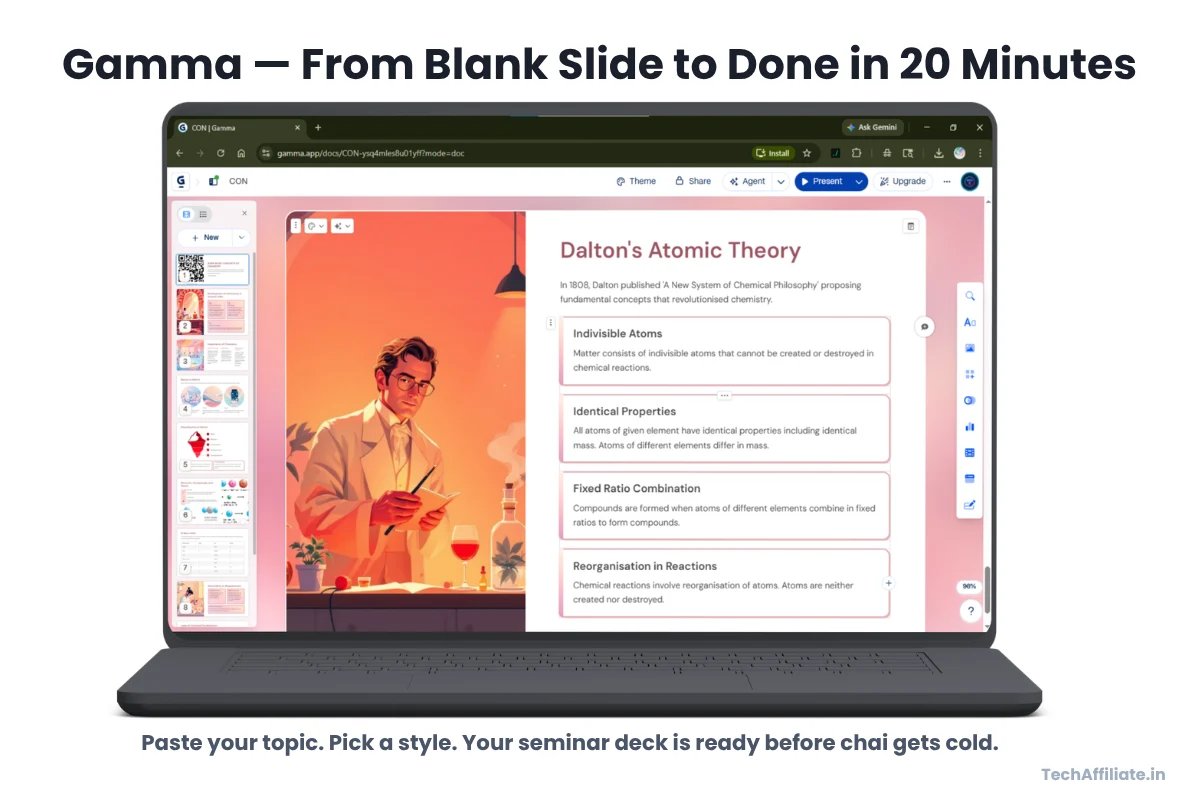
6. Gamma --> From "Haven't Started the PPT" to Done in 20 Minutes
For the night before the seminar. Or the morning of.
What it is: An AI presentation builder. Paste your topic or outline, pick a visual style, and Gamma generates a complete formatted slide deck. Edit it like any normal presentation adjust content, reorder slides, add your own points.
Why it's underrated: Most students are stuck between wrestling with PowerPoint for 3 hours or downloading a Canva template that looks identical to six other presentations in the same room. Gamma generates clean, modern decks fast so the time you actually spend goes into content and preparation, not box alignment.
Before Gamma: Open PowerPoint at 11pm. 40 minutes choosing a theme. Copy-paste notes that look terrible on slides. Add a clip art image that makes it worse somehow. Sleep at 2am unprepared for the questions you'll face tomorrow.
With Gamma: Paste your outline. Pick a style. Done in 20 minutes. Use the remaining time to understand what you're going to say which is the part professors actually evaluate.
Use it this week:
- Take a NotebookLM summary, break it into 6–8 clear points, paste into Gamma, generate your seminar deck in one go
- Group project? Gamma builds the first draft. Everyone edits content together instead of one person designing while three people watch
- Club pitches, viva support slides, event presentations all faster and cleaner than starting from scratch
Pro tip: Max 8–10 slides. Bullet points and visuals only no paragraph walls on slides. Every animation you add is one more thing that can go wrong live. Fewer is always more professional.
7. AudioPen --> For the Student Whose Best Thinking Happens Out Loud
Turn your commute into revision time without staring at another screen.
What it is: Press record, talk naturally mix Hindi and English, repeat yourself, go off-track and AudioPen converts your spoken words into a clean, structured written summary or draft. No need to organize your thoughts before speaking. The tool handles structure. You just provide the thinking.
Why it's actually useful a specific moment: You just walked out of your Organic Chemistry lecture. Grignard reagents clicked for the first time. You have two more classes, then lab, then dinner. By tonight, thanks to the Forgetting Curve, most of that understanding will be gone.
Open AudioPen outside the classroom. Talk for 90 seconds about what you understood messy, Hindi-English, doesn't matter. It becomes a structured revision note. You've just interrupted the forgetting process before it started. Done in 90 seconds.
Best for students who:
- Think fastest while commuting, walking, or explaining things out loud to someone
- Find phone keyboard typing slow or frustrating
- Study History, Political Science, Economics, Sociology, Management, or any subject where understanding must be expressed in words not just memorized as formulas
Use it this week:
- Right after a lecture: speak 2–3 minutes about what you understood. Revise from that note in the evening.
- Stuck starting an essay or long answer? Talk through your argument point, evidence, conclusion. Let AudioPen give you a first draft to edit from.
- Capture project ideas and weekly study intentions during commutes instead of scrolling.
Pro tip: Don't try to sound organized before you hit record. The messier your thinking sounds, the more useful the tool becomes. Your job is to externalize the thinking. Its job is to structure it.
Your AI-Powered Study Workflow (Save This)
Every tool on this list fits into one of four stages of learning. Find the stage where you leak the most time that's where to start.
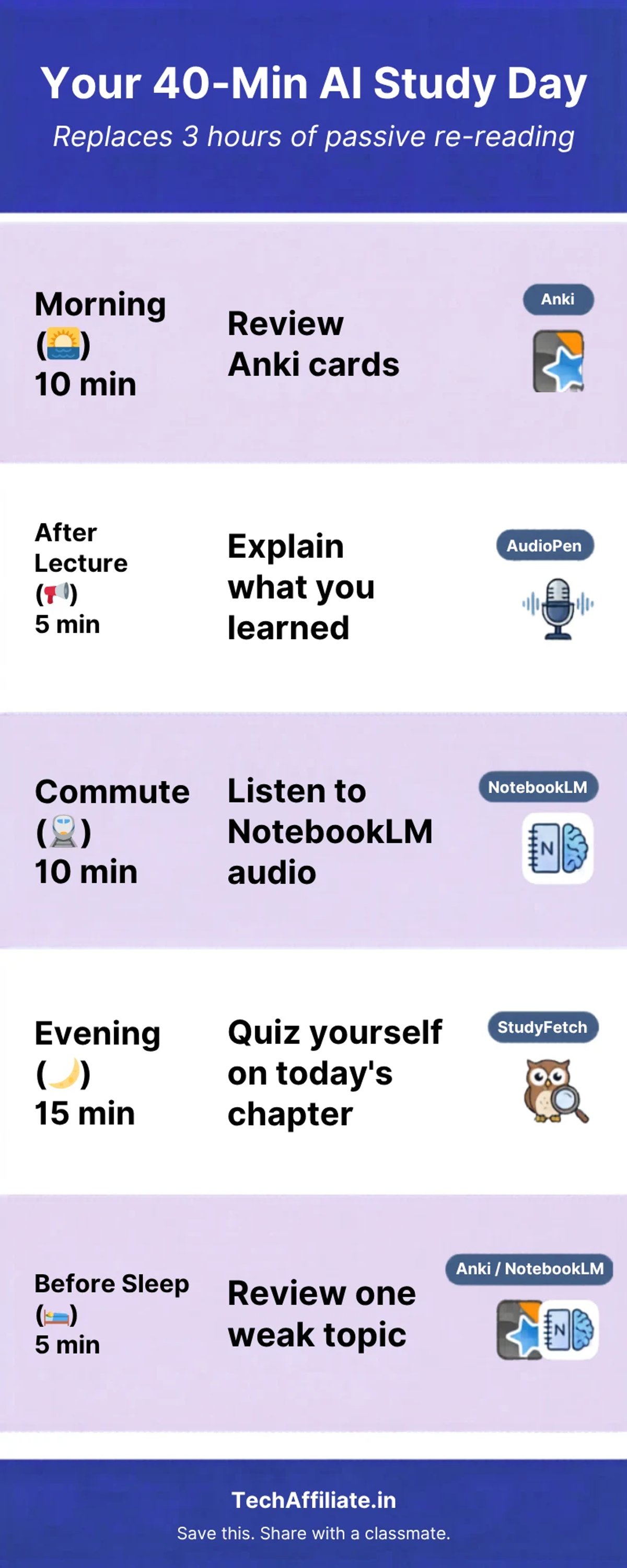
Your Real Study Day --> Realistic for Indian Students
No 5am wake-ups. No 4-hour study blocks. Here's what actually fits into a real student schedule:
| Time Slot | Action | Tool | Time |
|---|---|---|---|
| Morning | Quiz yourself on yesterday's chapter before class | NotebookLM | 10 min |
| After class | Convert rough notes into clean bullet summary | NotebookLM | 15 min |
| Evening | Flashcard revision — follow the app's schedule | Anki / StudyFetch | 15 min |
| Twice a week | Polish one assignment draft | Grammarly + QuillBot | 20 min |
| Twice a week | Add one real citation to your project | SciSpace | 15 min |
| Once a week | Update project presentation | Gamma | 20 min |
| Once a week | Voice-record what's still confusing | AudioPen | 5 min |
↔️ Scroll horizontally to see all columns
Total: roughly 40–45 focused minutes per day.
What it replaces: 2–3 hours of low-quality, low-retention studying that feels productive but doesn't survive until exam day.
FAQ --> Honest Answers, No Spin
Do I need to pay for any of this? NotebookLM and Anki are completely free with no meaningful student limits. Grammarly, SciSpace, StudyFetch, Gamma, and AudioPen all have usable free tiers. Start without spending anything upgrade only when a specific feature limit is actually blocking your work.
Will I get in trouble for using AI tools? Using AI to understand, organize, and revise your material is no different from using a smart textbook or a study app. The problem begins when you submit AI-generated text you can't explain especially in viva. Use these tools to learn better, not to learn less.
Which 2 tools work on a low-end phone with patchy internet? NotebookLM (runs in any browser, no app download) and Anki (lightweight, works fully offline after first setup). These two alone cover note organization and long-term retention the two biggest gaps in most students' study habits.
Useful for JEE, NEET, SSC, or board exams? Yes and this is where the science is clearest. Large syllabi with high retention requirements are exactly where spaced repetition and active recall deliver the most measurable improvement. NotebookLM makes your coaching material interactive instead of passive. Anki or StudyFetch handles the long-term retention that cramming cannot.
Is this going to make me lazy? Only if you use these tools passively reading AI summaries without testing yourself. The risk is real and worth naming honestly: if you treat a NotebookLM summary as the end of the process rather than the beginning, you're just re-reading with extra steps. Use the summary to quiz yourself and the laziness risk disappears. The difference in exam results will be obvious.
Pick Two. Set One Up Today.
AI won't sit your boards, crack JEE, or explain your project in viva. But the right tools used consistently, not occasionally, save real hours every week and help you retain what you study instead of recognizing it the night before and forgetting it the morning after.
The best free AI tools for Indian students in 2026 aren't the most viral ones. They're the ones that fit your actual life, your syllabus, your schedule, your phone, your budget.
Don't try all seven this week. Pick two based on where you're losing the most time:
- Revision and memory: NotebookLM + Anki or StudyFetch
- Writing and projects: Grammarly + SciSpace
- Your next presentation: Open Gamma today
Set one up today. Not this weekend. Today. It takes 10 minutes to upload your first PDF to NotebookLM or create your first Anki deck. The student who does it today has a 30-day head start on the one who bookmarks this and forgets.
Drop a comment below: which tool are you starting with, and what subject? It helps the next student reading this make the decision faster.
Found this useful? Forward it to one classmate. That's exactly what a good senior would do.
TechAffiliate.in | Written for Indian students | No sponsored placements in this article
Read Next on TechAffiliate.in
Affiliate Disclosure
TechAffiliate may earn a commission if you purchase through our links. This helps support our work but does not influence our reviews. We provide our honest assessments of products. See my testing methodology →
Related Articles
 AI & Machine Learning
Dec 16, 2025 • 9 min read
5 Essential AI Skills to Master in 2025 (Complete Learning Guide)
AI won't replace humans—it replaces those who don't use AI. Master these 5 essential skills with free resources, realistic timelines & actionable steps.
 AI & Machine Learning
Dec 30, 2025 • 16 min read
DeepSeek vs ChatGPT vs Gemini 2026: Which AI is Better? (Tested 30 Days)
Gemini topped India's AI searches in 2025. I tested GPT-5.2, Gemini 3 Flash, and DeepSeek V3.2 for 30 days. Real results, privacy warnings, honest winner.
 AI & Machine Learning
Jan 4, 2026 • 19 min read
Zero Code? Indians Making ₹80K/Month With AI "Vibe Coding"
1.8 million developers worldwide pay for AI to write code. Indians earning ₹80K/month with vibe coding zero traditional programming needed. Complete 2026 guide inside.
 Student Guides
Nov 10, 2025 • 8 min read
How to Use AI for Assignments Without Getting Caught (Ethical Guide 2025)
67% of students get caught using AI. Teachers have AI detectors now. Here's the ethical way to use ChatGPT for learning (not cheating) 80/20 rule, humanizer tools, and what Indian colleges are actually doing.
Comments (0)
Leave a Comment
No comments yet
Be the first to share your thoughts!