How to Check if a URL is Safe: Complete Guide 2026
Aditya Kachhawa

You're scrolling through WhatsApp. A message pops up: "Your SBI account will be blocked in 24 hours. Click here to verify KYC immediately." The link looks official. Your pulse quickens.
This is the moment that separates victims from survivors.
Every day, thousands of Indians lose money to phishing links, often within minutes. Not because they're careless, but because scammers have gotten terrifyingly good at creating URLs that look almost identical to the real thing.
One click. That's all it takes.
But here's what they don't want you to know: every dangerous link has tells. Tiny red flags that scream "SCAM" if you know where to look.
Disclaimer: This guide provides educational information about URL safety and cybersecurity awareness. It is not legal, financial, or professional security advice.
Quick Answer: Is This Link Safe? (30-Second Check)
Before clicking ANY link from messages, emails, or social media:
- Hover (desktop) or long-press (mobile) to see the full URL
- Check domain spelling character-by-character
- Verify the real domain matches the company's official site
- Look for tricks: 0 vs O, 1 vs l, rn vs m, extra hyphens
- Paste into VirusTotal if you're still unsure
Still uncertain? Don't click. Type the company website manually in your browser instead.
What is a Safe URL?
Safe URL Definition:
A safe URL is a legitimate web address that:
- Belongs to the verified organization it claims to represent
- Uses HTTPS encryption (padlock icon in browser)
- Has been registered by the authentic company or entity
- Contains no malicious code, phishing scripts, or malware
- Matches the official domain exactly (character-for-character)
Example of safe URLs:
https://onlinesbi.co.in(State Bank of India)https://paytm.com(Paytm)https://amazon.in(Amazon India)https://icicibank.com(ICICI Bank)
What is a Suspicious URL?
Suspicious URL Definition:
A suspicious URL is a web address that shows warning signs of phishing or fraud:
- Contains misspellings or character substitutions (paypa1.com instead of paypal.com)
- Uses look-alike domains designed to deceive (typosquatting)
- Includes company names in wrong positions (as subdomains instead of registered domain)
- Hides the real destination using URL shorteners in unexpected contexts
- Requests login credentials or payments through links in messages
- Uses unusual or suspicious domain extensions (.xyz, .top, .tk for established companies)
- Shows
xn--prefix indicating foreign character encoding (Punycode)
Examples of suspicious URLs:
https://sbi-ekyc-update.com(fake SBI domain)https://paytm.verify-account.net(fake Paytm domain)https://google.com@malicious-site.ru(uses @ trick)https://amaz0n.com(zero instead of 'o')https://onlinesbi.co.verify.xyz(wrong domain ownership)
Quick test: If you need to verify whether it's the company's real domain, type the company's official website into Google separately and compare.
Understanding URLs: Where Scammers Hide
Before you can spot danger when you check if a link is safe, you need to understand URL structure.
The Anatomy of a URL
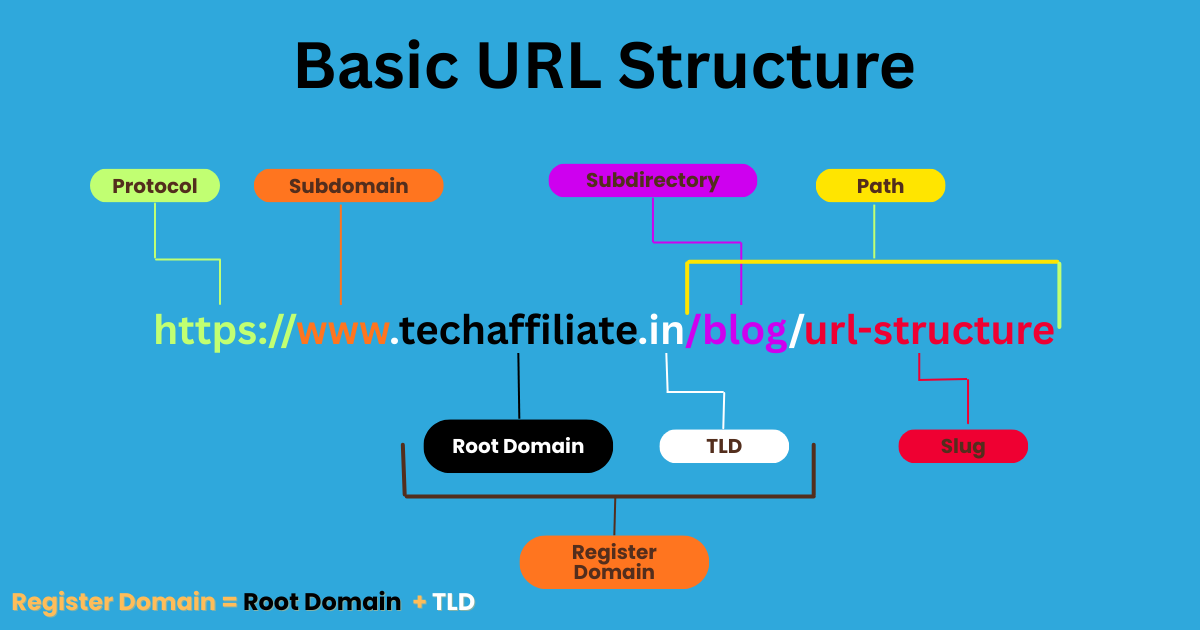
The critical rule: The registered domain is what comes right before the public suffix.
A public suffix is the part of the domain you can't own individually like .com, .in, or multi-level suffixes like .co.in, .gov.in, .ac.in.
The registered domain is the part someone actually registered and owns.
Everything before the registered domain (subdomains) can be added by the domain owner.
Everything after it (path, parameters) can be controlled by the domain owner.
Only the registered domain + public suffix combination reveals the true owner.
Example Breakdown
Let's break down a complete URL:
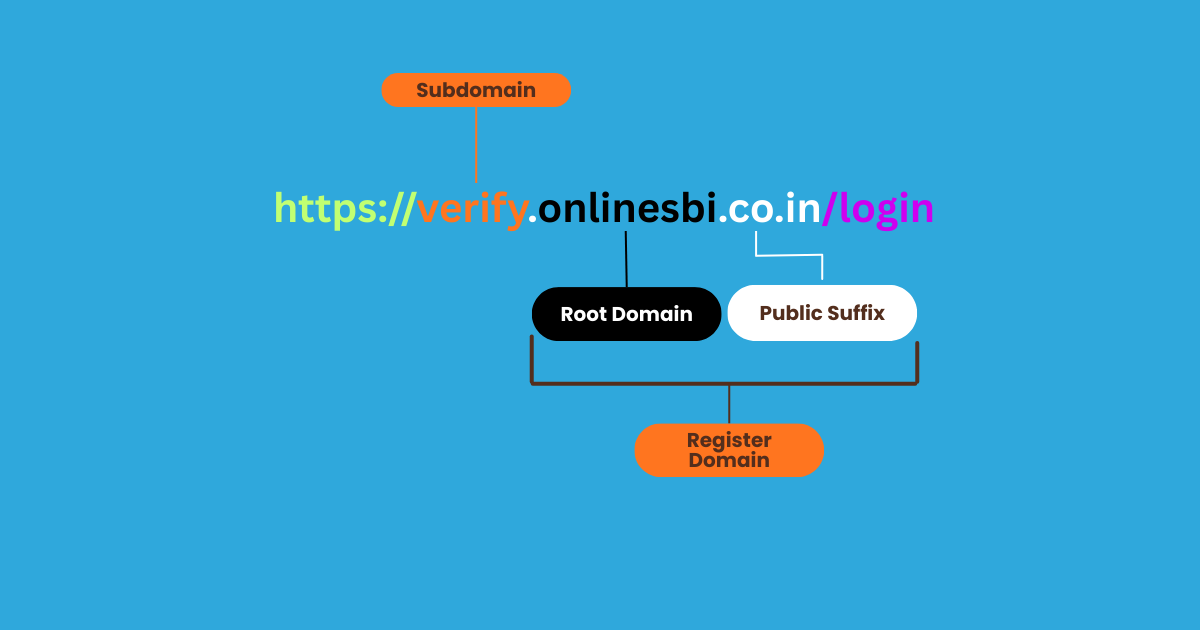
What each part means:
Subdomain:verify
Can be created freely by whoever owns the domainonlinesbi.co.in.
Registered domain:onlinesbi.co.in
The actual domain name that was registered and is legally owned by an entity.
Public suffix:.co.in
A multi-level public suffix for Indian commercial websites that cannot be registered separately.
Real owner:
Whoever registeredonlinesbi.co.in--> this is the only part that determines website ownership.
Understanding Multi-Level Public Suffixes
Indian domains often use two-part public suffixes:
.co.in- Commercial organizations in India.gov.in- Government entities in India.ac.in- Academic institutions in India.net.in- Network organizations in India.org.in- Non-profit organizations in India
Key insight: For these domains, you need to look at what comes before the entire suffix (both parts), not just before .in.
Real vs Fake: Can You Spot It?
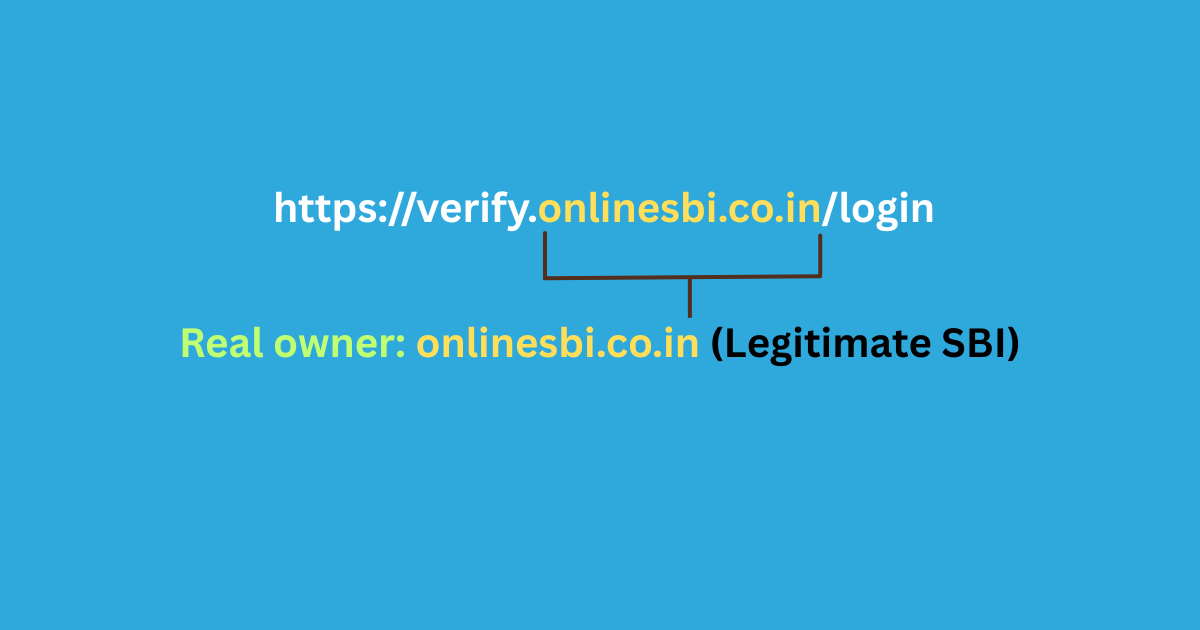
Example 1:
Example 2:
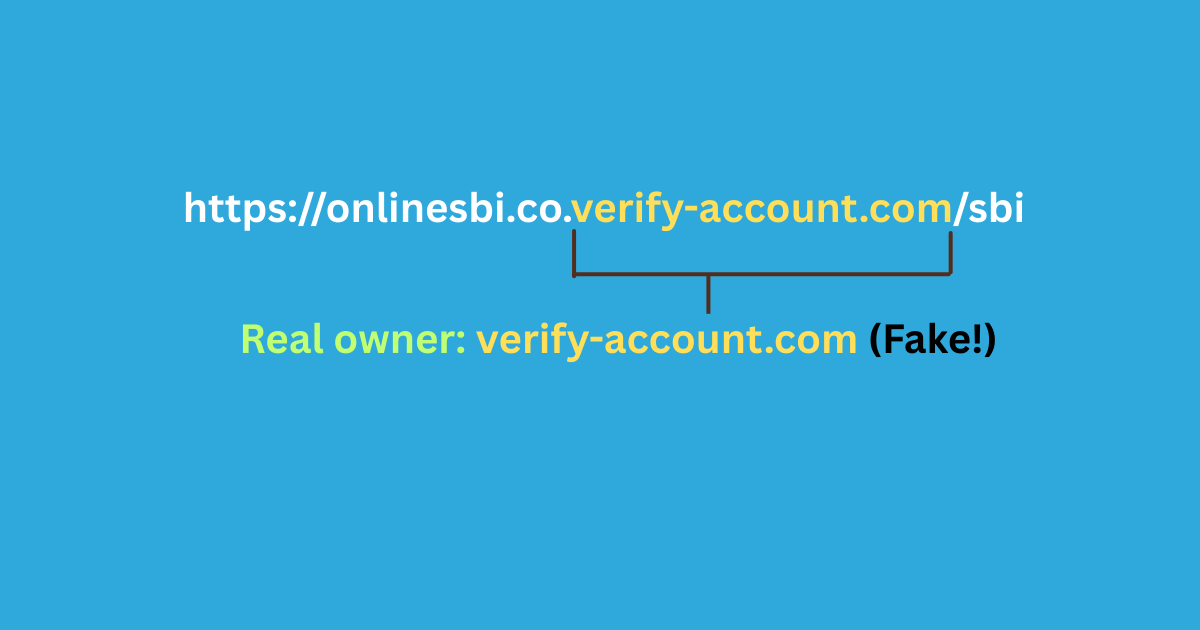
See the difference? In Example 2, onlinesbi.co is just a subdomain. The actual registered domain is verify-account.com --> NOT SBI !
More examples:
Fake: https://google.com.verify-account.ru
Real domain: verify-account.ru (Russia) --> NOT Google!
Fake: https://sbi-online-banking.xyz/login
Real domain: sbi-online-banking.xyz --> SBI uses onlinesbi.sbi or onlinesbi.co.in
Fake: https://paytm.secure-login.net/verify
Real domain: secure-login.net --> Paytm uses paytm.com
Fake: https://icicibank.co.secure-verify.com
Real domain: secure-verify.com --> ICICI Bank uses icicibank.com or icicibank.co.in
The Simple Rule
For single-level suffixes (.com, .net, .org, .in):
Look at what comes right before the suffix.
For multi-level suffixes (.co.in, .gov.in, .ac.in):
Look at what comes right before the entire multi-level suffix.
Your brain sees "SBI" or "Paytm" anywhere in the URL and relaxes. That's exactly what attackers count on.
Pro Tip: If a company name appears anywhere in the URL except in the registered domain position, it's 100% fake.
Pro Tip: When in doubt, ask yourself: "Could a random person register this domain name tomorrow?" If yes (like sbi-verify.com), it's not the official domain.
15 Critical Red Flags: Instant Danger Signals
When you check if a URL is safe, look for these instant red flags:
| Red Flag | Example | Why It's Risky | Action |
|---|---|---|---|
| Typosquatting | amazom.com | Exploits typing mistakes | Read letter-by-letter |
| Zero for O | micros0ft.com | Looks identical at glance | Check for numbers in brand names |
| Number for letter | paypa1.com (1 for l) | Brain autocorrects | Examine each character |
| rn = m trick | arnazon.com (rn looks like m) | Visual confusion | Copy to text editor |
| Punycode | xn--pple-43d.com | Foreign characters disguised | Look for xn-- prefix |
| Subdomain trick | paytm.verify-login.xyz | Real domain is .xyz not Paytm | Check registered domain |
| @ symbol | google.com@evil.com | Everything before @ is ignored | Reject @ in URLs |
| Random strings | aB3xK9pL.com | No brand uses random chars | Verify against official domain |
| Suspicious TLD | bank.top, verify.xyz | Scammers love .xyz/.top/.click | Trust .com/.in/.gov.in/.co.in |
| URL shortener | bit.ly/3xK9 in bank SMS | Hides real destination | Never click in financial messages |
| Fake security words | secure-login.com | Creates false safety | Security words in domain = red flag |
| HTTP not HTTPS | http://banking.com | No encryption | Always verify HTTPS |
| Too many hyphens | sbi-online-secure-verify.com | Rare in real sites | Official sites use simple domains |
| IP address | 192.168.1.1/login | No company uses raw IPs | Reject number-based URLs |
| Wrong country | icicibank.ru | Indian banks won't use .ru | Match extension to company location |
↔️ Scroll horizontally to see all columns
5 Expert Warnings Most People Miss
1. The "Verified Sender" Trap
You receive an SMS from "SBI" or "ICICI Bank." The sender name looks official.
Reality: Sender names can be spoofed completely. The display name means nothing.
Warning: Never trust the sender name. Only trust the URL domain after verification.
2. QR Code Phishing (Quishing)
QR codes are the new frontier for phishing attacks. You can't visually inspect them. Once scanned, your phone opens the URL immediately no chance to verify first.
Pro Tip: Use QR scanner apps that preview the URL before opening. Many banking apps now include this feature.
3. The 48-Hour Window
New phishing sites operate for 24-48 hours before getting reported and blacklisted.
During this time, NO security tool will flag them. They're too new to be in any database.
What to do: Check domain age with WHOIS lookup. Anything under 30 days is suspicious for "established" companies.
4. Fake "Login With Google" Buttons
Those convenient "Login with Google" or "Login with Facebook" buttons? They can be faked.
After clicking, verify the URL shows accounts.google.com or facebook.com not a third-party domain.
5. Password Manager False Sense of Security
Always verify the domain in your address bar before entering credentials, even if autofill suggests it.
Dangerous Myths Debunked
Myth 1: "HTTPS Means Safe"
Reality: HTTPS only encrypts the connection. It doesn't verify legitimacy. Over 80% of phishing sites use HTTPS. The padlock means encrypted, not trustworthy.
Myth 2: "Antivirus Protects Me Completely"
Reality: Antivirus only catches known threats in its database. New phishing sites and zero-day exploits bypass it. Essential but not sufficient.
Myth 3: "URL Shorteners Are Always Dangerous"
Reality: Legitimate tool for marketing. Danger is context, shortened links in bank SMS or payment requests are red flags.
💡 Pro Tip: For bit.ly, add "+" to preview: bit.ly/abc123+
Myth 4: "I Can Spot Phishing By Mistakes"
Reality: Modern phishing is professional-grade with perfect design and grammar. The only reliable indicator is the URL domain.
Myth 5: "Banks Never Send SMS Links"
Reality: Banks DO send links for offers and updates. The key: NEVER use those links for login or sensitive actions.
Safe practice: For urgent matters, open your banking app separately or call the official number on your card.
Real Scams Targeting Indians Right Now
The KYC Expiration Scam
- Message: "Your SBI KYC has expired. Complete e-KYC within 24 hours. Click: sbi-ekyc-update.com"
- Red flags: Wrong domain (SBI uses
onlinesbi.sbi), urgency tactics, unsolicited message - Reality: Banks NEVER send KYC update links via SMS. Impact: ₹2-3 lakh losses reported.
The Parcel Customs Scam
- Message: "Your parcel is held at customs. Pay ₹850 clearance fee. Track: indiapost-customs.net"
- Red flags: Wrong domain (India Post uses
indiapost.gov.in), immediate payment demand - Reality: India Post never demands instant payments via SMS.
The Job Offer APK Scam
- Message: "Congratulations! Amazon work-from-home selected. Download app: amazon-jobs-india.com/app.apk"
- Red flags: .apk file, wrong domain, unrealistic earnings, unsolicited offer
- Reality: APK contains spyware. One victim lost ₹67,000 within hours.
How to Verify Any URL: 7-Step Process
Follow this process every time you need to check if a link is safe:
Step 1: Don't Click --> Inspect First
Desktop: Hover your mouse over the link. The full URL appears in the bottom-left corner of your browser.
Mobile: Long-press the link for 1-2 seconds. A preview popup shows the full URL.
Step 2: Identify the Real Domain
Find the registered domain what comes right before the public suffix:
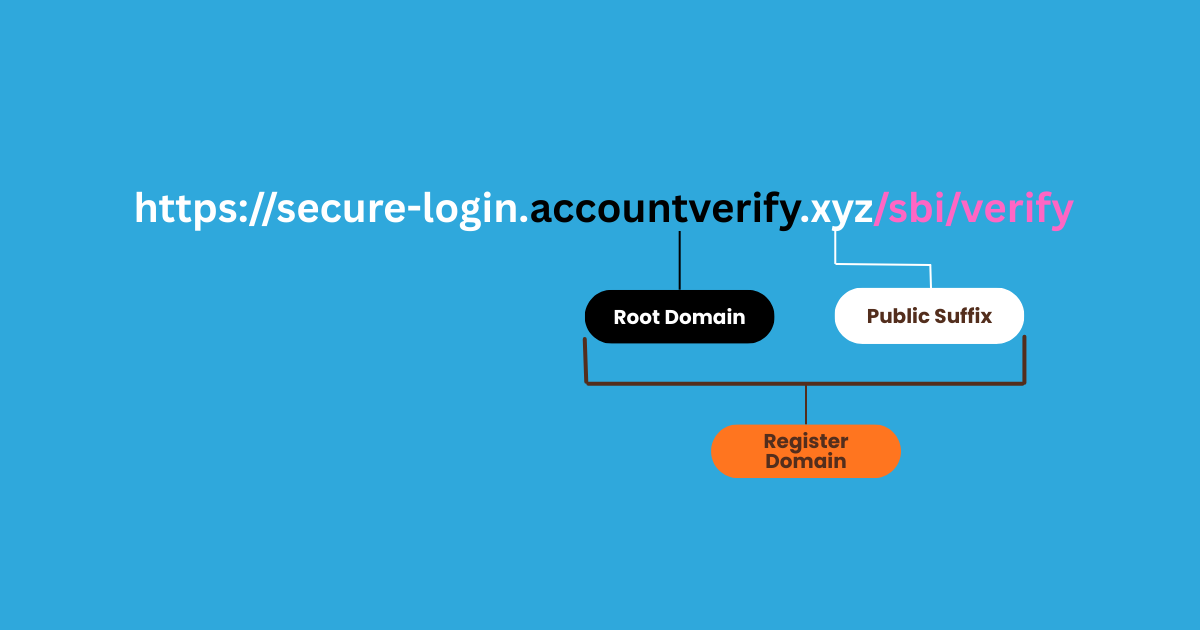
Real owner: accountverify.xyz (NOT SBI!)
For Indian domains with .co.in, .gov.in, .ac.in:
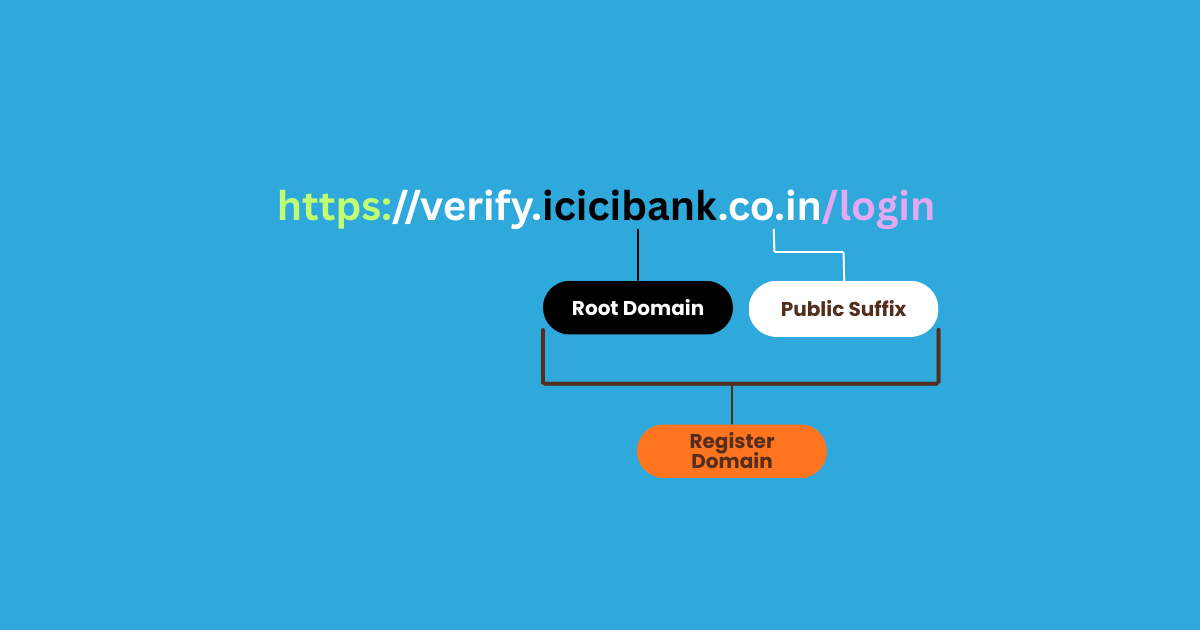
Real owner: icicibank.co.in (Legitimate ICICI Bank)
Does it match the company claiming to send the message?
Step 3: Check for Visual Tricks
Read the domain character by character. Look for:
- Numbers replacing letters? (paypa1.com instead of paypal.com)
- Zero instead of O? (micros0ft.com)
- Extra hyphens or words? (sbi-online-secure.com)
- Unusual extension? (.xyz, .top, .tk instead of .com/.in/.co.in)
- Foreign characters? (Look for
xn--prefix)
Step 4: Expand Shortened URLs
Never click shortened URLs from unexpected messages.
For bit.ly: Add "+" at the end → bit.ly/abc123+ shows the destination
For others: Use URL checker tools (they expand automatically before scanning)
Step 5: Run Through a URL Safety Checker
Paste the URL into at least one of these free tools:
- VirusTotal (most comprehensive)
- Google Safe Browsing (fastest)
- URLVoid (shows domain age)
Detailed instructions in the next section.
Step 6: Search the Domain
Google search: "suspicious-domain.com" scam
If it's a known phishing site, you'll find reports and warnings within seconds.
Step 7: Verify Through Official Channels
Never log in from message links. Instead:
- Open your browser or banking app
- Type the company website manually (or use your saved bookmark)
- Log in there directly
- Check your official notifications or inbox
If the message is legitimate and urgent, it will appear in your official account notifications.
Best Free URL Safety Checkers
VirusTotal
What it does: Scans URLs against 70+ antivirus engines simultaneously.
How to use: Go to virustotal.com → Click "URL" → Paste URL → Wait 10-20 seconds
Reading results:
- 0-2 detections: Likely safe
- 3-9 detections: Suspicious
- 10-25 detections: Probably malicious
- 25+ detections: Definitely dangerous
Limitation: Misses brand-new sites (under 24 hours old)
Google Safe Browsing
What it does: Checks Google's database (used by Chrome, Firefox, Safari).
How to use: Go to transparencyreport.google.com/safe-browsing/search → Paste URL → Get instant results
Reading results:
- Green checkmark: Not flagged
- Red warning: Known malicious --> avoid
URLVoid
What it does: Checks 40+ blacklist engines + shows domain age and IP location.
How to use: Go to urlvoid.com → Paste URL → Click "Scan Website"
Why useful: Shows domain age (under 6 months = red flag for "established" companies)
Pro Tip: Use at least TWO different checkers for important verifications.
Emergency Response: "I Clicked a Phishing Link"
Don't panic. Act fast. Follow this checklist:
First 60 Seconds
Step 1: Go offline immediately
- Mobile: Turn on Airplane Mode
- Desktop: Disconnect WiFi/unplug ethernet
Step 2: Close browser completely
- Force quit (don't just close tab)
Step 3: Don't enter information
- If you see a login page, force close immediately
First 10 Minutes
If you ENTERED a password:
Step 4: Change passwords NOW (different device)
- The account you entered credentials for
- Your primary email
- All banking and UPI apps
- Any account using the same password
Step 5: Enable 2FA everywhere
If you ENTERED bank/card details:
Step 6: Call your bank immediately
- Use number on back of card
- Report fraud, request card block
Step 7: Check for unauthorized activity
- Review last 20 transactions
- Check pending UPI transfers
If you DOWNLOADED a file:
Step 8: Delete WITHOUT opening
- Android: Settings → Apps → Uninstall
- Windows: Delete → Empty Recycle Bin
First 24 Hours
Step 9: Run full antivirus scan
Step 10: Clear all browser data
- Cache, cookies, passwords, history
Step 11: Monitor accounts daily (for one week)
Step 12: Report the attack
- Email: report@cybercrime.gov.in
- Website: cybercrime.gov.in
- Your bank's fraud department
Platform-Specific
Android:
- Check recently installed apps
- Revoke suspicious permissions
- Enable Google Play Protect scan
Windows:
- Check startup programs (Task Manager)
- Review recent file modifications
⚠️ If you lose money: File FIR at police station + complaint on National Cybercrime Reporting Portal within 24 hours.
Mobile URL Safety: Special Challenges
The Mobile Disadvantage
- Smaller screens hide full URLs
- No hover preview
- In-app browsers hide security indicators
- Accidental taps happen easily
Copy Links Before Clicking
- WhatsApp: Long-press → "Copy" → Paste in Notes to examine.
- Instagram: Long-press → "Copy message"
- Telegram: Tap and hold → "Copy link"
Preview Shortened URLs
bit.ly: Add "+" to end: bit.ly/abc123+ shows destination
Avoid In-App Browsers
Always choose "Open in Browser" to see the full address bar and verify domains.
Android APK Scam Alert
⚠️ Critical: APK files are installation packages. Scammers disguise malware as "official apps."
Never install APK from:
- Links in messages
- Non-Play Store sources
- "Urgent update" requests
- Job offers requiring app installation
Safe practice: Only install from Google Play Store or Apple app store
Permission Red Flags
Be suspicious if apps request:
- SMS reading/sending (only banks need for OTP)
- Accessibility services (allows device control)
- Device admin rights (prevents uninstallation)
Google Play Protect
Enable now: Play Store → Menu → Play Protect → Turn on scanning
UPI Scam Protection
Common tricks:
- "Accept payment request to receive ₹5000" → Deducts money
- "Verify UPI PIN" → No service needs this
- "Accept collect request for refund" → Refunds are sent directly
Safe practices:
- Never share UPI PIN
- Check "Pay" vs "Receive" before confirming
- Enable transaction notifications
- Set daily limits (₹10,000-20,000)
- Never accept collect requests from unknown numbers
Your Safety Checklist (Save This)
Before Clicking Any Link:
- Did I expect this message from this sender?
- Hover/long-press to see the full URL
- Check domain spelling character-by-character
- Verify the registered domain matches the company's official domain
- Look for character substitution tricks (0 vs O, 1 vs l, rn vs m)
- Check for
xn--prefix (Punycode/foreign characters) - Paste into VirusTotal or Google Safe Browsing if unsure
- Search Google for: "domain-name.com" scam
Instead of Clicking Links in Messages:
- Type the company website manually in browser
- Open the official app to check notifications
- Call customer service using the official number from your card/website
- Ask yourself: "Does this request make logical sense?"
Red Flags That Mean STOP Immediately:
- "Account will be blocked in 24/48 hours"
- "Suspicious activity detected - verify now"
- Unexpected prizes, winnings, or lottery notifications
- Shortened URL (bit.ly, tinyurl) in banking/payment messages
- Request to download APK file
- Asking for UPI PIN for any reason
- "Earn ₹5000 daily" or other unrealistic income promises
- Links in emails about package delivery you didn't order
- KYC update requests via SMS/WhatsApp
- Tax refund links from unofficial sources
Share This Safety Info With:
- Parents and grandparents (most vulnerable demographic)
- Less tech-savvy family members
- Anyone who's been targeted by scams before
- Your family WhatsApp groups
- Elderly neighbors and relatives
The 7 Golden Rules
Rule 1: Pause Before You Click
That 5-second hesitation is your superpower.
Scammers weaponize urgency, they want you to act before thinking. The moment you slow down and verify, their tactics fail.
Practice: Count to 5 before clicking any unexpected link. Ask yourself: "Why am I receiving this now?"
Rule 2: Never Login From Links
Type websites manually. Use bookmarks. Open official apps directly.
Never, ever click through to login pages from:
- SMS messages
- WhatsApp messages
- Emails
- Social media DMs
- Pop-up notifications
Rule 3: Domain is Truth
Only the registered domain in your browser's address bar matters.
Everything else design quality, professional language, sender name, message content can be faked perfectly.
The domain is the only reliable indicator of authenticity.
Rule 4: Use Multiple Verification Methods
Combine multiple safety checks:
- Visual inspection of the domain
- URL safety checker tools
- Google search for scam reports
- Verification through official channels
- Common sense evaluation
No single method catches everything. Multiple layers of verification provide maximum protection.
Rule 5: Password Managers Are Lie Detectors
If your password manager won't autofill credentials, you're probably on a fake site.
Password managers only work on exact domain matches. They won't autofill on paypa1.com if you saved credentials for paypal.com.
This is a feature, not a bug. Trust your password manager when it refuses to fill.
Read: Password Manager Setup & Best Practices
Rule 6: Verify Through Official Channels
When in doubt, contact companies through their official website or customer service.
Never use contact information provided in suspicious messages. Always:
- Go to the company's official website independently
- Use the customer service number printed on your card/documents
- Visit the branch in person for banking matters
Rule 7: Share This Knowledge
The best security tool is awareness.
Cybersecurity is a community effort. Every person you educate is one less victim and one less attack vector for scammers to exploit.
Share this guide with three people today. Forward it to your family WhatsApp group right now.
Take Action Right Now
That suspicious link sitting in your messages? Don't ignore this feeling.
Your instinct is already protecting you. Now reinforce it with knowledge.
Your next steps:
- Bookmark this guide for reference when the next suspicious link arrives (and it will)
- Practice on your next 5 links and build the URL verification habit before facing a real threat
- Forward to your family WhatsApp group right now, share this guide with your parents, grandparents, and less tech-savvy relatives
Because here's the truth: that link could be harmless. Or it could drain your bank account in 90 seconds.
The only question is are you willing to take 30 seconds to find out which one it is?
Take action: Forward this guide to three people in the next 5 minutes. That simple action could save someone you love from losing everything.
Frequently Asked Questions
Is this URL safe? How do I check?
Don't click, hover or long-press to preview. Verify the domain matches the company exactly. Look for typos and character tricks. Use VirusTotal or Google Safe Browsing. When in doubt, type the website manually.
Can a URL be dangerous without entering information?
Yes. Drive-by downloads install malware upon visiting, without any clicks or input required.
Does HTTPS mean a website is safe?
No. HTTPS only means encrypted connection, not legitimate. Over 80% of phishing sites use HTTPS. The padlock means encrypted, not trustworthy.
How can I check shortened URLs safely?
For bit.ly, add "+" to preview: bit.ly/abc123+. For others, paste into VirusTotal they expand before scanning.
What's the difference between a subdomain and real domain?
The registered domain comes right before the public suffix (.com, .in, .co.in). In login.amazon-verify.xyz, the real domain is amazon-verify.xyz (NOT Amazon).
Are links from known contacts safe?
No. Accounts get compromised constantly. Always verify unexpected links, even from friends.
What is typosquatting?
Registering domains similar to brands (like amazom.com instead of amazon.com). Detect by reading character-by-character.
What's a homoglyph attack?
Using foreign characters that look like English letters. Look for xn-- prefix (Punycode). Example: xn--pple-43d.com uses Cyrillic characters.
Can QR codes be dangerous?
Yes. QR code phishing (quishing) is growing. You can't inspect URLs before scanning. Use QR scanner apps that preview URLs first.
How do I know if my bank's SMS is real?
Check the domain matches official (like onlinesbi.co.in). Never use SMS links for login, only for information. For urgent matters, open your app independently.
Found this helpful? Share it with someone who needs this information. Your share could prevent someone from losing their savings.
Affiliate Disclosure
TechAffiliate may earn a commission if you purchase through our links. This helps support our work but does not influence our reviews. We provide our honest assessments of products. See my testing methodology →
Related Articles
 Cybersecurity
Dec 3, 2025 • 14 min read
Sanchar Saathi App Now Mandatory on Every Phone: Should You Be Worried About Privacy?
India mandates the Sanchar Saathi app on all new smartphones from February 2026. While it helps recover stolen phones and fight fraud, privacy concerns are mounting. Apple refuses to comply, and opposition leaders call it unconstitutional. Here's everything you need to know.
 Cybersecurity
Jan 7, 2026 • 17 min read
Why Your Encrypted Data Is Already at Risk (And What's Being Done About It)
Hackers are stealing encrypted data NOW to decrypt with quantum computers in the 2030s. Learn how Post-Quantum Cryptography protects your data today.
 AI & Machine Learning
Dec 12, 2025 • 10 min read
ChatGPT vs Gemini 2026: Which Won? (Tested 30 Days India)
ChatGPT 5.2 launched December 11, 2025 with 45% fewer errors, 3 AI modes, and better coding. Complete comparison: ChatGPT 5.2 vs Google Gemini 3. India pricing ₹1,600/month, features, availability, and which AI wins for developers, students & professionals.
 AI & Machine Learning
Dec 30, 2025 • 16 min read
DeepSeek vs ChatGPT vs Gemini 2026: Which AI is Better? (Tested 30 Days)
Gemini topped India's AI searches in 2025. I tested GPT-5.2, Gemini 3 Flash, and DeepSeek V3.2 for 30 days. Real results, privacy warnings, honest winner.
Comments (0)
Leave a Comment
No comments yet
Be the first to share your thoughts!