Pika H3 Flex Explained: The Open-Weight AI Video Model With Six-Step Generation
Aditya Kachhawa

Pika announced H3 Flex on October 29, 2026, with a headline feature set that includes six-step generation, up to 12 reference files, synchronized audio, five editable audio stems, 4K finishing and downloadable model weights. Those capabilities do not all belong to the same deployment. The local open-weight package generates natively at 480p or 768p with a mixed stereo soundtrack. Higher-resolution finishing, separate audio-stem export and prompt enhancement are provided through Pika's hosted API. Pika's widely repeated seven-second figure measures transformer computation in a controlled benchmark—not the total time a user should expect to wait. The weights also inherit the MiniMax H3 Community License Agreement, whose standard grant excludes the United States, United Kingdom, European Union and South Korea.
This guide separates the claims from the conditions: what H3 Flex is, what runs locally, what needs Pika's service, what Pika's own benchmarks do and do not show, and what to read before using it commercially.
At a glance (as of October 31, 2026): announced October 29 · post-trained from MiniMax H3 · six sampling steps instead of 50 · native 480p/768p · requested 5–15 second clips at 24 fps · synchronized 32 kHz stereo audio · up to 12 reference files · 1080p/2K/4K finishing, five audio stems and prompt enhancement are Pika-hosted · weights released under the MiniMax H3 Community License Agreement.
What is Pika H3 Flex?
H3 Flex is Pika's post-trained version of MiniMax H3, a video model that generates video and synchronized audio together. According to Pika's technical deep dive, the team did three things to the base model:
- Fine-tuned it on an in-house, aesthetically curated audio-video dataset covering several generation and editing tasks.
- Distilled the 50-step sampling process down to six steps using Projected Distribution Matching Distillation (PDMD).
- Added reward- and preference-based training (ReFL and DPO) to improve visual quality, clarity, instruction following and realism.
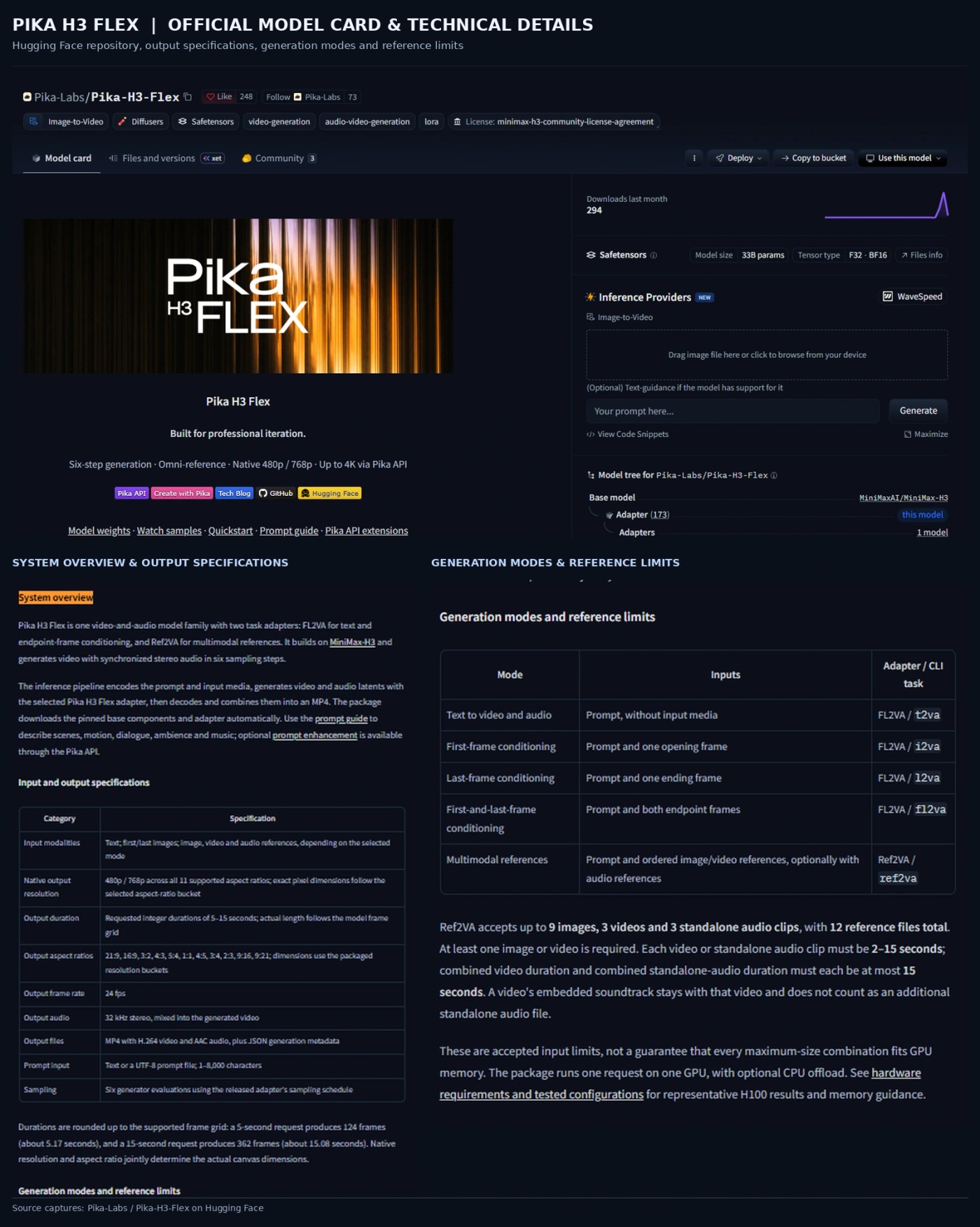
It ships as two LoRA adapters that sit on top of the MiniMax H3 base, according to the Hugging Face model card: FL2VA for text and first/last-frame conditioning, and Ref2VA for multimodal references. That also explains how it works in ComfyUI's workflows: you load the MiniMax H3 base you already have, then add the Pika adapter.
Open weights, not "open source"
Pika's own posts sometimes say "open source". The more precise term is open weights. The adapters are classed as Model Derivatives of MiniMax H3 and distributed under the MiniMax H3 Community License Agreement, which carries territorial, commercial and use conditions (covered below). It is not an MIT or Apache grant for the weights.
What does "six-step generation" mean?
Diffusion-style video models start from noise and refine it over a series of denoising steps. Each step is a pass through the large transformer, so fewer steps generally means less compute per clip. The hard part is cutting steps without wrecking quality.
MiniMax H3's standard schedule uses 50 steps. Pika's student model produces joint audio-video output in six, about eight times fewer. Those are internal sampling iterations. They are not six clicks, six frames or a promise of six-second delivery.
One practical detail from the model card: each release manifest records an exact six-step sampling schedule, and it warns that generic six-step Euler sampling is not equivalent. The six-step result depends on using Pika's schedule.
How fast is it, really?
Pika publishes several speed figures. They measure different things.
| Claim | What it actually measures | Source |
|---|---|---|
| 15-second 768p clip with audio in "as little as seven seconds" | Transformer (DiT) computation in a controlled benchmark. Pika's footnote says it is not total end-to-end API latency; reference inputs, finishing, stem separation, hardware and service overhead all add time. | Launch post |
| About 1.8× faster than Fal H3 Max on average | Transformer denoising time at 768p against Fal-hosted models across text-to-video, image-to-video and 10-second reference-to-video. Conditioning, decoding and serving overhead are excluded from that comparison. | Technical deep dive |
| Full-inference latency cut from 3.409 s to 2.129 s | A five-second 768p text-to-video clip with audio on eight B300 GPUs, after fused kernels, FlashAttention-4, block-sparse attention and compressed communication. | Technical deep dive |
↔️ Scroll horizontally to see all columns
Two cautions follow. First, Pika describes its accelerated serving stack as a Pika-hosted feature and says local performance depends on your hardware and setup, so the optimized figures should not be read as what the downloadable package will deliver. Second, "faster than real time" is defined by Pika as latency below the clip's duration; in the latency section it applies that to transformer denoising time, not the whole request.
For a local data point, ComfyUI's documentation says a five-second 1344×768 clip finishes in about a minute on a single card. It does not identify the card or provide a reproducible hardware configuration on that page, so treat the figure as indicative rather than a performance guarantee. Pika's own hardware guide separately documents representative local tests on an H100 80GB; it says H200 and B300 have not been qualified for the downloadable package. Do not confuse those local tests with Pika's separate optimized-serving benchmark, which used eight B300 GPUs.
What can H3 Flex do?
Generate video and audio in one pass
Local inference accepts text, first-frame, last-frame or first-and-last-frame inputs, and multimodal references. Per the model card, output is:
- Native 480p or 768p across 11 aspect ratios, from 21:9 to 9:21
- Requested durations of 5–15 seconds, rounded to the model's frame grid (a 5-second request gives 124 frames, about 5.17 seconds; a 15-second request gives 362 frames, about 15.08 seconds)
- 24 fps, with 32 kHz stereo audio mixed into the video
- An MP4 with H.264 video and AAC audio, plus JSON generation metadata
- Prompts of 1–8,000 characters
Work from up to 12 references
Reference mode (Ref2VA) accepts up to 12 reference files in total, made up of at most nine images, three videos and three standalone audio clips. At least one image or video is required. Each video or standalone audio clip must run 2–15 seconds, and the combined video duration and the combined standalone-audio duration must each stay within 15 seconds. A video's embedded soundtrack stays with that video and does not count as a standalone audio file.
The model card is explicit that these are accepted input limits, not a guarantee that a maximum-size request will fit in GPU memory.
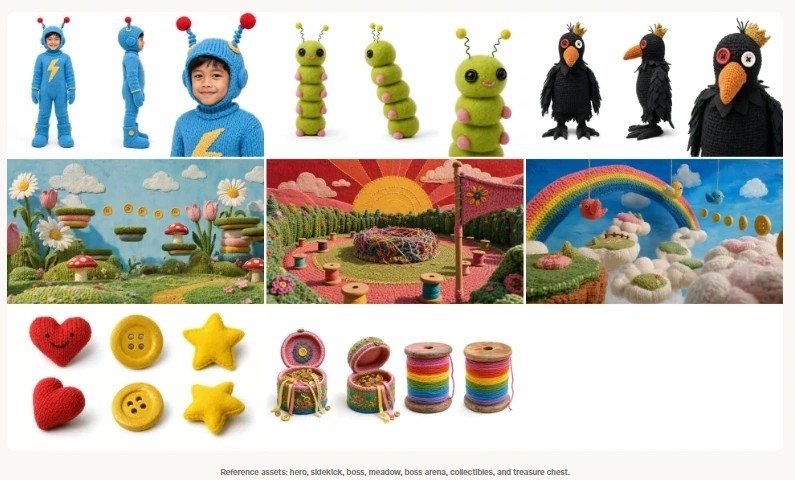

Pika's examples use references to carry a character from one image, a world from another and movement from a video. Its showcase includes a product photo turned into a multi-shot commercial, a character sheet and motion video combined into a stylised dance, and a moodboard guiding a three-shot sequence. The showcase prompts and input assets are published, and Pika notes they are creative showcases rather than release-validation renders, so exact reproduction with the released package is not guaranteed.
Direct camera moves and multi-shot sequences
Pika's prompts specify overhead openings, crane moves, whip pans, orbits and hard cuts in a single clip, sometimes with dialogue and sound design. That is worth experimenting with, but Pika's own evaluation is candid about limits: other systems were preferred for physics, multi-scene narrative, lighting and materials, and action-heavy or control-video reference tasks, and the conclusion lists physics, multi-scene consistency and complex reference control as areas to improve.

Edit a shot using references
Pika shows reference-guided edits that swap an outfit, a prop or an environment while keeping the original performance and timing, plus motion transfer and character swaps. As with any generative edit, results in your own footage will vary.
Export five audio stems (hosted)
Through the Pika API, a request can return five stems: dialogue, score, SFX, foley and ambience. Pika's technical post says the generator produces one synchronized soundtrack and a separate prompted source-separation model recovers the stems, which are returned alongside the unchanged video and mixed audio. Pika calls this a first for a video model; that is its claim, which we have not checked against other products.
Stem separation is not part of the local package. Local output is a single mixed track.
Finish at 1080p, 2K or 4K (hosted)
Pika recommends drafting at 768p and then upscaling the version you like. The upsampler is a 1B-parameter pixel-space transformer that works in a single network evaluation, with scale factors from 1× to 4×. It is hosted today. Pika's technical post says "we will opensource the upsampler model" but gives no date, so that hosted-only status could change.

Local model vs Pika-hosted features
| Capability | Local open-weight package | Pika-hosted API |
|---|---|---|
| Native video | 480p and 768p | 480p and 768p generation |
| Higher resolution | Not included | 1080p, 2K and 4K finishing through the draft-to-video endpoint |
| Audio | Mixed 32 kHz stereo | Synchronized audio |
| Separate audio stems | Not included | Dialogue, score, SFX, foley, ambience |
| Prompt enhancement | Not included | Optional prompt-rewriter endpoint |
| Accelerated serving stack | Not included; local speed depends on your hardware | Used for Pika's published latency figures |
| Reference inputs | Up to 12 files (9 images, 3 videos, 3 audio) | Up to 12 references |
↔️ Scroll horizontally to see all columns
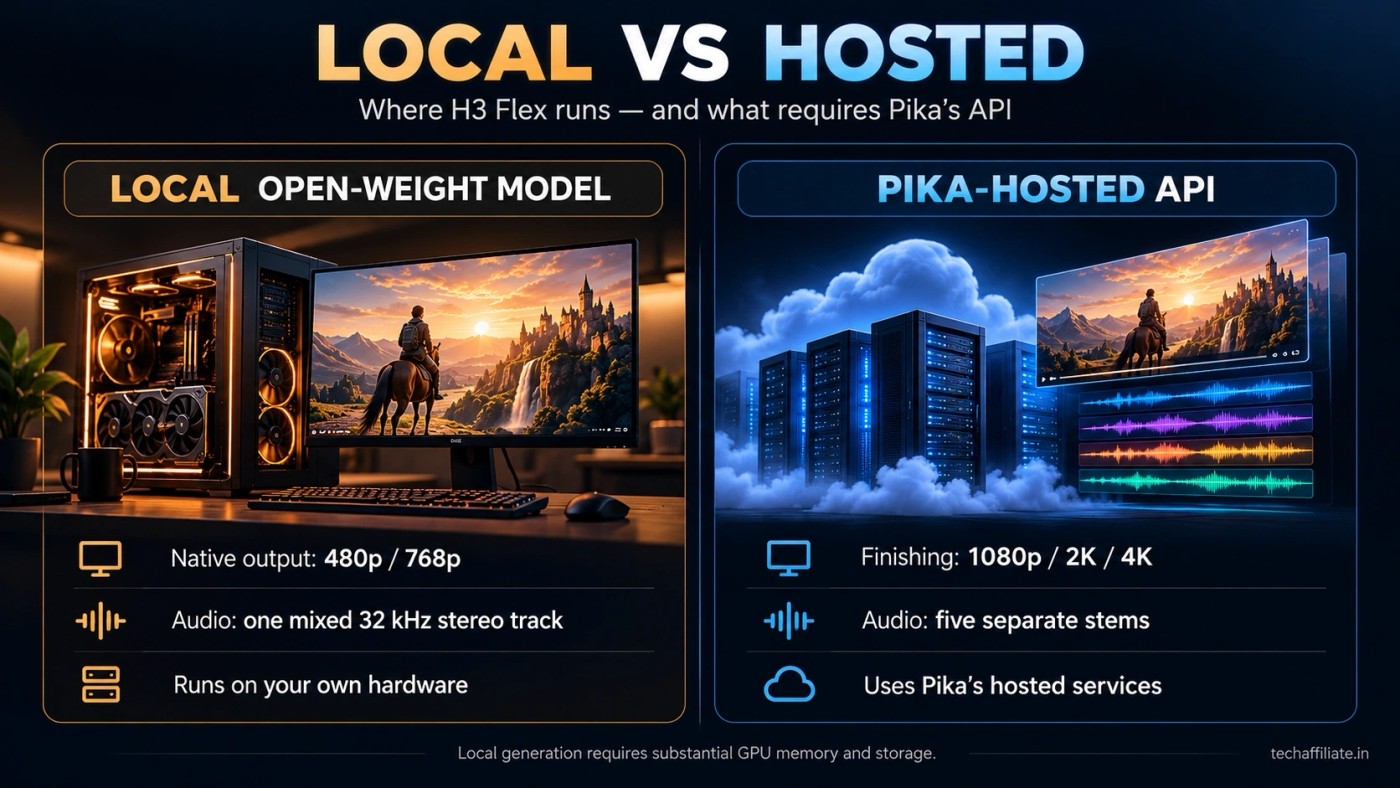
Pika's launch post and the model card both state that the upsampler, stem separation, prompt enhancement and accelerated serving stack are Pika-hosted, separate from the downloadable adapters.
How good is it? Pika's benchmarks, read carefully
Pika's technical deep dive compares H3 Flex with MiniMax H3, Fal H3 Max and HeyGen Video (quality). All models generated at 768p from the same prompt set. Higher is better for every metric.
| Metric | Pika H3 Flex | MiniMax H3 | Fal H3 Max | HeyGen Video (quality) |
|---|---|---|---|---|
| Video technical quality (VT) | 12.3 | 11.7 | 10.6 | 11.5 |
| Video aesthetic quality (VA) | 5.41 | 5.28 | 5.00 | 5.33 |
| Kaleidoscope video quality (KVQ) | 0.024 | 0.022 | 0.019 | 0.020 |
| Universal video quality (UVQ) | 0.602 | 0.595 | 0.590 | 0.595 |
| Audio aesthetic (AA) | 7.02 | 6.85 | 6.89 | 6.76 |
| Audio-video alignment (A-V) | 0.212 | 0.208 | 0.216 | 0.201 |
| Text-video alignment (T-V) | 0.225 | 0.225 | 0.226 | 0.224 |
↔️ Scroll horizontally to see all columns
Source: Pika's own evaluation, Table 3 of its technical deep dive.
How to read it:
- It is Pika's evaluation. Pika ran the comparison and chose the competitors, prompts and metrics. It is not an independent benchmark.
- It is not a clean sweep. H3 Flex leads the five visual and audio quality metrics. Fal H3 Max scores higher on audio-video and text-video alignment, and Pika itself describes alignment as comparable across the four models. The differences in the alignment rows are small.
- Human preference results are mixed. In Pika's blind pairwise tests, H3 Flex led on human anatomy, complex composition and audio synchronization for text- and image-to-video, and on visual style and framing and camera motion for reference-to-video. Other systems were preferred in physics, multi-scene narrative, lighting and materials, and action-heavy or control-video reference tasks.
- The leaderboard is a snapshot. Pika's launch post says H3 Flex ranked #1 among open-weights models and #7 overall on DesignArena's text-to-video leaderboard "at the time of writing." We did not check the live leaderboard, and rankings move.
Can you run it on your own computer?
Yes, through three routes, but plan for serious hardware.
- Pika's inference package. The
pika-h3-procommand downloads the pinned base components and your chosen adapter, with pip, Conda or Docker quickstarts on GitHub. - Hugging Face Diffusers. There is an official Diffusers pipeline page and example scripts for first-frame and reference generation.
- ComfyUI. Pika and Comfy publish text-to-video, first/last-frame and reference-to-video workflow templates, with Comfy-format BF16 LoRA weights.
What the documentation says about requirements:
- Pika's representative 480p and 768p CLI requests passed on one NVIDIA H100 80GB. The package runs one request on one GPU, so a second GPU does not split a request.
- Large requests may need
--cpu-offloadand substantial host RAM. - Allow at least 211 GB for the base components plus approximately 5.5 GB for both adapters, with extra space for dependencies and download staging. Each workflow loads only its matching transformer partition.
- The hardware guide gives representative sampling measurements: about 66–69 GiB of GPU memory for a 480p, five-second run; a 768p, 15-second request exceeds H100 memory in default mode; and the CPU-offload example uses roughly 29–32 GiB of GPU memory and about 94 GiB of host memory, including page cache. These are sampling-stage figures, not complete system requirements: the text encoder and VAEs have separate memory requirements, and the guide says to leave additional headroom for references, prompts, dependencies and output buffers.
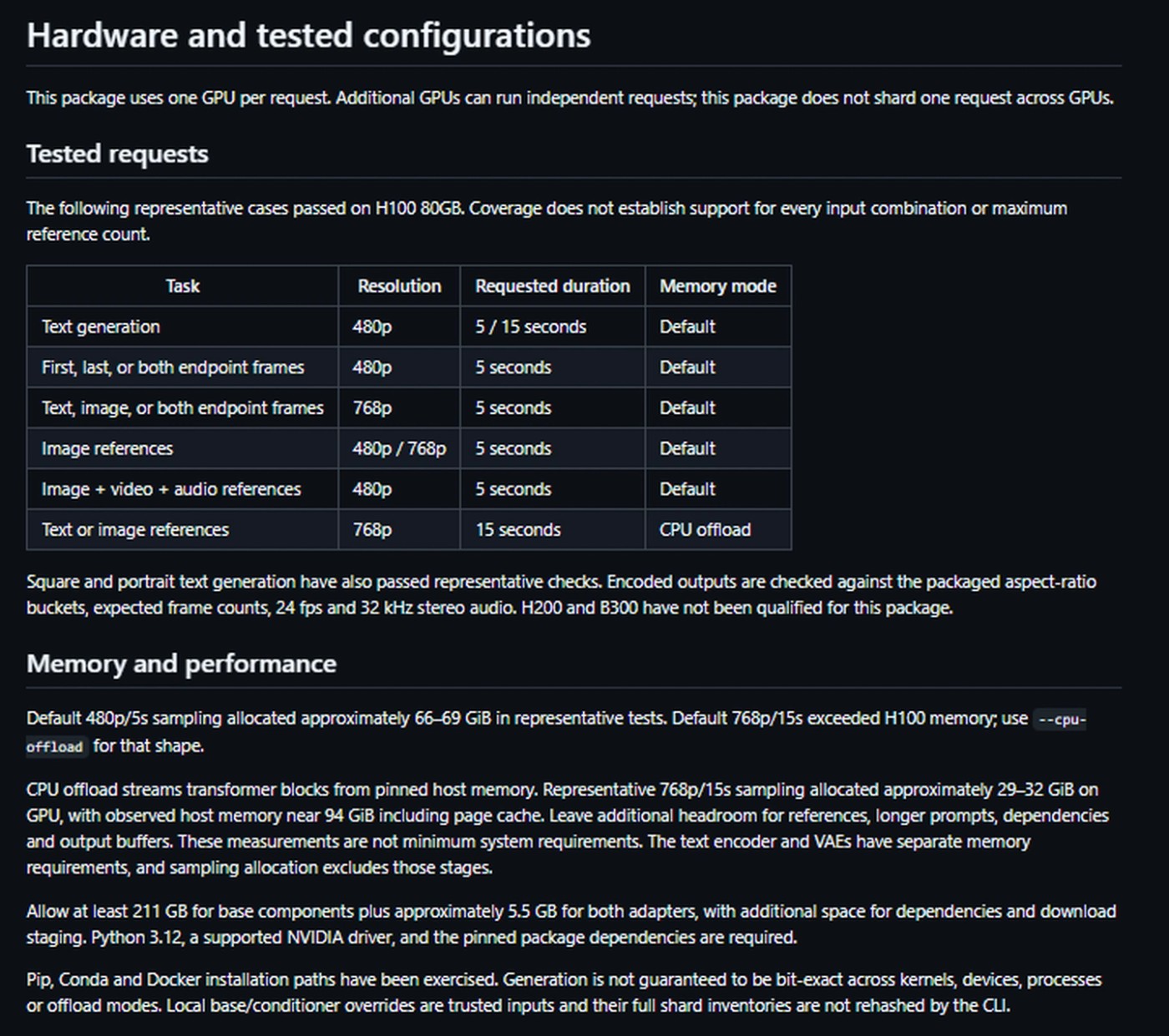
These are representative test results, not minimum requirements. The practical reading: if you do not have a high-memory GPU, a lot of system RAM and several hundred gigabytes free, a hosted route is more realistic than local inference. Always check the hardware guide before downloading.
What does it cost?
Pika's API pricing pages list the following rates as displayed on October 31, 2026. Prices are in US dollars and are billed per second unless noted otherwise.
Text-to-video and image-to-video output:
| Output resolution | Listed price per output second |
|---|---|
| 480p | $0.01 |
| 768p | $0.02 |
| 1080p | $0.035 |
| 2K | $0.04 |
| 4K | $0.08 |
↔️ Scroll horizontally to see all columns
Reference-to-video output:
| Output resolution | Listed price per output second |
|---|---|
| 480p | $0.03 |
| 768p | $0.06 |
| 1080p | $0.075 |
| 2K | $0.08 |
| 4K | $0.10 |
↔️ Scroll horizontally to see all columns
The reference-to-video price table also lists separate charges for uploaded video input, based on its resolution and duration. Other listed API charges include $0.001 per second for audio stems and $0.02 per request for the prompt rewriter. The draft-to-video endpoint is shown as "draft price deducted" rather than a single flat rate. See the text-to-video pricing page and reference-to-video pricing page before budgeting; rates and billing rules can change.
The local weights are downloadable without a per-generation Pika API charge, but that does not make local inference cost-free: the documented hardware and storage requirements are substantial, and the licence conditions below still apply. Pika's comparative pricing claims are company-published and should be treated as such.
Is it free to use commercially? Read the licence
The adapters are distributed under the MiniMax H3 Community License Agreement (dated August 2, 2026). Points that matter most, paraphrased from the text:
- Territory and outputs. The standard grant applies worldwide except the European Union, the United Kingdom, the Republic of Korea and the United States (MiniMax invites parties in those territories to request a separate licence). Crucially, the agreement explicitly restricts using, reproducing, modifying, distributing or displaying the model, its derivative works and their outputs outside the permitted territory—an unusually important restriction for anyone planning to publish or distribute generated clips internationally.
- Revenue. Commercial products and services generating more than US$20 million in yearly revenue need prior written authorisation from MiniMax. Other licence conditions apply even below that threshold.
- Attribution. A commercial product or service using MiniMax H3 or its works must prominently display "MiniMax H3" in its user interface. Redistribution requires a copy of the agreement and a NOTICE file.
- Model training. You may not use the works or their outputs to improve any other AI model, apart from MiniMax H3 and its Model Derivatives.
- Downstream users. If you offer a product or service built on it, you must bind users to terms at least as protective and maintain safeguards against prohibited uses.
- Public-content disclosure. The Acceptable Use Policy prohibits using the model or its outputs in a public environment without clearly and prominently disclosing that the information or content is machine-generated. It also prohibits impersonation without consent and military use.
Other components have separate licences: the MiniMax H3 licence notes that its Qwen3-VL-32B encoder is Apache 2.0, and Pika's example Python code is Apache 2.0. Those separate code/component licences do not replace the MiniMax H3 Community License Agreement governing the H3 base and its derivatives.
How the territory and output clauses apply to a creator publishing clips to an international audience is a legal question this article cannot answer. This is a summary, not legal advice. Read the full agreement, and take advice before building a commercial product on it.
How can you try it?
- Pika API Club: H3 Flex is available through Pika's API, which also provides the hosted finishing features.
- Model files and code: the Hugging Face repository and the GitHub inference package.
- ComfyUI and Diffusers: see the Comfy tutorial and the model card's Diffusers links.
- Pika's creation product: Pika's launch post says H3 Flex is "coming to the Pika creation product on November 2." As of this article's publication on October 31, 2026, that is a planned date, not a live feature. We will update this section after November 2.
Who should pay attention?
Creators and editors get the most from the reference inputs, synchronized sound and hosted stems, though the best of those live in the API rather than the download.
Developers and researchers get adapters, inference code and Diffusers and ComfyUI paths to build on, provided the licence and hardware fit.
Small studios and agencies can use the hosted workflow for storyboards, draft ads and previs, but should test consistency on their own material and read the commercial terms first.
Casual users on ordinary PCs should wait for a hosted app. Downloadable weights are not the same as a model that runs on a laptop.
The bigger picture
H3 Flex is built around iteration: draft at 768p, keep what works, change a detail, rework the sound, finish the winner. That is a different goal from Google Genie 4 and interactive world models, which simulate a world you steer in real time rather than a clip you watch. The two are related areas of generative media, not direct equivalents.
Our verdict: H3 Flex is a notable open-weight release for developers and professional creators who want controllable video-and-audio generation. It is not a simple, free, run-anywhere video generator. The headline features that matter most to many creators, 4K finishing and separate stems, depend on Pika's service, and the local route needs heavy hardware and a licence you have read. The real test is how its references, consistency and finished output hold up in real projects, which we have not tested.
Frequently asked questions
What is Pika H3 Flex?
Pika H3 Flex is a video-and-audio generation model that Pika post-trained from MiniMax H3. It uses six sampling steps, supports reference-guided generation, and is released as open-weight adapters plus inference code.
Is Pika H3 Flex open source?
It is more accurately open-weight. The weights and code are downloadable, but the adapters fall under the MiniMax H3 Community License Agreement, which has territorial, revenue, attribution and use conditions. Some Pika posts use the phrase "open source" more loosely.
Is Pika H3 Flex free?
The weights and inference code are free to download, but running them needs substantial compute and storage. Hosted API use is priced; Pika lists starting prices from $0.01 per second for text- and image-to-video as of October 31, 2026.
Can Pika H3 Flex generate 4K locally?
No. The local package generates natively at 480p or 768p. 1080p, 2K and 4K finishing is a Pika-hosted feature.
Does the local model export separate audio stems?
No. Local output is one mixed stereo track. The five stems (dialogue, score, SFX, foley, ambience) come from Pika's hosted API.
How many references can Pika H3 Flex use?
Up to 12 files in total: at most nine images, three videos and three standalone audio clips, with at least one image or video required.
Does "seven seconds for a 15-second clip" mean it generates that fast?
Not end to end. Pika's footnote says seven seconds measures transformer computation in a controlled benchmark, not total API latency.
Can I run Pika H3 Flex on a normal gaming PC?
Probably not comfortably. Pika documents representative local tests on an H100 80GB. Its current hardware guide says to allow at least 211 GB for base components plus about 5.5 GB for both adapters; some 768p/15-second runs require CPU offload and around 94 GiB of host memory in the documented test. These are not ordinary-PC requirements you can safely assume your system meets. Check the hardware guide before downloading.
Is it available in Pika's main app?
Pika says it is coming to its creation product on November 2, 2026. As of October 31 it is available through the API Club.
Sources
- Introducing Pika H3 Flex (Pika, October 29, 2026)
- Pika H3 Flex Technical Deep Dive
- Pika H3 Flex on Hugging Face (model card)
- Pika H3 Flex on GitHub and its hardware guide
- MiniMax H3 Community License Agreement
- Pika API: H3 Flex models and starting prices
- ComfyUI: Pika H3 Flex workflows
Editorial transparency: This article is based on Pika's launch announcement and technical deep dive, the Hugging Face model card, the GitHub repository and hardware guide, Pika's API pricing pages, ComfyUI's documentation and the MiniMax H3 Community License Agreement. TechAffiliate has not run H3 Flex, generated samples or reproduced Pika's benchmarks. Performance figures and comparisons are attributed to Pika or its documentation. Local hardware figures are representative measurements, not minimum requirements. API prices, rankings and availability are as displayed on October 31, 2026 and may change.
Affiliate Disclosure
TechAffiliate may earn a commission if you purchase through our links. This helps support our work but does not influence our reviews. We provide our honest assessments of products. See my testing methodology →
Related Articles
 AI & Machine Learning
Oct 14, 2026 • 27 min read
Gemini 4 Argon vs GPT-6 Astra vs Claude Opus 5.5 (2026)
Compare Gemini 4 Argon, GPT-6 Astra, and Claude Opus 5.5 on benchmarks, API pricing, coding, long-context tasks, and which model fits your work.
 Developer Tools
Oct 28, 2026 • 11 min read
DeepSeek Search & Fetch API Tutorial (2026): Python Setup, Examples, and Pricing
DeepSeek's Search API finds relevant web pages, while Fetch returns a page as Markdown. Learn the endpoints, a Python example, the costs and the billing deadline.
 Tech News
Oct 29, 2026 • 13 min read
Google Genie 4 Explained: Can You Build Games With It Yet?
Google DeepMind's Genie 4 generates interactive simulated worlds you can steer with text, plus native audio. We explain what it does, who can use it today, and why it isn't a game engine yet.
 AI & Machine Learning
Jun 18, 2026 • 18 min read
GLM-5.2 Review (2026): Benchmarks, Free Access & How to Use It
GLM-5.2 is the leading open-weights AI model from Z.ai. Explore benchmarks, pricing, MIT licensing, 1M-token context, and learn how to use GLM-5.2 for free.
Comments (0)
Leave a Comment
No comments yet
Be the first to share your thoughts!