Gemini 4 Hydrogen Review: Free Access, Coding Tests, and Limitations
Aditya Kachhawa
Gemini 4 Hydrogen correctly solved our analytics questions, recognised a misleading statistical comparison, and built a working click-through-rate calculator. When we identified a problem with that calculator, it also produced a targeted repair.
One reasoning answer overstated what the data proved, and the larger application needed additional accessibility work. This review explains the official free-access routes and what our practical tests established.
Access documentation and pricing checked November 18, 2026.
What is Gemini 4 Hydrogen?
Google introduced Hydrogen on November 12, positioning it for everyday work, coding, and tasks involving multiple steps. It joins Argon and Carbon in the Gemini 4 family. Google's announcement
The developer documentation lists text, images, video, audio, and PDFs as inputs, with text output. Available tools depend on the product through which you access it. Model documentation
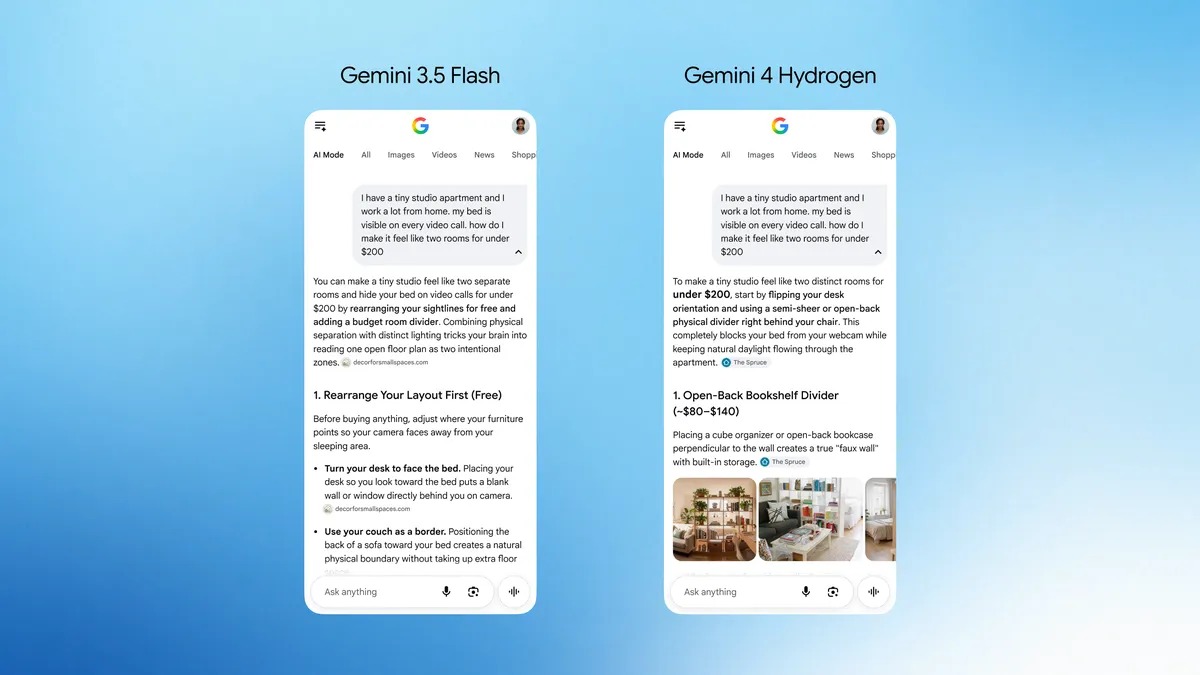
Google's official Search demonstration. Image credit: Google. This is a vendor example. Our own test results appear below. Source
Can you use Gemini Hydrogen for free?
Google documents free access through the Gemini app and a free developer API tier. Both have conditions and usage limits. The author confirms using Hydrogen on a free Gemini account in Task mode. Free API usage was not separately tested.
Use Hydrogen in Gemini Task mode
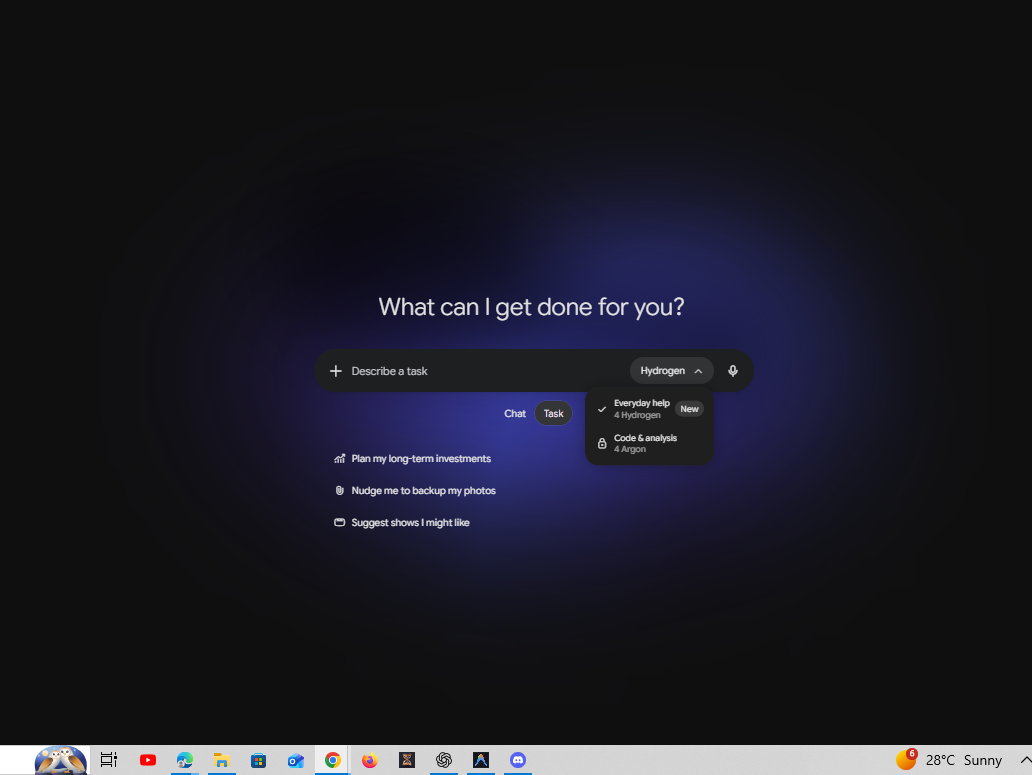
We confirmed access on our free Gemini account. In the interface shown below:
- Open Gemini and sign in to your free account.
- Switch to Task beneath the prompt box.
- Open the model menu and select Everyday help — 4 Hydrogen if available.
- Enter your task and submit it.
The screenshot shows Hydrogen selected while Argon is locked. Availability and usage allowances can differ by account and rollout. Our observation does not establish unlimited use or a fixed free quota.
Try Hydrogen in Google AI Studio
- Open Google's direct Hydrogen prompt page and sign in with an eligible Google account.
- Confirm that the selected model is
gemini-4-hydrogen. - Check the displayed account or project tier and available allowance.
- Start with a short text prompt using the available free tier.
- If you see a payment requirement, eligibility error, or exhausted quota, check those account conditions before continuing.
Google links to this model directly from its documentation. Open Hydrogen in AI Studio
The API pricing page lists free input and output tokens for Hydrogen's free tier. Google Search grounding is unavailable on that tier. Free-tier content may be used to improve Google's products under the applicable terms. Use a nonsensitive sample for your first experiment. Pricing and terms
Try this prompt with an answer you can verify:
A page received 12,000 impressions and 96 clicks. Calculate its click-through rate and show the arithmetic.
The correct answer is 0.8%.
Use automatic model selection in Gemini
Google lists Auto or Flash-Lite for free personal-account chats and Hydrogen for Tasks. In chat, enable automatic model selection under Settings → Usage limits where available. More demanding prompts may then use Hydrogen; other prompts may use Flash-Lite.
Open the response menu and check its model details. Google describes a “See response details” option. Manual selection depends on your plan, and work or school access depends on the Workspace license. Gemini model availability
What does the API cost?
| Usage | Standard paid price per million tokens |
|---|---|
| Input | $1.50 |
| Output, including thinking tokens | $7.50 |
↔️ Scroll horizontally to see all columns
For example, 10,000 input tokens and 2,000 total billable output tokens cost approximately $0.03, excluding tools and other charges. Thinking tokens count toward output billing. Official pricing
Our first test — accurate analytics calculations
We gave Hydrogen three pages with different impression and click counts.
| Page | Impressions | Clicks | Correct CTR |
|---|---|---|---|
| A | 12,000 | 96 | 0.8% |
| B | 3,000 | 75 | 2.5% |
| C | 8,000 | 24 | 0.3% |
↔️ Scroll horizontally to see all columns
Hydrogen calculated all three correctly. We also asked how many additional clicks Page C would receive at a 2.5% CTR with impressions held at 8,000. It correctly calculated 200 total clicks and 176 additional clicks.
Its explanation mentioned search intent and placement as reasons the improvement might fail to materialise.
The harder reasoning test — Simpson's paradox
We supplied a comparison in which Design B had a higher overall CTR while Design A performed better within both device groups.
| Measure | Design A | Design B |
|---|---|---|
| Desktop CTR | 8.00% | 7.00% |
| Mobile CTR | 3.00% | 2.00% |
| Overall CTR | 3.50% | 6.50% |
| Estimated CTR with a 50/50 device mix | 5.50% | 4.50% |
↔️ Scroll horizontally to see all columns
Hydrogen calculated every figure correctly and identified Simpson's paradox. It explained that B received much more desktop traffic, where both designs performed better. It recommended randomized testing within device groups and checking downstream conversions.
One sentence needed qualification. Hydrogen said replacing A with B “would reduce” clicks. That prediction requires the observed device-specific rates to remain applicable after the switch. The arithmetic was correct, but the causal wording was too definite.
Coding test — a calculator that needed one repair
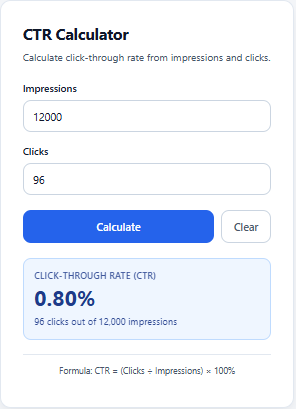
We requested a single HTML calculator with labelled inputs, validation, keyboard submission, and results to two decimal places.
The exported file returned 0.80% for 96 clicks from 12,000 impressions and 7.42% for 89 clicks from 1,200 impressions. It also handled several invalid inputs.
However, changing the inputs left the previous result visible until Calculate was pressed again. We supplied the file and described the issue. Hydrogen added a function that cleared results and errors whenever either input changed. Independent execution of its JavaScript confirmed the repair and preserved the original calculation.
A larger application — weighted totals and validation
Next, we requested a tool with multiple editable rows, validation, local saving, and reset confirmation.
The important calculation was weighted overall CTR. A page with 100 impressions and 10 clicks, another with 9,900 impressions and 99 clicks, and a third with no traffic produced the correct 1.09% overall result. The zero-traffic row displayed N/A.
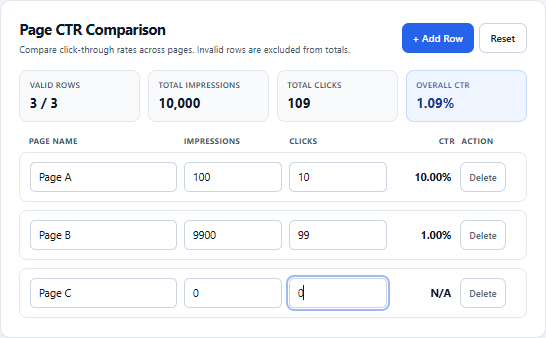
Executing its validation function confirmed that negative numbers, fractional counts, blank click counts, and clicks exceeding impressions were excluded.
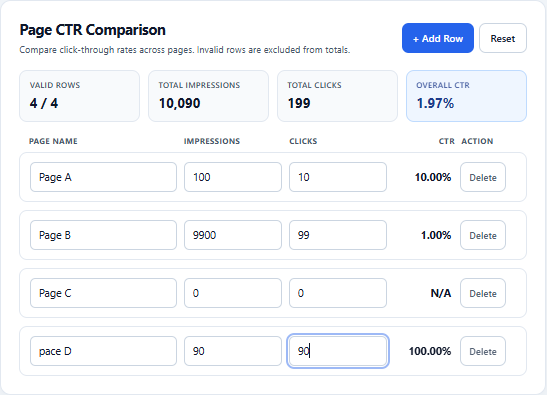
Adding a fourth page with 90 impressions and 90 clicks produced 100.00% for that row. The updated overall result was 199 clicks from 10,090 impressions, or 1.97%.
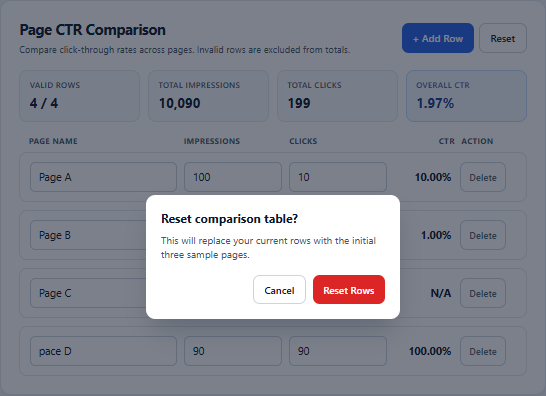
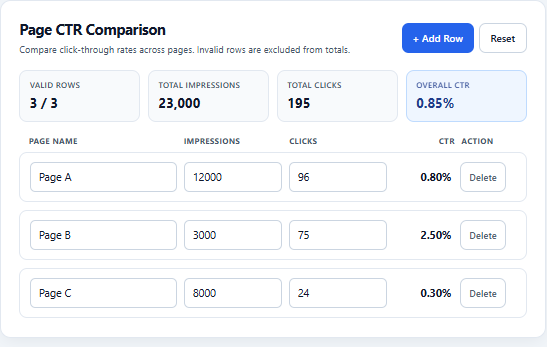
The reset sequence displayed a confirmation dialog and then restored the initial sample rows. Their 195 clicks from 23,000 impressions correctly rounded to 0.85%.
Where the generated code needed more work
The reset dialog lacked code to keep keyboard focus inside it while open. Storage errors were silently ignored, which could leave a user unaware that entries had not been saved.
Saving and restoration logic was present, but refresh persistence, mobile layout, and full keyboard behaviour remained unverified. An independent automated browser attempt timed out. The findings above use manual screenshots, source inspection, and targeted JavaScript execution.
Frequently asked questions
Is Gemini 4 Hydrogen free to use?
Google documents free access through automatic selection in Gemini and a free developer API tier. Usage allowances and eligibility apply. The author confirms using Hydrogen on a free Gemini account in Task mode. Free API usage was not separately tested. Gemini access · API pricing
How do I try Hydrogen in AI Studio?
Open the official model link, sign in, confirm gemini-4-hydrogen, and check your available tier and quota. Start with a short text prompt and verify the selected model. Try Hydrogen
Why can't I select Hydrogen in Gemini?
Free chat access uses automatic selection. Manual selection depends on your plan; work and school accounts follow their Workspace license. Model availability
How do I know which model answered?
Check the menu beneath the answer for response details and model information. Google's instructions
Is Hydrogen good for coding?
It produced correct calculations, repaired a stale-result issue, and built a comparison app in our tests. The larger app needed accessibility improvements. These results support trying it for small applications with verification.
Can Hydrogen analyse images and PDFs?
Its documented inputs include images, PDFs, audio, video, and text. This review did not complete an independent image-reading test. Supported inputs
Can Hydrogen generate images?
The API documentation lists text output and marks native image generation as unsupported. It can generate code that draws graphics; applications may supply additional tools. Capabilities
What is its context window?
Google lists a unified input-output window of 1,048,576 tokens, with 65,536 default synchronous output tokens and longer output through long decode. Product allowances can differ. Token limits
How much does its API cost?
Standard paid rates are $1.50 per million input tokens and $7.50 per million output tokens, including thinking. Tools may add charges. Pricing
Is it better than ChatGPT or Claude?
Our tests do not establish that comparison. We did not run competing models under matching conditions. Model choice needs comparable prompts, tools, settings, and verification.
Is Gemini Hydrogen worth trying?
Our results support trying Hydrogen for small analytics and frontend tasks. It calculated correctly, recognised a misleading aggregate comparison, and repaired code after a concrete bug report.
Check assumptions in reasoning answers and test generated applications before sharing them. Exact generation times and thinking levels were not captured, so this review establishes specific capabilities without a speed claim or general ranking.
Affiliate Disclosure
TechAffiliate may earn a commission if you purchase through our links. This helps support our work but does not influence our reviews. We provide our honest assessments of products. See my testing methodology →
Related Articles
 AI & Machine Learning
Jun 18, 2026 • 27 min read
GLM-5.2 Review (2026): Benchmarks, Free Access & GLM-5.3 Comparison
A sourced guide to GLM-5.2's 1M-token context, MIT-licensed weights, benchmarks and API access, with GLM-5.3 comparisons and a same-prompt coding comparison.
 Tool Comparisons
Nov 2, 2026 • 23 min read
7 Best AI Presentation Tools in 2026: Hands-On Comparison of Free & Paid Tools
We generated real presentations with Gamma, Canva, Gemini in Google Slides, Pitch, and Copilot using the same prompt, and researched Beautiful.ai and Plus AI. Here is what worked, what failed, and what each tool costs.
 AI & Machine Learning
Dec 30, 2025 • 16 min read
DeepSeek vs ChatGPT vs Gemini 2026: Which AI is Better? (Tested 30 Days)
Gemini topped India's AI searches in 2025. I tested GPT-5.2, Gemini 3 Flash, and DeepSeek V3.2 for 30 days. Real results, privacy warnings, honest winner.
 AI & Machine Learning
Dec 11, 2025 • 10 min read
What is Agentic AI? The Technology Replacing Apps in 2026 - Complete India Guide
Agentic AI isn't ChatGPT 2.0... it's something far more powerful. Discover how AI agents are replacing traditional apps in 2026, and why 200,000+ Indian IT professionals are already using this technology at TCS, Infosys, Wipro, and Cognizant. Complete guide for students and professionals.
Comments (0)
Leave a Comment
No comments yet
Be the first to share your thoughts!