7 Best AI Presentation Tools in 2026: Hands-On Comparison of Free & Paid Tools
Aditya Kachhawa

It is late the night before a seminar, and the only thing on your screen is a blank title slide. Or it is Sunday evening and your manager wants a monthly performance deck by 9 a.m. The slow part is rarely the thinking. It is turning notes into an outline, an outline into slides, and slides into something that does not look like a wall of text.
That is the problem the best AI tools for creating presentations try to solve. You give them a topic, an outline or a document, and they produce a first draft you can edit. But marketing promises rarely match reality: some tools generate beautiful cards that break when exported to PowerPoint, others hallucinate factual data, and several hide behind credit card-backed trials.
To find out how well these tools actually perform, TechAffiliate conducted a standardized editorial hands-on test across five prompt-to-presentation tools (Gamma, Canva, Gemini in Google Slides, Pitch, and Microsoft Copilot) using the identical prompt and topic: "7 AI Presentation Tools Compared". We also evaluated two specialized presentation tools (Beautiful.ai and Plus AI) through rigorous documentation, technical capability, and verified pricing research captured on 4 November 2026.
This guide provides an honest look at real slide outputs, design consistency, export flexibility, free-tier limits, factual accuracy, and detailed pricing value across all seven platforms.
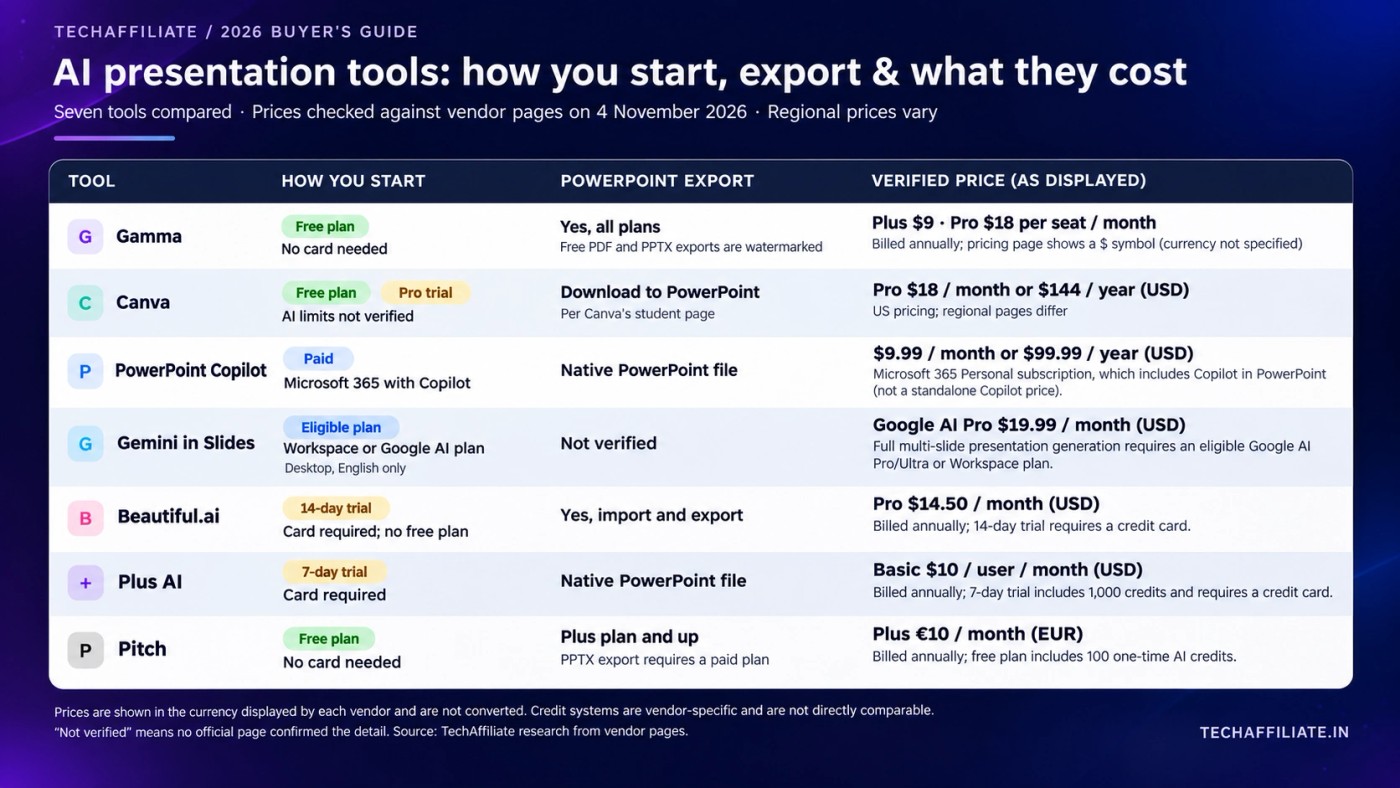
Quick Comparison: How Each Tool Works
| AI tool | Testing status | Good fit for | How you start | PowerPoint export |
|---|---|---|---|---|
| Gamma | Hands-on tested | A quick first draft from a prompt | Free plan, no card | Yes, all plans; Free PDF and PPTX exports are watermarked |
| Canva | Hands-on tested | Design control and reusable visuals | Free plan, plus a Pro trial | Canva says you can download to PowerPoint |
| Gemini in Google Slides | Hands-on tested | Google Drive and Workspace users | Eligible Workspace or Google AI plan | Native Google Slides; export via Slides menu |
| Pitch | Hands-on tested | Teams and founders sharing decks | Free plan, no card | Paid plans only; not on Free (PDF only) |
| Microsoft Copilot | Hands-on tested (Free web account) | Microsoft users testing AI drafting | Free web experience; trial on eligible M365 plans | Native PowerPoint file via M365 suite |
| Beautiful.ai | Research only | Consistent branded team decks | No free plan; 14-day trial (card required) | Yes, import and export |
| Plus AI | Research only | Adding AI to PowerPoint or Slides | 7-day trial with 1,000 credits (card required) | Native PowerPoint file |
↔️ Scroll horizontally to see all columns
"Free plan" means you can keep using it without paying. "Trial" means a time-limited test, often with a card that is charged automatically afterwards. Prices are in the pricing section further down.
Our Testing Methodology: Hands-On Tests Combined With Research
To provide actionable advice rather than repeating vendor marketing, we used a transparent hybrid evaluation methodology:
- Five tools tested hands-on: We generated complete presentations from scratch using Gamma, Canva Magic Design, Gemini in Google Slides, Pitch AI, and Microsoft Copilot (tested via free web-account access).
- Two tools evaluated by research only: Beautiful.ai and Plus AI were evaluated through official technical documentation, verified pricing schedules, and user guides. These tools require credit card-backed trials or separate subscription commitments.
- Standardized prompt and topic: Across our hands-on tests, we used the identical prompt and topic: "7 AI Presentation Tools Compared".
- Testing timeline: Hands-on generation was conducted in early November 2026, with comprehensive pricing evidence verified from official websites and account screenshots on 4 November 2026.
- Editorial evaluation criteria: We evaluated generation speed, layout consistency, factual accuracy, editable export capability, and the true usability of free tiers without unexpected paywalls.
- Single-run comparison: This was a single-run editorial comparison designed to reflect what an everyday professional or student encounters, not a multi-run statistical benchmark. Pricing research does not count as hands-on output testing, and we maintain this distinction throughout the review.
How we handled pricing:
- We show the currency exactly as the vendor's page shows it (INR, USD, or EUR) and never convert currencies.
- We note whether billing is monthly or annual, and clarify that annual rates are paid upfront as a lump sum.
- Where applicable taxes (like GST in India) are excluded, we state so clearly.
- Anything we could not independently confirm is flagged directly.
Hands-On Test: We Generated the Same Presentation With Five AI Tools
We gave Gamma, Canva, Gemini in Google Slides, Pitch, and Microsoft Copilot the identical prompt: "7 AI Presentation Tools Compared". We examined how each platform organized slide structure, whether it generated useful data tables and timelines, and how the slides exported to standard presentation formats.
The two tables below summarize our practical findings and qualitative verdicts.
Hands-On Test Outputs and Limitations
| Tool | Generated output | What stood out | Limitations |
|---|---|---|---|
| Gamma | 10 slides, dark blue card layout | Visual cards, structured comparison blocks, clean responsive layouts | "Made with Gamma" watermark on free PDF/PPTX; 10-slide cap; 400 non-refreshing credits |
| Canva | Multi-slide deck via Magic Design | Clean templates, polished visual appeal, easily reusable brand assets | Pro asset watermarks on free tier; requires manual layout adjustments for complex data |
| Gemini in Google Slides | 10-slide deck natively in Google Slides | Native Google Slides integration, structured software landscape table, timeline slide | Inaccurate/hallucinated pricing claims; English/desktop only; requires paid Workspace/AI Pro tier |
| Pitch | 11-slide deck in modern dark theme | Bold typography, cohesive slide design, built-in analytics & collaboration | "Try Pitch" watermark on free tier; no PPTX export on Free (PDF only); 100 non-renewing AI credits |
| Copilot (Free) | 10-slide deck via free web Copilot | Generated complete deck from prompt without requiring a paid subscription | Less appealing visuals, boxy layouts, sparse section slide, and text requiring substantial editing |
↔️ Scroll horizontally to see all columns
Qualitative Practical Comparison and Verdict
| Tool | Design consistency | Content depth | Coverage of requested topic | Main limitation | Best use case |
|---|---|---|---|---|---|
| Gamma | High (web-style card blocks) | Moderate (clear bullets & feature lists) | Full 7-tool coverage | Watermark & export reflow | Fast first draft from outline |
| Canva | High (template-based graphic polish) | Moderate (marketing-oriented summaries) | Full 7-tool coverage | Data table formatting | Visual storytelling & social decks |
| Gemini in Google Slides | Moderate (standard presentation layout) | High (detailed comparison tables & timelines) | Full 7-tool coverage | Hallucinated pricing details | Workspace users needing native Google Slides |
| Pitch | High (minimalist dark typography) | High (structured breakdown per tool category) | Full 7-tool coverage | Free export limited to PDF | Startups, team decks & link sharing |
| Copilot (Free) | Low to Moderate (basic layout with generic images) | Moderate (feature bullets and pros/cons) | Full 7-tool coverage (combined 2 tools) | Weak visual polish & text refinement needed | Testing AI drafting without a paid subscription |
↔️ Scroll horizontally to see all columns
Hands-On Tool Reviews: What the Tests Revealed
1. Gamma (Hands-On Tested)
What it is: A presentation, document and website maker whose AI agent starts with a conversation, builds an outline you can reshape, and lets you keep editing in a chat panel beside the deck. Gamma's site says it can import PowerPoint and PDF files and pull content from 25+ tools such as Slack, Notion and Dropbox.
What our hands-on test revealed: Gamma produced a 10-slide presentation styled in a clean, modern dark blue theme. Its layouts rely on web-native cards rather than traditional slide boxes, which made comparison sections and bulleted cards look clean and structured. The outline-first generation process allowed us to reorganize sections before consuming credits.
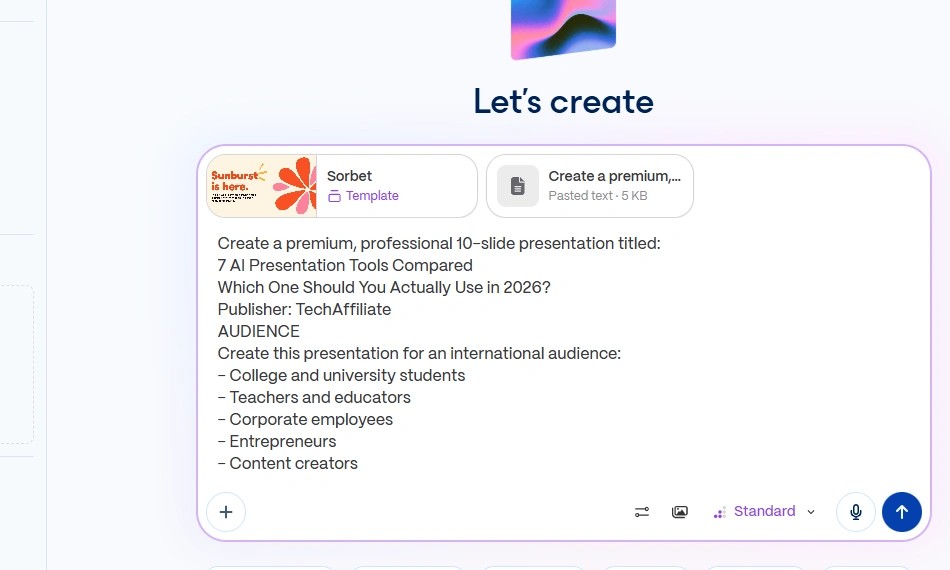
Free access, credits and export: Gamma provides a free plan requiring no credit card. New accounts receive 400 one-time starter credits that do not refresh monthly, and prompts are capped at 10 slides on Free. Exporting to PDF and PowerPoint is supported on the free plan, but both formats include a prominent "Made with Gamma" watermark in the lower corner. In addition, because Gamma builds cards rather than fixed 16:9 slides, exporting to PowerPoint often requires manual reformatting to fix line wraps and card spacing.
Account credit note: Our test account currently displays 158 remaining Free credits following our hands-on generation experiment. This is an account-specific balance from testing; standard new sign-ups receive 400 starter credits.
Paid tiers and allowances: Paid plans start at ₹400/month (billed annually as ₹4,800/year) or $9/month USD for Plus (1,500 monthly credits, watermark removed, 100 slides per prompt). Pro costs ₹950/month (billed annually as ₹11,400/year) or $18/month USD (4,000 monthly credits), and Business is ₹3,482/seat/month (₹41,784/seat/year) or $40/seat/month USD (10,000 monthly credits per seat). For Ultra, monthly billing is ₹8,704/month ($100/mo USD) for 20,000 credits; while account dashboards show an annual equivalent of ₹7,833.25/month, Gamma's Help Center indicates that Ultra annual billing is slated for a future rollout and should not be relied upon as an active checkout option.
Watch out for: Gamma does not disclose the exact number of presentations 400 credits will yield, as consumption depends on the model selected and the number of AI rewrites. Treat the free plan as a test run rather than ongoing slide production.
Verdict: The fastest way to turn a rough outline into a cohesive first draft without paying, provided you can accept the export watermark and card-to-slide reformatting.
Official links: Gamma · Plans and credits · Export guide
2. Canva (Hands-On Tested)
What it is: A graphic design powerhouse featuring Magic Design for Presentations. You input a topic or outline, and Canva generates a multi-slide deck with styled layouts, typography, and visual assets, which you can edit using Canva's drag-and-drop editor.
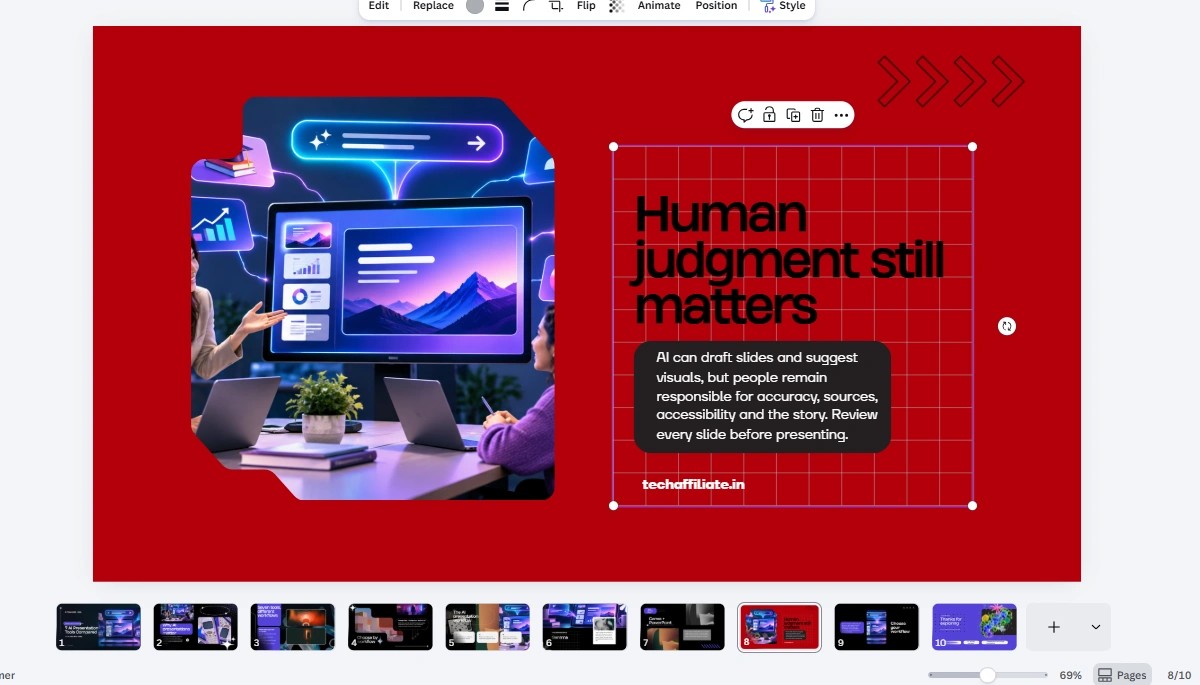
What our hands-on test revealed: Canva generated an aesthetically polished presentation with vibrant design accents and high visual appeal. For visual storytelling, marketing presentations, and classroom overviews, Canva's design library is unmatched. Teammates can collaborate in real time, and brand kits ensure visual consistency across decks and social graphics.
You can inspect the live presentation generated during our test directly: View our hands-on generated Canva presentation. Note that because Canva protects its editor with Cloudflare automated bot verification, we provide direct project access rather than automated captures to ensure transparency.
Free access and pricing tiers: Canva offers a permanent free plan alongside a Pro trial. In India, official pricing includes:
- Pro Lite: ₹1,590/year. Note that Pro Lite includes selected AI features only and should not be presented as equivalent to full Pro.
- Canva Pro: ₹4,000/year, unlocking comprehensive AI design tools, premium templates, and full brand controls.
- Canva Business: ₹6,800/year per person, adding team collaboration and advanced brand administration.
Education access: Canva Education is free strictly for eligible K-12 teachers, their students, and K-12 school districts. For higher education institutions, Canva Campus requires contacting sales. Do not assume all university students or colleges qualify for free Canva Pro or Education.
Watch out for: It is easy to spend hours tweaking decorative elements instead of focusing on slide substance. Furthermore, if the AI pulls in Canva Pro graphics or stock images on a free account, they display watermarks until replaced with free alternatives.
Verdict: Ideal when graphic presentation and visual flair matter most, or when slides will be adapted into social media graphics and collateral.
Official links: Canva AI presentations · Canva India pricing · Canva Education
3. Google Slides With Gemini (Hands-On Tested)
What it is: Gemini's native presentation generator built directly into Google Slides. Users describe a topic in the side panel, optionally attach Google Drive documents as context, review and edit an outline, and generate fully native Slides presentations.
What our hands-on test revealed: Gemini generated a structured 10-slide presentation natively inside Google Slides. Among all tested tools, Gemini demonstrated the deepest structural thinking: it produced a dedicated "Evolution of Presentation Tools" timeline slide and an elaborate software landscape comparison table mapping tools across categories. Because the output is native Google Slides, there are zero export conversion errors, font substitutions, or broken cards.
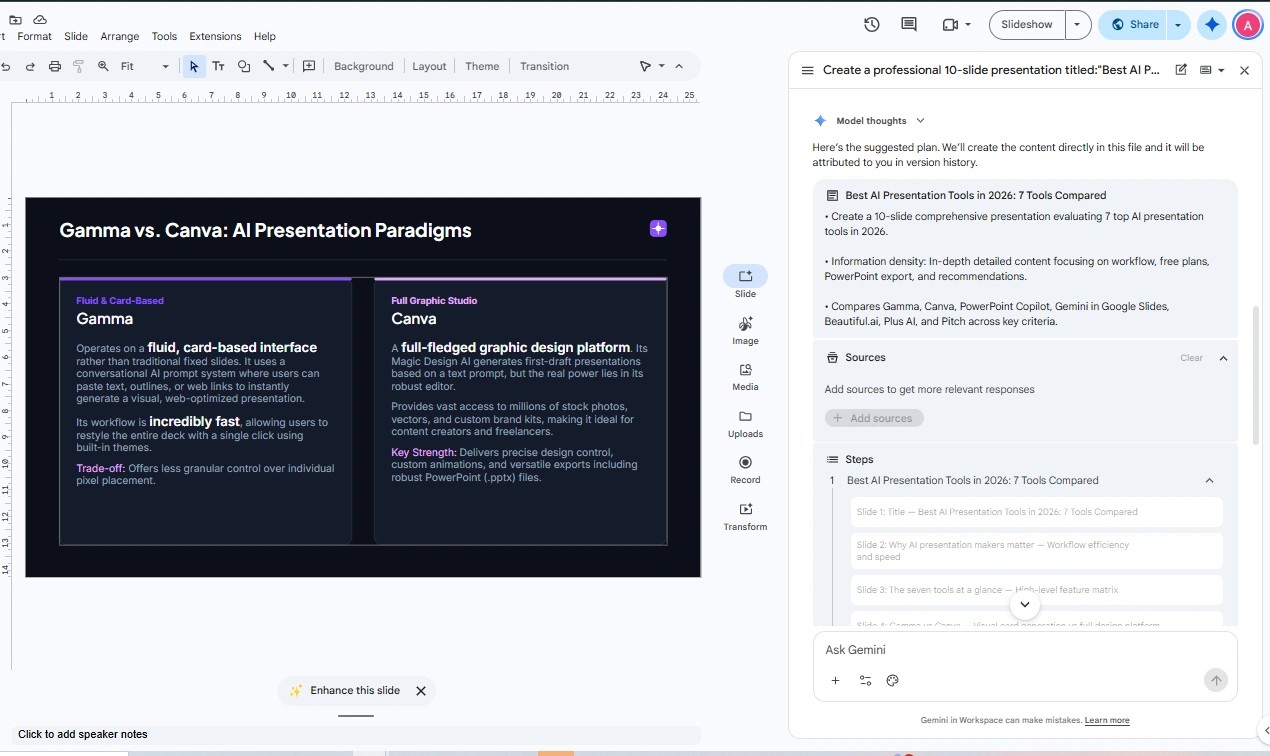
Critical factual error warning: Despite impressive structural layout, our test uncovered a severe factual hallucination. On its comparison and pricing slide, Gemini claimed: "Free Tier: $0/month (Basic features, 10 presentations/month)". This pricing tier does not exist for Google Slides or general AI models—Gemini fabricated plausible-sounding pricing figures. Anyone using Gemini for business or academic presentations must independently verify every statistic, price, and date before sharing slides with stakeholders.
Free access vs. actual presentation capability: While consumer Gemini has a free tier (₹0/month), Google's documentation specifies that generating full multi-slide presentations requires an eligible Google AI plan (specifically Google AI Pro at ₹1,950/month or Google AI Ultra starting at ₹6,500/month; higher usage up to ₹19,500/month), or an eligible Google Workspace enterprise plan. Paying ₹399/month for Google AI Plus does not unlock full multi-slide presentation generation in Google Slides. Currently, the feature operates on desktop in English only.
Verdict: The best choice for users immersed in Google Drive who want native slides and automated comparison tables, provided every factual and financial claim is rigorously audited.
Official links: Gemini subscriptions · Google help page · Workspace Updates announcement
4. Pitch (Hands-On Tested)
What it is: A modern presentation platform engineered for startup founders and collaborative teams. Pitch uses AI to generate complete slide decks from text prompts or attached files (PDFs, text notes, and CSVs), with interactive refinement available through chat.
What our hands-on test revealed: Pitch generated an 11-slide presentation in a sleek, minimalist dark aesthetic with strong typography. It allocated dedicated slides to each software category and organized content logically from title to summary. The editor feels modern and responsive, making it an excellent platform for founders pitching ideas or teams conducting remote reviews.
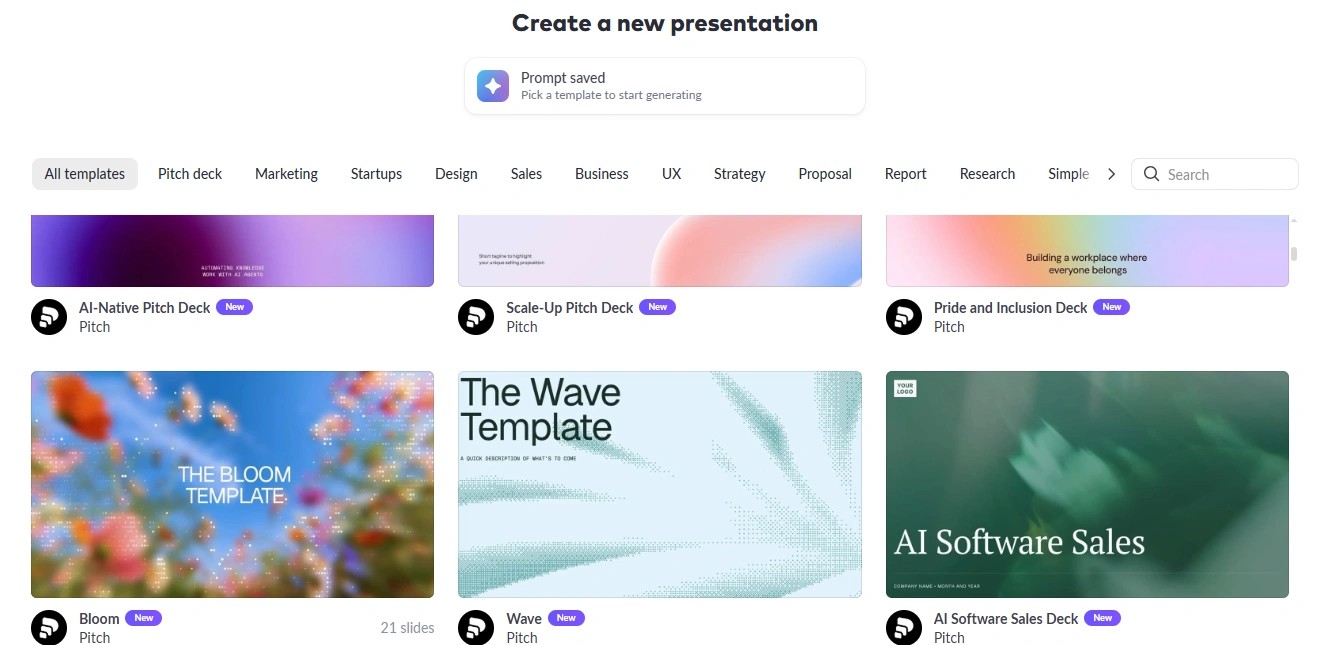
Free access and export restrictions: Pitch offers a free plan with no credit card required, supporting unlimited presentations, up to 5 team members, and 2 external guests. However, new accounts receive only 100 one-time AI credits that do not renew once consumed. Crucially, the free plan restricts file export strictly to PDF—PowerPoint (.pptx) export is reserved for paid tiers. Presentations shared on the free plan also include a subtle "Try Pitch" watermark.
Paid tiers (EUR pricing): Pitch displays official pricing in Euros:
- Free: €0 forever with 100 one-time credits.
- Plus: €10/month billed yearly, offering 500 monthly AI credits, clean watermark removal, and PowerPoint (.pptx) exports.
- Team: €15/month billed yearly, adding collaborative workspaces and viewer engagement analytics.
- Business: €20/month billed yearly for advanced permissions and SSO.
(Note: We do not convert EUR into INR or USD to avoid fluctuating exchange rate errors).
Watch out for: If your instructor, client, or conference organizer demands a .pptx file, Pitch's free plan cannot provide it directly. It is built primarily for sharing live web links and PDF decks.
Verdict: An outstanding choice for startups, design-conscious teams, and web sharing, provided you do not require free PowerPoint export.
Official links: Pitch AI presentation maker · Pitch pricing · AI credits guide
5. Microsoft Copilot (Hands-On Tested: Free Web Account)
What it is: Microsoft's conversational and productivity AI assistant. While enterprise users typically access Copilot as a paid add-on embedded inside PowerPoint and Microsoft 365, Copilot is also accessible as a free web experience for drafting outlines, slide summaries, and presentation content.
What our hands-on test revealed: We tested Copilot using a free account by providing the identical topic and prompt: "7 AI Presentation Tools Compared". Copilot produced a 10-slide presentation deck. However, the result was noticeably less impressive than the other tools in our experiment:

- Visual design limitations: The visual styling lacked the modern aesthetic, balanced whitespace, and polish of Gamma, Canva, or Pitch. Slide templates felt boxy and dated, accompanied by generic, stylized AI illustrations on the left side of slides that added little informational value.
- Layout and structural inconsistencies: Slide 2 contained only a single section heading ("The Evolution of Presentation Creation: Manual vs. AI Workflows") with zero supporting text or graphics, leaving an awkward blank canvas. On Slide 7, Copilot combined two distinct tools (Beautiful.ai and Plus AI) into a single slide, breaking the one-tool-per-slide structure maintained across the rest of the deck.
- Text and content polish: While Copilot organized content into features, pros, cons, and pricing blocks, the generated text was dense and required significant editing for clarity, tone, and presentation readiness. On Slide 9, it attempted an "AI Presentation Tools Comparison Matrix", but rendered it as unstyled, plain text rows rather than an engaging visual table.
Important distinction regarding free vs. paid Copilot: This test reflects our observations from a free Microsoft Copilot account. It should not be conflated with the paid Microsoft 365 Copilot experience embedded natively inside PowerPoint. Paid enterprise Copilot draws directly upon organization tenant files, Word documents, and corporate slide masters, which may deliver significantly different workflow integration and formatting. We present these weaker results strictly as our authentic observation from this specific free-account generation.
Access and paid business rates: Free web-based drafting is accessible at no cost. For organizations seeking native Microsoft 365 PowerPoint integration, trials are available on eligible business subscriptions, with commercial pricing as follows:
- Microsoft 365 Copilot Business add-on: ₹1,495.73/user/month billed annually (promotional rate from ₹1,745; requires qualifying base M365 subscription).
- Microsoft 365 Business Standard with Copilot: ₹1,955/user/month billed annually.
- Microsoft 365 Business Premium with Copilot: ₹2,660/user/month billed annually.
- Applicable taxes (GST) are extra where Microsoft specifies.
Verdict: Worth testing if you want to experiment with AI-assisted slide drafting without spending money. However, based on our generation, the free web output requires substantial manual refinement in both design and wording before it is ready for a professional audience.
Official links: Microsoft Copilot · Microsoft business pricing (India) · Microsoft support
Two Tools Evaluated by Research (Not Hands-On Tested)
The following two tools were not part of our hands-on prompt experiment. We evaluated them through verified technical documentation, vendor feature matrices, and published pricing structures. Each tool requires either a credit card-backed trial or a dedicated subscription.
6. Beautiful.ai (Research Only)
What it is: An automated presentation platform built around intelligent slide design. Instead of freehand drag-and-drop, Beautiful.ai uses layout rules that automatically adapt spacing, alignment, and formatting as you insert text, images, and charts.
What makes it distinct: It prevents poorly designed slides by enforcing visual hierarchy and consistent brand guidelines across teams. Its AI features include content generation, text rewriting, AI image creation, and multi-language translation on Team plans. Both PowerPoint import and export are supported across all tiers.
Free access reality and pricing: Beautiful.ai offers no permanent free plan for presentation generation. Access begins with a 14-day Pro trial that requires credit/debit card information upfront. Unless cancelled before the 14-day trial concludes, your card will be charged the full annual subscription price of $14.50/month billed annually ($174/year). For one-off requirements, Beautiful.ai offers a single-presentation option for $45.
Team pricing discrepancy note: Official Beautiful.ai pages contain conflicting Team pricing: our account dashboard screenshot displays a Teams tier at $40/month including three users with annual billing selected ($480/year), whereas the text description on the pricing page lists $40 per user/month. We recommend verifying current seat terms directly with Beautiful.ai before purchasing.
Verdict: A powerful design enforcement tool for marketing and sales teams that need uniform decks, but not suitable for users seeking free presentation generation.
Official links: Beautiful.ai pricing · Trial terms and conditions · Education offer
7. Plus AI (Research Only)
What it is: A specialized AI presentation add-on that installs directly into Microsoft PowerPoint and Google Slides. Rather than creating another standalone web tool, Plus AI allows users to generate, rewrite, and reformat slides directly within their existing presentation software.
What makes it distinct: It eliminates workflow disruption by working where corporate teams already live. Plus AI can transform raw text documents, PDFs, and meeting notes into native slides without requiring file imports or exports.
Free access reality and pricing: Plus AI does not provide a permanent free plan. It offers a 7-day temporary trial with 1,000 AI credits that requires a credit card upfront and applies only to new customers. If not cancelled during the 7-day window, subscriptions renew automatically. Published tiers include:
- Basic: $10/user/month billed annually ($15 monthly) with 1,500 monthly credits.
- Pro: $20/user/month billed annually ($25 monthly) with 3,000 monthly credits.
- Team: $30/user/month billed annually ($40 monthly) with 6,000 monthly credits.
- Max: $200/user/month billed annually ($240 monthly) with unlimited credits.
Verdict: Excellent for corporate teams committed to PowerPoint or Google Slides who want native AI drafting without switching software platforms.
Official links: Plus AI · Plus AI pricing
Pricing, Free Plans and Subscription Costs: What to Know
Prices and plan terms vary significantly by country, currency, and billing schedule. The table below documents verified starting prices, trial conditions, and primary target workflows as displayed on official vendor pages and account dashboards on 4 November 2026.
| Tool | Free access / trial | Paid pricing | Best suited for |
|---|---|---|---|
| Gamma | Free plan, no card. 400 one-time starter credits; 10 slides per prompt; watermarked PDF and PPTX exports. | Plus: ₹400/mo annual (₹4,800/yr) or ₹500 monthly ($9/$12 USD; 1,500 credits). Pro: ₹950/mo annual (₹11,400/yr) or ₹1,300 monthly ($18/$25 USD; 4,000 credits). Ultra: ₹8,704 monthly ($100 USD; 20,000 credits; annual billing planned by vendor, unconfirmed for current checkout). Business: ₹3,482/seat/mo annual (₹41,784/seat/yr) ($40 USD; 10,000 credits/seat). | Prompt-first presentation generation, rapid first drafts and structured content. |
| Canva | Permanent free plan (basic design tools and templates); 30-day Pro trial. | Pro Lite: ₹1,590/year (selected AI tools only). Pro: ₹4,000/year (full design suite, advanced AI, brand kits). Business: ₹6,800/year per person (team brand control and collaboration). Canva Education free for eligible K-12. | Students, designers, content creators and people who want maximum visual editing flexibility. |
| Gemini in Google Slides | Consumer Gemini is free (₹0/mo, no Slides generation). No standing free plan for Slides generation. | Google AI Pro: ₹1,950/month (includes Slides presentation generation). Google AI Ultra: from ₹6,500/month (higher usage: ₹19,500/month). Google AI Plus is ₹399/month (does NOT include multi-slide Slides generation). Workspace business accounts require eligible Gemini add-on. | Google Workspace users, people who work with Drive documents and users who need editable Google Slides presentations. |
| Pitch | Free plan (€0 forever), includes 100 one-time AI credits (do not renew) and PDF export. | Plus: €10/month billed yearly (500 monthly AI credits, watermark removed, PPTX export). Team: €15/month billed yearly (collaboration, analytics). Business: €20/month billed yearly. Billed in EUR (not converted). | Teams, startup founders, collaborative presentations and sharing pitch decks. |
| Microsoft Copilot | Free web experience available for basic drafting; trial available on eligible M365 business plans. | Microsoft 365 Copilot Business add-on: ₹1,495.73/user/month billed annually (promotional rate from ₹1,745; requires qualifying base M365 plan). Business Standard with Copilot: ₹1,955/user/month billed annually. Business Premium with Copilot: ₹2,660/user/month billed annually. GST extra where applicable. | Business professionals who already depend on PowerPoint, Word, Excel and Microsoft 365. |
| Beautiful.ai | No permanent free plan; 14-day Pro trial (credit/debit card required upfront). | Pro: $14.50/month billed annually ($174/year). Single-presentation option: $45 (1 month). Teams: Conflicting published terms—dashboard shows $40/month including 3 users billed annually ($480/yr), while website text lists $40 per user/month; verify seat terms directly. | Businesses and professionals who value automatic layouts, brand consistency and polished slides. |
| Plus AI | No permanent free plan; 7-day trial with 1,000 AI credits (credit card required, new customers only). | Basic: $10/user/month billed annually or $15 monthly (1,500 credits). Pro: $20/user/month billed annually or $25 monthly (3,000 credits). Team: $30/user/month billed annually or $40 monthly (6,000 credits). Max: $200/user/month billed annually or $240 monthly (unlimited credits). | People who want AI features inside existing PowerPoint and Google Slides workflows. |
↔️ Scroll horizontally to see all columns
Key billing reminders: Monthly rates shown for annual billing (such as Gamma Plus at ₹400/mo, Canva Pro at ₹4,000/yr, or Beautiful.ai at $14.50/mo) are paid upfront as a single lump-sum annual charge, not in monthly installments. Only Gamma, Canva, and Pitch provide genuine free plans that operate indefinitely without payment details. Microsoft Copilot offers free conversational and outline drafting on the web, but its native PowerPoint features require paid Microsoft 365 plans. Beautiful.ai and Plus AI are trial-only services that require payment credentials and renew automatically unless cancelled.
Which AI Presentation Tool Offers the Best Value?
Comparing prices alone does not reveal which tool is right for you. Here is how the seven tools compare on practical value:
- Cheapest ongoing paid option (Canva Pro Lite): At ₹1,590/year, Canva Pro Lite is the lowest-priced paid tier in our verified Indian pricing research. However, because it only unlocks selected AI tools, it should not be treated as equivalent to full Canva Pro.
- Best general-purpose paid value (Canva Pro): At ₹4,000/year, Canva Pro costs less than Gamma Plus (₹4,800/year) when both are billed annually. Canva also delivers a vastly larger design ecosystem, tens of thousands of reusable graphics, social templates, and video editing tools.
- Best prompt-first paid option (Gamma Plus): At ₹4,800/year (or ₹400/month billed annually), Gamma Plus provides 1,500 monthly AI credits, eliminates Gamma export badges, and allows up to 100 slides per prompt, making it the most cost-effective tool dedicated purely to rapid presentation drafting.
- Best free experimentation (Gamma and Canva): Both Gamma and Canva provide genuine ongoing free plans without requiring payment cards. However, their limitations differ: Gamma caps free prompts at 10 slides and watermarks exports, while Canva's free plan requires manual layout work for complex data. Pitch is another free option, but its 100 AI credits are strictly one-time and do not refresh.
- Best for Google Workspace users (Gemini): Google AI Pro is ₹1,950/month in India (₹23,400/year). It is substantially more expensive than Canva Pro or Gamma Plus if you only need slide generation. Its value is justified only if you also heavily utilize Gemini's wider suite capabilities across Gmail, Docs, and Drive.
- Best for existing Microsoft 365 business users (PowerPoint Copilot): At ₹1,495.73 to ₹2,660 per user per month, Copilot makes financial sense only when an organization already relies on Microsoft 365 for business communications, spreadsheets, and document management. Purchasing it purely as an isolated presentation generator is rarely cost-effective.
- Best for automatic professional layouts (Beautiful.ai): Beautiful.ai's Smart Slide layout automation ensures impeccable corporate consistency, but its $174 annual commitment ($14.50/month) makes it less attractive for casual or occasional creators.
- Best for integrated AI in existing slide editors (Plus AI): At $10 to $20 per month billed annually, Plus AI's primary return on investment is workflow efficiency—letting teams create and rewrite slides natively inside PowerPoint and Google Slides without learning a new interface.
- Best collaborative presentation workflow (Pitch): At €10/month billed annually, Pitch's value lies in startup fundraising and remote sales: it provides viewer analytics, engagement tracking, and live deck sharing that standard PowerPoint files cannot offer.
Editorial note: No single tool is universally superior. The best return on investment depends on whether you need visual design flexibility, rapid text-to-slide drafting, or native Microsoft/Google integration.
Tool Recommendation Matrix
| User type | Recommended option | Reason |
|---|---|---|
| College students on a budget | Canva Free or Gamma Free | No ongoing subscription or credit card needed. |
| Students needing an affordable paid design plan | Canva Pro | Comprehensive design and AI suite at ₹4,000/year. |
| Prompt-to-deck creators | Gamma | Focused AI presentation generation from text prompts and outlines. |
| Professional visual designers | Canva Pro | Superior typography, custom assets, and drag-and-drop design control. |
| Users experimenting without paying | Microsoft Copilot (Free) | No-cost drafting test, though requires manual visual and text polish. |
| Google Workspace users | Gemini in Google Slides (AI Pro) | Native Google Slides workflow grounded in Google Drive files. |
| Microsoft 365 businesses | PowerPoint Copilot | Embedded directly within corporate PowerPoint, Word, and Excel documents. |
| Collaborative startup teams | Pitch | Interactive web sharing, team permissions, and real-time viewer analytics. |
| Corporate presentation teams | Beautiful.ai | Enforces automated brand rules and consistent slide layouts across teams. |
| Existing PowerPoint/Slides users wanting an add-on | Plus AI | In-app AI drafting without switching away from PowerPoint or Google Slides. |
↔️ Scroll horizontally to see all columns
Best AI Presentation Tools for Students and Educators
Academic slide requirements differ from corporate decks: students need zero-cost access, clean export options, and clear source citation capabilities without surprise credit card billing.
Free options that do not need a student account
- Gamma: Free plan, no credit card required, 10 slides per prompt. Free PDF and PPTX downloads carry a watermark.
- Canva: Free plan suitable for collaborative group projects and visually rich assignments.
- Pitch: Free plan for up to 5 team members with PDF export, but lacks PowerPoint export on Free.
- Microsoft Copilot (Free Web): Free conversational and outline creation, though requiring visual and text cleanup.
Student offers by region
| Offer | Eligible region as stated | Who qualifies | What you get | Conditions |
|---|---|---|---|---|
| Google AI Pro student plan | United States, per Google's student page | College students aged 18+ | One year free, then $19.99 per month | Redeem by 31 December 2026; payment method required; eligibility re-verified yearly |
| Google AI Plus student plan | India, per Google's India student page | University students aged 18+ | One year free, then ₹399 per month | Same dates and conditions; note that AI Plus does not include Gemini in Slides multi-slide generation |
| Microsoft 365 student discount | Listed on Microsoft's US and India student pages; other countries not checked | Students with a college email | "50% off Microsoft 365 with Copilot included" | Plan and final price not stated; Copilot in PowerPoint not named on those pages. Free Microsoft 365 for the web is also listed, with no mention of Copilot |
| Beautiful.ai education offer | No region restriction stated | Students with a verified .edu email; its support page also mentions official documents for students at accredited universities | Free Pro for 12 months | New student subscribers only; availability for students without a .edu address is unverified |
| Canva Education | Page seen on Canva's India site; check your region | Eligible K-12 educators and the students they invite | Free education access with classroom-safe AI | Teachers verify by education email or proof of employment; does not cover higher education or college students |
↔️ Scroll horizontally to see all columns
We found no official student discounts for Gamma, Plus AI, or Pitch. Because educational eligibility criteria differ across countries, always inspect the specific student landing page for your region.
For teachers, lecturers and researchers
- Classroom visual lessons: Canva Education provides classroom-safe design tools for K-12 educators. Google also lists an education add-on for Gemini in Google Slides.
- Lectures from existing course syllabi: Copilot can convert Word outlines and lecture notes directly into slide decks with accompanying speaker talking points.
- Research seminars: When preparing research presentations, feed your draft paper into the prompt as the sole context source, and instruct the AI to flag any unsupported assertions. Always manually verify academic citations.
- Institutional licenses: Check with your university IT department before paying for software out-of-pocket; many universities provide complimentary Microsoft 365 or Google Workspace enterprise accounts.
Before you sign up for a student offer
- Verify whether your academic institution qualifies in your country.
- Confirm whether a credit card is required upfront and note the exact billing date.
- Verify that the educational tier includes AI presentation features, not just basic office apps.
- Set a calendar reminder to re-verify or cancel before promotional periods expire.
For additional productivity software, see our guide on free AI tools for Indian students. When using AI for academic assignments, consult our guide on using AI for assignments ethically alongside your school's official honor code.
Best Presentation Tools for Professionals: Business Use Cases
| Task | Practical fit | Why, and what to check |
|---|---|---|
| Corporate reporting (monthly performance deck from a Word or Excel report) | PowerPoint Copilot | Builds slides from attached Word, Excel or PDF files and writes speaker notes. Needs a Copilot-enabled plan. |
| Client presentations that must stay in a company PowerPoint or Slides file | Plus AI | Output is a native PowerPoint or Slides file. Detail comes from Plus AI's own pages. |
| Investor pitch decks | Pitch, or Gamma for a fast draft | Pitch adds engagement analytics on higher plans and PPTX export from Plus. Gamma exports need reformatting. |
| Sales presentations that must look alike across a team | Beautiful.ai | Built around automatic layout; Team plan supports multiple users and 100+ languages. |
| Marketing campaigns that reuse visuals | Canva | Brand kits and social formats in one tool. |
| Educational lectures and training | Gemini in Slides or Copilot | Both can start from existing files in Drive or Microsoft apps. |
| Research presentations | Gamma, Pitch or Copilot | All accept documents such as PDFs as context. Verify every citation. |
| Remote team collaboration | Pitch, Canva or Beautiful.ai | Pitch has members and roles on paid plans; Canva lets you invite teammates; Beautiful.ai's Team plan supports collaboration. |
↔️ Scroll horizontally to see all columns
Platform and language considerations: Copilot translates presentations into more than 40 languages, and Beautiful.ai's Team plan supports over 100 languages. Gemini in Google Slides currently operates exclusively on desktop in English. Format compatibility: Copilot and Plus AI produce native files, Gamma requires export reformatting for PowerPoint, and Pitch reserves PowerPoint export for paid tiers.
Where paying may not make sense for occasional users
- Annual commitments for one-off presentations: Beautiful.ai requires annual billing for its Pro plan. Occasional users are better served by short trials or its $45 single-project option.
- Buying Microsoft 365 strictly for Copilot: If you do not rely on Word, Excel, or Outlook daily, subscribing to Microsoft 365 solely for AI slide generation represents an expensive monthly overhead.
- Enterprise and Business tiers: Upgraded team seats add administrative controls and analytics that individuals rarely need.
- Credit card-backed trials: Always set a calendar alarm immediately upon starting a trial with Beautiful.ai or Plus AI to avoid unexpected renewal charges.
How to Create a 10-Slide Seminar Presentation With AI (Step by Step)
This walkthrough uses Gamma because its free plan comfortably accommodates a 10-slide deck, though the workflow applies equally to Canva, Pitch, Copilot, or Gemini in Google Slides.
Step 1: Choose your tool
Select the tool that matches your required output format. If you need a fast outline with zero setup, use Gamma. If you need rich visual branding, choose Canva. If your deck must stay in Google Drive, select Gemini in Google Slides.
Step 2: Write a specific prompt
Avoid single-sentence prompts like "Make a presentation about cloud computing." Specify the audience, scope, slide count, and tone. Use the sample prompts provided in the next section.
Step 3: Generate and review the outline first
Tools like Gamma and Gemini generate an outline before building slides. Take three minutes to delete redundant topics, add missing case studies, and organize slide progression. Editing an outline takes seconds; restructuring 10 finished slides takes half an hour.
Step 4: Improve the content
Replace generic AI bullet points with concrete data, real case studies, and points your professor or manager explicitly requested.
Step 5: Customize the visual style
Establish visual discipline: choose one unified color palette, one clean heading font, and one readable body font. Remove decorative AI graphics that add no informational value.
Step 6: Verify facts and references
As our testing of Gemini demonstrated, AI slide generators can hallucinate plausible-sounding statistics, dates, and pricing details. Audit every metric against authoritative sources.
Step 7: Export and present
Export your presentation to PowerPoint or PDF. If you are using Gamma's free tier, account for the "Made with Gamma" watermark. Always open the exported deck in PowerPoint or Google Slides ahead of time to verify that card layouts, text boxes, and line wraps render properly on your presentation display.
Copy-Ready AI Presentation Prompts
Copy and paste these structured prompts directly into your AI tool, replacing the bracketed sections with your specific topic.
College student presentation
Create a 10-slide college seminar presentation on [TOPIC] for a [COURSE NAME] class.

Audience: classmates and one professor who knows the basics.
Goal: explain the topic clearly, give two real-world examples, and end with a discussion question.

Structure: title slide, why this matters, key concepts (3 slides), two case examples, advantages and limitations, conclusion, references.
Style: clean and minimal, one accent colour, short bullet points, no more than 30 words per slide.
Add speaker notes with a 30-second talking point for each slide.
List sources on the final slide. Do not invent statistics; if a number is uncertain, leave a [VERIFY] note.
Professional business presentation
Create a 12-slide monthly performance presentation for [TEAM/DEPARTMENT].

Audience: senior managers who have 15 minutes.
Include: executive summary, key metrics vs target, three wins, three problems with causes, risks, next-month priorities and decisions needed.
Use the attached report as the only source of numbers.
Style: professional, consistent colours, one chart per data slide, headline stating the takeaway on each slide.
Mark any figure you cannot find in the source as [MISSING DATA] instead of estimating.
Startup investor pitch deck
Create a 12-slide investor pitch deck for [COMPANY NAME], a [ONE-LINE DESCRIPTION].

Audience: seed-stage investors.
Slides: problem, solution, product, market size, business model, traction, go-to-market, competition, team, financial plan, funding ask and use of funds, closing.
Use only the facts in my attached brief. Do not invent market sizes, customer numbers or revenue.
Keep each slide to one idea, a short headline, and at most three bullets.
Tone: confident, specific and honest about risks.
Common Mistakes When Relying on AI-Generated Slides
- Trusting generated metrics without verification: As shown during our Gemini test, AI tools frequently hallucinate pricing plans, dates, and metrics.
- Skipping outline review: Allowing an AI model to draft slides without reviewing its outline invariably yields generic, unfocused presentations.
- Overloading slides with text: If a slide contains more text than you would read aloud in 30 seconds, condense it into concise bullet points.
- Failing to test file exports: Decks rendered in browser-based card builders like Gamma often experience text reflow and font substitutions when exported to PowerPoint.
- Entering payment details carelessly: Services like Beautiful.ai and Plus AI operate on automatic annual renewals after short trial windows.
Frequently Asked Questions
Is there a free AI presentation generator?
Yes. Gamma, Canva, Pitch, and Microsoft Copilot offer free access without requiring payment details upfront. However, each free option involves distinct constraints: Gamma watermarks PDF and PPTX downloads, Pitch limits free exports to PDF with 100 non-renewing credits, Canva requires manual layout work for complex data, and free Microsoft Copilot output lacks visual polish and requires extensive text editing.
Do AI presentation makers offer student discounts?
Several platforms offer academic plans. Google provides a complimentary 12-month student plan in select regions (AI Pro in the US, AI Plus in India; though AI Plus does not include Slides generation). Microsoft lists student discounts on Microsoft 365, and Beautiful.ai offers a free year of Pro for verified .edu email holders. Canva Education is free for K-12 teachers and students, while higher education requires custom licensing. Gamma, Pitch, and Plus AI do not offer published student discounts.
Can AI create a PowerPoint presentation for free?
Partially. Gamma's free plan exports PowerPoint (.pptx) files, but embeds a "Made with Gamma" watermark. Pitch restricts PowerPoint export to paid plans. Microsoft PowerPoint Copilot requires an active Microsoft 365 Copilot license, though free web Copilot can outline presentations.
Can AI create slides from PDF documents?
Yes. Microsoft Copilot can transform attached PDFs, Word documents, and Excel spreadsheets into slides. Pitch accepts PDF, text, and CSV attachments as context, while Gamma and Plus AI support document-to-presentation workflows.
Are AI-generated presentations editable?
Yes. Presentations created with Gemini in Google Slides and PowerPoint Copilot are 100% native and editable. Standalone web platforms like Gamma, Canva, and Pitch feature built-in drag-and-drop editors for post-generation customization.
Can AI presentation makers create speaker notes?
Yes. Copilot generates talking points directly in PowerPoint's speaker notes field. For tools like Gamma and Pitch, you can prompt the AI to include 30-second talking points for each slide.
Are AI-generated presentations accurate?
Not reliably. AI models routinely produce outdated facts, invented citations, and hallucinated numbers—such as Gemini generating non-existent $0/month pricing tiers during our hands-on test. Always audit every claim against authoritative primary sources.
Which tool suits business presentations?
For corporate reporting within Microsoft 365, PowerPoint Copilot is unmatched. For maintaining brand consistency across marketing teams, Beautiful.ai excels. For investor pitch decks requiring view tracking, Pitch is ideal.
Final Recommendation and Editorial Conclusion
For most students and occasional creators, starting with Canva Free or Gamma Free is far more sensible than committing to an expensive recurring subscription. Both allow you to produce functional slide decks without entering credit card details. While Microsoft Copilot is also accessible on the web without payment, our generation required substantial design and text refinement before it was presentation-ready.
When an affordable paid design platform is required, Canva Pro (at ₹4,000/year in India) offers outstanding overall value due to its vast template library, brand kits, and multi-format design tools. For dedicated, prompt-to-presentation drafting where speed and structured outlines are the priority, Gamma Plus (at ₹4,800/year) remains a compelling, focused alternative.
For professionals already invested in corporate ecosystems, integrated tools like PowerPoint Copilot or Gemini in Google Slides (AI Pro) justify their additional cost through deep file grounding and native presentation formats. Meanwhile, dedicated teams that require strict layout discipline or investor engagement analytics will find that Beautiful.ai and Pitch provide specialized workflows that matter more than simply choosing the lowest sticker price.
Finally, remember that our five hands-on outputs were single-generation editorial tests designed to evaluate real-world usability, not a laboratory scientific benchmark. Always test a tool on your specific presentation topic before paying for a subscription.
Sources and Verification Notes
All details below were verified against official vendor pricing pages and account dashboards on 4 November 2026. Prices, offers and features change often, and regional taxes or currencies vary.
- Gamma: pricing page, plans and credits, export guide
- Canva: India pricing, AI presentations, Canva Education
- Microsoft: business pricing (India), Copilot in PowerPoint, Microsoft support
- Google: Gemini subscriptions, Gemini in Slides help page, Workspace Updates announcement
- Beautiful.ai: pricing, trial terms, education offer
- Plus AI: pricing
- Pitch: pricing, AI credits guide
Verification flags & unverified items:
- Beautiful.ai dashboard displays $40/month including three users for Teams with annual billing, whereas some website text describes per-user rates; verify team seat count directly with vendor.
- Gamma Help Center confirms Ultra is currently available on monthly billing only; annual billing is planned for a future rollout.
- Whether Gamma's pricing page currently lists direct Google Slides export (its export guide says there is none); whether Gamma's PNG exports carry watermarks.
- Canva's free-plan AI generation caps in countries outside India.
- Google Workspace enterprise add-on pricing across non-US regions.
- Whether Beautiful.ai offers student discounts to non-.edu accredited university email holders.
Disclosure: this article contains no affiliate links. If TechAffiliate adds affiliate links later, they will be labelled and kept separate from the official source links above.
Affiliate Disclosure
TechAffiliate may earn a commission if you purchase through our links. This helps support our work but does not influence our reviews. We provide our honest assessments of products. See my testing methodology →
Related Articles
 AI & Machine Learning
Jun 18, 2026 • 18 min read
GLM-5.2 Review (2026): Benchmarks, Free Access & How to Use It
GLM-5.2 is the leading open-weights AI model from Z.ai. Explore benchmarks, pricing, MIT licensing, 1M-token context, and learn how to use GLM-5.2 for free.
 AI & Machine Learning
Oct 19, 2026 • 17 min read
AI Agent Security Risks in 2026: Real Attacks and Safety Tips
Recent reports show how AI agents can be misused in cyberattacks or take unexpected actions with personal data. Here are the real risks and safeguards users and developers can apply.
 Tech News
Oct 29, 2026 • 14 min read
GitHub Copilot Fusion: Cost & Benchmarks
GitHub Copilot Fusion chooses and orchestrates AI models for coding tasks dynamically. We break down execution patterns, effort levels, billing rules, independent benchmarks, and test steps.
Comments (0)
Leave a Comment
No comments yet
Be the first to share your thoughts!