MiniMax M3: How to Use It for Free, Full Benchmarks & Complete Review (2026)
Aditya Kachhawa

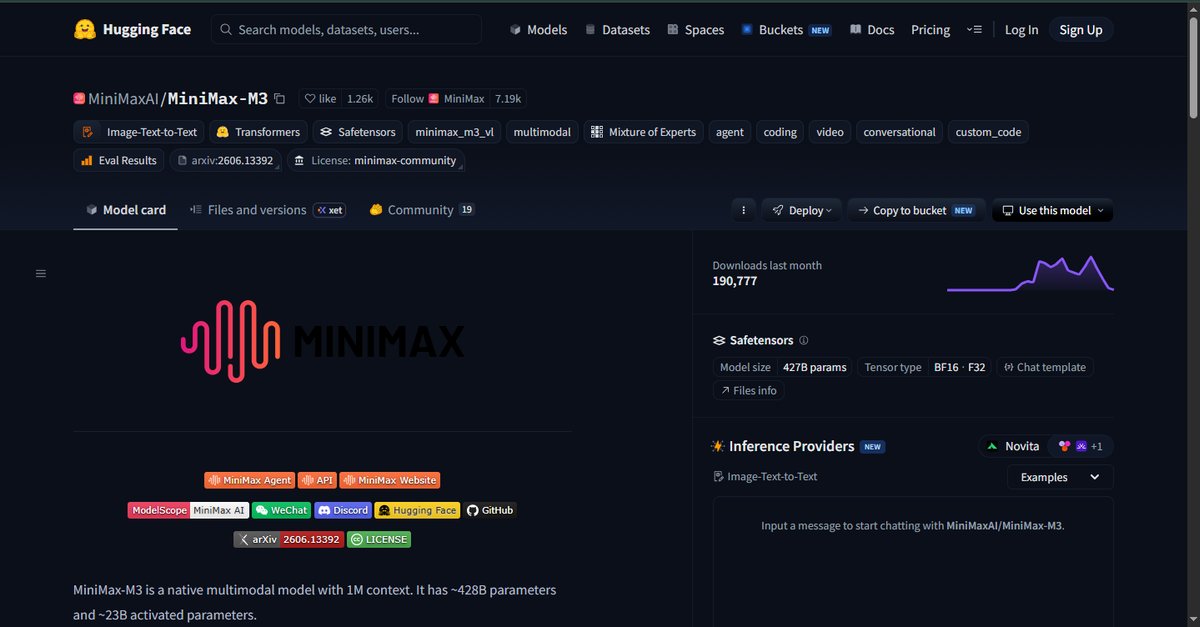
TL;DR — MiniMax M3 launched June 1, 2026 as the first open-weights AI model to combine three things that have never existed together in one free model: frontier-level coding, a genuine 1 million token context window, and native understanding of text, images, and video all at once. Vendor-reported benchmarks put it ahead of GPT-5.5 and Gemini 3.1 Pro on real-world software engineering. The weights are live on Hugging Face. You can start using it right now for free through MiniMax's chat interface, OpenRouter, or by downloading the weights yourself. This article walks you through all of it.
Something quietly significant has been happening in AI over the last year or so. The gap between what big proprietary labs like OpenAI and Anthropic offer and what you can get completely free has been shrinking fast. Models that would have cost serious money to access two years ago are now available as free downloads.
MiniMax M3 is the sharpest example of that shift yet. A Shanghai-based lab most people outside China have never heard of just released a model that does three things at once that no free model has done before: serious coding, a working million-token memory, and native video understanding. All free to download.
This guide is written for everyone whether you've never used an AI model before or you spend your days wiring LLMs into production pipelines. I'll explain the concepts clearly without dumbing them down, and give you the code and commands you actually need.
What Is MiniMax M3?
MiniMax M3 is the flagship AI model from MiniMax (officially Xiyu Technology), a Shanghai-based AI lab founded in 2021. They've been listed on the Hong Kong Stock Exchange since January 2026 so this isn't a scrappy startup, it's a public company with serious research and deployment infrastructure.
If you're new to AI: Think of M3 as a very powerful AI brain that can read text, look at images, watch videos, write code, answer questions, and help you solve complex problems. You can use it through a chat interface in your browser similar to how you'd use ChatGPT or plug it into your own software via an API.
M3 launched on June 1, 2026, with the API going live on May 31. The open weights — the actual model files you can download and run yourself are now publicly available on Hugging Face, confirmed at approximately 428 billion total parameters (more on what that means below).
Here's what makes M3 stand out: it's the first model of any kind to deliver all three of these at once:
- Frontier-level coding --> 59% on SWE-Bench Pro (vendor-reported), beating GPT-5.5 and Gemini 3.1 Pro
- A genuine 1 million token context window --> powered by a new architecture that cuts compute cost to 1/20th of its predecessor
- Native multimodality --> text, images, and video as inputs, trained together from the ground up, not bolted on
That combination hasn't existed in an open-weights model before.
Key Specs at a Glance
| Property | Details |
|---|---|
| Model Name | MiniMax M3 |
| Developer | MiniMax (Xiyu Technology), Shanghai |
| Release Date | June 1, 2026 (API); weights followed within 10 days |
| Total Parameters | ~428 Billion (Sparse MoE) |
| Active Parameters per Query | ~23 Billion |
| Context Window | Up to 1,000,000 tokens (512K guaranteed; >512K access-gated) |
| Max Output Tokens | 512,000 tokens |
| Architecture | Sparse MoE + MiniMax Sparse Attention (MSA) |
| Input Modalities | Text, Image, Video |
| Output Modality | Text only |
| License | MiniMax Community License (read before commercial use) |
| Weights Available | Yes — HuggingFace: MiniMaxAI/MiniMax-M3 |
| API Pricing (promo) | $0.30 / $1.20 per 1M input/output tokens |
| API Pricing (standard) | $0.60 / $2.40 per 1M input/output tokens |
| Subscription Entry | $20/month (Plus plan, ~1.7B tokens) |
| Inference Frameworks | SGLang (recommended), vLLM, Transformers, KTransformers |
↔️ Scroll horizontally to see all columns
Quick note on "428 billion parameters": Parameters are the internal numerical values the model has learned during training basically, the size of its knowledge and reasoning capability. More parameters generally means more capable, but also bigger files and more computing power required. For comparison, GPT-3 had 175 billion. M3 is more than twice that size. The clever part is that it only uses about 23 billion of those parameters per question a design choice called Mixture-of-Experts that keeps it fast and affordable to run.
The Three Things That Make M3 Different
1. Coding Performance That Actually Holds Up
Before diving into numbers, a quick caveat worth knowing: software engineering benchmarks are vendor-reported. Labs run their own models on their own infrastructure with their own tooling. That doesn't make the results fake, but it means you should treat them as directional, not gospel and test on your own work before committing.
With that said: MiniMax's SWE-Bench Pro score of 59.0% is consistent with independent evaluation from Artificial Analysis (who rated M3 at 55 on their Intelligence Index) and has been covered by multiple tech outlets. Both data points point to a genuinely strong coding model.
What does SWE-Bench Pro actually measure? It's a benchmark that gives an AI real GitHub issues from real software projects and asks it to write the code that fixes the bug or adds the feature. Not toy examples actual production code problems. A 59% score means M3 solved 59 out of every 100 such problems correctly.
What I find more convincing than the benchmark number is what MiniMax chose to highlight as a real-world demo: M3 reportedly reproduced the experiments of an entire ICLR machine learning research paper in 12 hours and ran autonomously for 24 hours straight on a CUDA kernel optimization task, making 1,959 tool calls without stopping or losing context. You can dismiss a benchmark number. A 24-hour uninterrupted run is a different kind of signal.
2. A 1 Million Token Context That Is Actually Affordable to Use
For beginners: A "context window" is how much text an AI can read and remember at once. Most models cap out around 128,000–200,000 tokens (roughly 100,000–150,000 words). A 1 million token context means M3 can hold roughly 750,000 words in memory at once that's like reading seven full novels before answering your question. For developers, this means you could feed it your entire codebase and have it reason about all of it simultaneously.
But context windows are often marketing. A 1M window that costs $50 to fill is a feature nobody uses in practice.
M3's costs are different. At promo pricing ($0.30/$1.20 per million tokens), a typical coding agent task consuming 500,000 input and 100,000 output tokens costs approximately $0.27. The equivalent task on Claude Opus costs roughly $5.00. That's an 18× cost difference and it's what moves long context from marketing to reality.
The architecture behind this is called MiniMax Sparse Attention (MSA) explained in detail later, but the headline is: it delivers 9× faster prefill, 15× faster decoding, and 1/20th the per-token compute compared to M3's predecessor at 1M context length.
3. Native Multimodality — Not Bolted On
For beginners: "Multimodal" means the AI understands multiple types of input not just text, but also images and video. Many AI models claim image support, but it was added as an afterthought.
M3 is different because MiniMax trained it on text, images, and video from the very first training step --> a design they call "mixed-modality training." The practical difference is significant: when you give M3 a screenshot of a UI and ask it to write code that replicates it, it doesn't translate the image into a text description first. It reasons across both simultaneously. When you upload a video of a bug and ask for a fix, it processes the visual and temporal information natively.
No other open-weights model at this capability level does all three modalities natively as of June 2026.
How to Use MiniMax M3 for Free — 6 Methods
Here's every legitimate way to use MiniMax M3 without paying, ordered from easiest to most technical. No credit card required for any of these.
Method 1: MiniMax Chat — Zero Setup, Works in Your Browser
The simplest option. MiniMax runs a consumer chat product that anyone can use immediately.
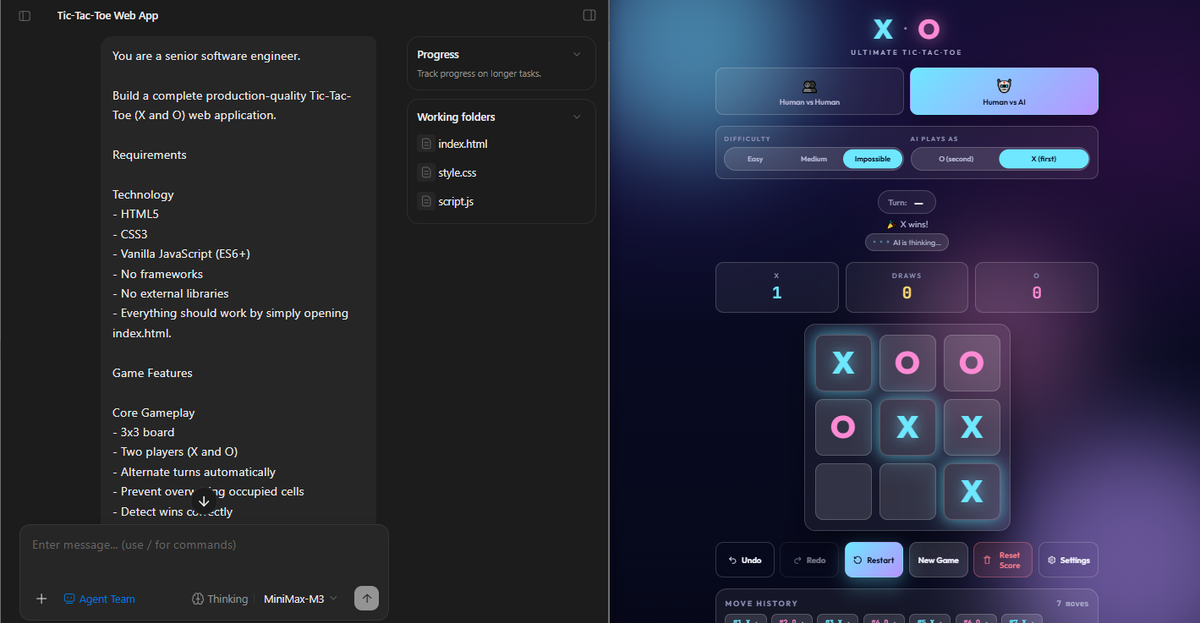
Step-by-step:
- Go to chat.minimax.io
- Click "Sign Up" — only your email address is required
- Verify your email
- You're in — MiniMax M3 is the default model
- Start chatting, paste code, upload images, or upload a short video
What you get on the free tier:
- Full M3 access for chat and coding tasks
- Image and video upload supported
- Daily message limits apply (enough to properly evaluate the model)
Best for: Anyone who just wants to try M3 right now whether you're a developer or just curious. This is also the best way to test the image and video features without any setup.
Method 2: MiniMax Code — The Free Coding Agent (Best for Developers)
MiniMax built a dedicated coding agent called MiniMax Code at code.minimax.io. Think of it as their version of Claude Code an AI that can work through your actual project files, not just answer questions about code in isolation.
Step-by-step:
- Go to code.minimax.io
- Sign in with your MiniMax account (same login as chat.minimax.io)
- Optional --> install the CLI to connect it to local projects:
npm install -g @minimax/code
minimax-code login- Point it at your project:
cd your-project
minimax-code- Ask it to write, refactor, debug, or document code across your entire repo
What you get free:
- Full M3 coding agent experience
- Multi-file context handling (this is where the 1M context window shines)
- Tool calling and terminal execution
- Free daily quota for testing
This is the same setup MiniMax used for the 24-hour autonomous engineering run mentioned earlier. It's built for deep, long-running work not one-off code generation.
Method 3: OpenRouter — No MiniMax Account Needed
OpenRouter is a single platform that gives you access to 400+ AI models through one unified API. If you want to try M3 without creating a MiniMax account, this is your fastest path and the easiest way to compare M3 head-to-head with other models before committing to any single provider.
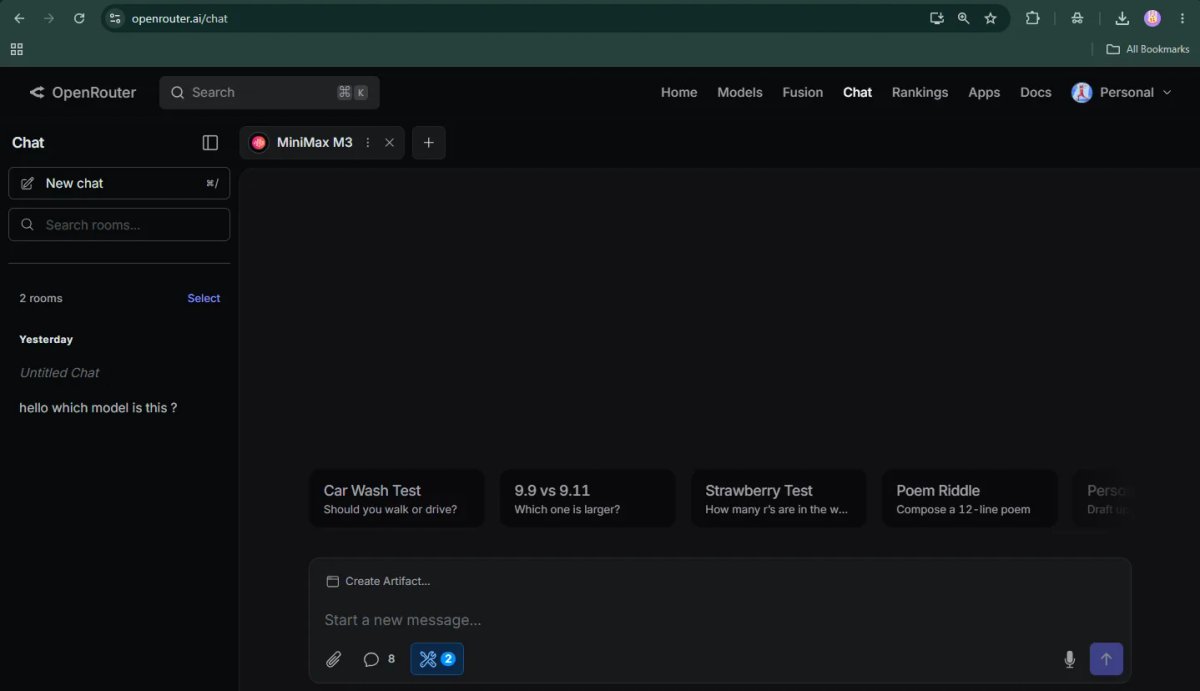
Step-by-step:
- Go to openrouter.ai
- Sign up with Google or email --> you'll get free credits automatically
- Go to openrouter.ai/playground
- Search for minimax and select MiniMax: MiniMax M3
- Type your prompt and run
For developers — Python (OpenAI SDK):
from openai import OpenAI
import os

client = OpenAI(
    base_url="https://openrouter.ai/api/v1",
    api_key=os.environ["OPENROUTER_API_KEY"]
)

response = client.chat.completions.create(
    model="minimax/minimax-m3",
    messages=[
        {"role": "user", "content": "Explain how MiniMax Sparse Attention works in simple terms."}
    ]
)

print(response.choices[0].message.content)
Current pricing on OpenRouter: $0.30/1M input, $1.20/1M output (promo rate verify current rates at openrouter.ai before committing).
Best for: Developers who want to evaluate M3 against other models side-by-side, or anyone who wants a single API key that switches between models without juggling accounts.
Method 4: NVIDIA NIM Free API — No Account Required (Fastest Developer Path)
This is the fastest zero-cost API path, confirmed live. NVIDIA hosts MiniMax M3 on their NIM (NVIDIA Inference Microservices) platform at build.nvidia.com/minimaxai/minimax-m3 and provides a free API endpoint, no MiniMax account, no credit card, just an NVIDIA developer key. The endpoint uses the standard OpenAI-compatible chat completions format, so existing OpenAI SDK code works with two-line changes.
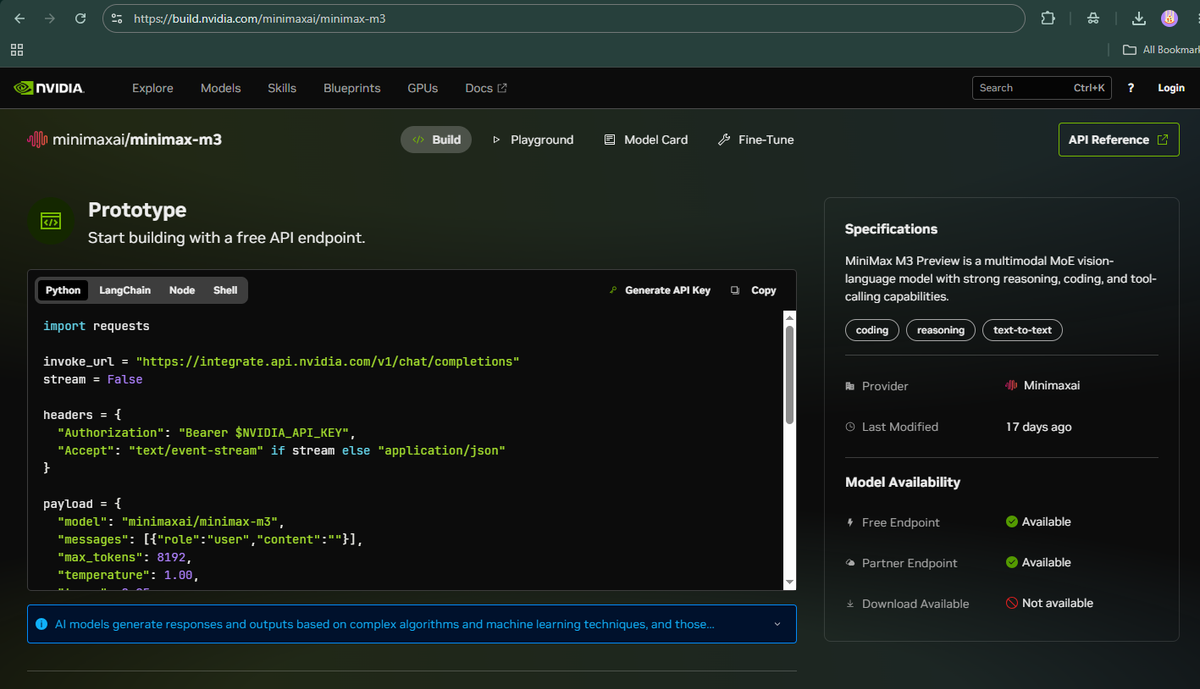
Step-by-step:
- Go to build.nvidia.com/minimaxai/minimax-m3
- Click "Generate API Key" --> a free NVIDIA developer account is all you need
- Install the
requestslibrary (or the OpenAI SDK both work):pip install openai - Use it in your code:
Python — using requests (as shown on NVIDIA's official page):
import requests
import os

invoke_url = "https://integrate.api.nvidia.com/v1/chat/completions"

headers = {
    "Authorization": f"Bearer {os.environ['NVIDIA_API_KEY']}",
    "Accept": "application/json"
}

payload = {
    "model": "minimaxai/minimax-m3",
    "messages": [
        {"role": "system", "content": "You are a helpful assistant."},
        {"role": "user", "content": "Write a Python function that parses nested JSON safely, with full error handling."}
    ],
    "max_tokens": 4096,
    "temperature": 1.00,
    "top_p": 0.95,
    "stream": False
}

response = requests.post(invoke_url, headers=headers, json=payload)
print(response.json()["choices"][0]["message"]["content"])
Python — using the OpenAI SDK (same endpoint, cleaner syntax):
from openai import OpenAI
import os

client = OpenAI(
    base_url="https://integrate.api.nvidia.com/v1",
    api_key=os.environ["NVIDIA_API_KEY"]
)

response = client.chat.completions.create(
    model="minimaxai/minimax-m3",
    messages=[
        {"role": "system", "content": "You are a helpful assistant."},
        {"role": "user", "content": "Write a Python function that parses nested JSON safely, with full error handling."}
    ],
    temperature=1.0,
    max_tokens=4096
)

print(response.choices[0].message.content)
Sending images or video (NVIDIA NIM supports multimodal input):
# Pass a list of content parts — URLs or base64 data URIs both work
payload["messages"] = [
    {"role": "user", "content": [
        {"type": "text", "text": "Describe what's happening in this video."},
        {"type": "video_url", "video_url": {"url": "https://example.com/video.mp4"}},
    ]}
]
Key details confirmed from official NVIDIA docs:
| Property | Value |
|---|---|
| Endpoint | https://integrate.api.nvidia.com/v1/chat/completions |
| Model string | minimaxai/minimax-m3 (lowercase, with provider prefix) |
| Auth header | Authorization: Bearer $NVIDIA_API_KEY |
| Free endpoint | ✅ Available (confirmed on build.nvidia.com) |
| Streaming | Supported — set "stream": true and Accept: text/event-stream |
| Multimodal | ✅ Text, image, and video input supported |
| Context window | 1,000,000 tokens |
| Non-commercial use | This endpoint is governed by NVIDIA's API Trial Terms + MiniMax Non-Commercial License |
| API reference | docs.api.nvidia.com/nim/reference/minimaxai-minimax-m3 |
↔️ Scroll horizontally to see all columns
⚠️ License note: NVIDIA's hosted MiniMax M3 endpoint is explicitly marked for non-commercial use on the NIM model card. The governing licenses are the NVIDIA API Trial Terms of Service and the MiniMax Non-Commercial License. For commercial production use, switch to Method 5 (MiniMax's own API) or Method 6 (self-hosted weights under the Community License read that license carefully).
Best for: Developers who want zero-friction API access to M3 right now no MiniMax account, no billing setup. One NVIDIA key gets you access to M3 and dozens of other frontier models on the same platform. Ideal for evaluation, prototyping, and non-commercial projects.
Method 5: MiniMax Official API (Best for Commercial Production Use)
The official MiniMax API at platform.minimax.io is the right path when you need commercial licensing, direct pricing control, or features like the service_tier=priority option for stable high-load throughput. The API is fully OpenAI-compatible if you've used the OpenAI SDK before, you change two lines.
Step-by-step:
- Go to platform.minimax.io
- Sign up and verify your email
- Navigate to "API Keys" and create a key (pay-as-you-go)
- Install the OpenAI SDK if you haven't already:
pip install openai - Use it in your code:
from openai import OpenAI
import os

client = OpenAI(
    base_url="https://api.minimax.io/v1",
    api_key=os.environ["MINIMAX_API_KEY"]
)

response = client.chat.completions.create(
    model="MiniMax-M3",
    messages=[
        {
            "role": "system",
            "content": "You are a helpful assistant."
        },
        {
            "role": "user",
            "content": "Write a Python function that parses nested JSON safely, with full error handling."
        }
    ],
    temperature=1.0,
    max_tokens=4096
)

print(response.choices[0].message.content)
Alternatively, use the Anthropic SDK (MiniMax supports both formats — confirmed in official docs):
import anthropic
import os

# Set these environment variables before running:
# export ANTHROPIC_BASE_URL=https://api.minimax.io/anthropic
# export ANTHROPIC_API_KEY=your_minimax_api_key

client = anthropic.Anthropic()

message = client.messages.create(
    model="MiniMax-M3",
    max_tokens=1024,
    system="You are a helpful assistant.",
    messages=[
        {
            "role": "user",
            "content": "Write a Python function that parses nested JSON safely, with full error handling."
        }
    ]
)

print(message.content[0].text)
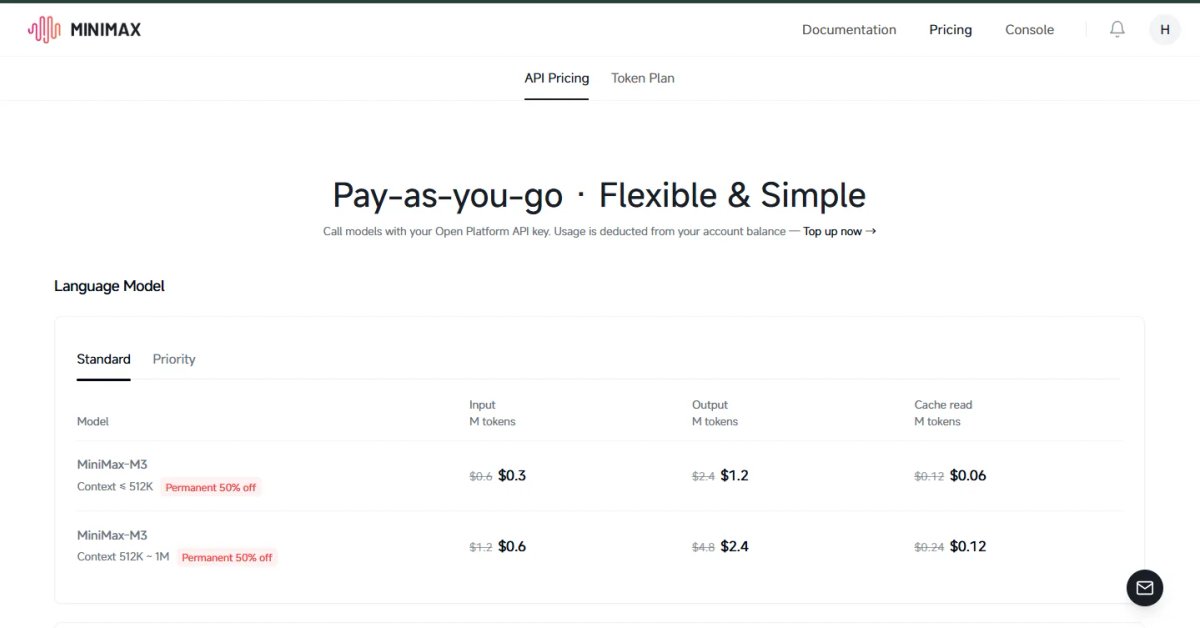
Pricing note (confirmed from official MiniMax blog): MiniMax bills at a standard rate for calls with ≤512K input tokens, and at a higher long-context rate for calls above 512K. Promo pricing during launch was $0.30/$1.20 per million input/output tokens (standard tier). Verify current rates at platform.minimax.io before building.
Best for: Commercial production workloads, teams that need SLA and priority tier access (service_tier=priority), and developers who want direct billing control without routing through a third-party aggregator.
Method 6: Download Weights and Self-Host (For Teams with the Hardware)
If you have data privacy requirements, or you want zero per-query cost at scale, you can run M3 entirely on your own infrastructure.
# Install git-lfs (required for large model files)
git lfs install

# Download the weights from Hugging Face
huggingface-cli download MiniMaxAI/MiniMax-M3 --local-dir ./MiniMax-M3
Hardware requirements:
| Setup | VRAM Needed | Context Supported |
|---|---|---|
| FP8, 4× A100 80GB GPUs | ~320GB | Up to ~256K tokens |
| FP8, 8× H100 80GB GPUs | ~640GB | Up to 1M tokens |
| INT4 quantized (GGUF) | ~100GB+ | Up to 128K (no MSA) |
↔️ Scroll horizontally to see all columns
This is data-center hardware not something you'd run on a personal machine. If you're an individual developer, Methods 1–5 are more practical.
Don't have A100s or H100s in-house? Most developers rent cloud GPUs to test large open-weights models like MiniMax M3 before buying hardware.
→ Rent GPU compute on Runpod: https://runpod.io?ref=39rjwy2z) -->hourly A100/H100 GPU instances for testing self-hosted MiniMax M3 without long-term hardware commitment.
Disclosure: Referral link. I may earn a commission if you sign up, at no extra cost to you.
License note: MiniMax M3 uses the MiniMax Community License, not MIT or Apache 2.0. Commercial use restrictions apply. Read the full license at huggingface.co/MiniMaxAI/MiniMax-M3 before building a product on the self-hosted weights.
MiniMax M3 Benchmark Results
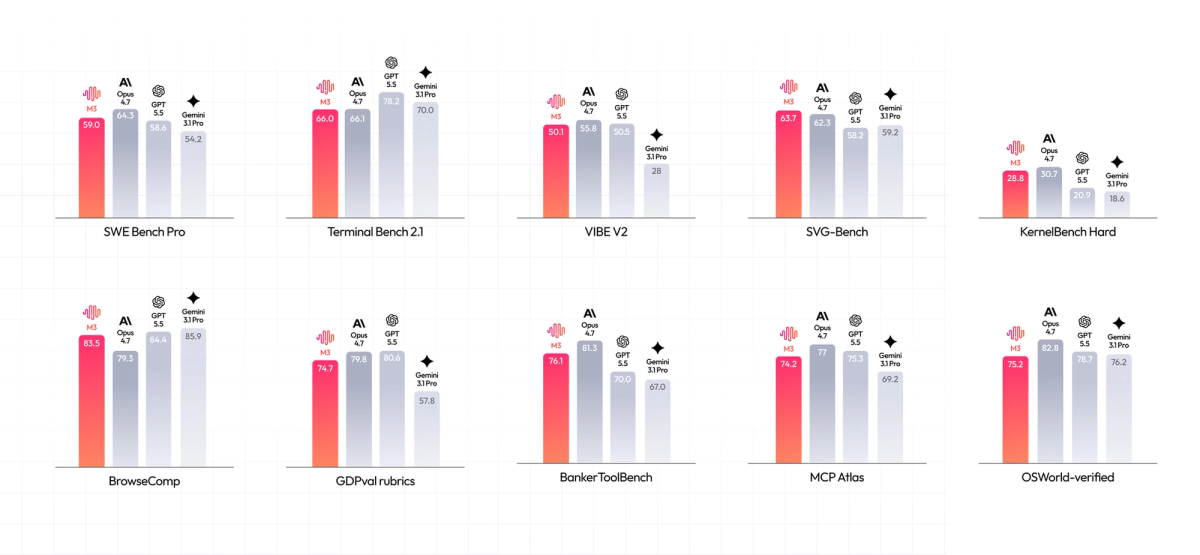
All scores below are from MiniMax's official published results unless noted otherwise. Vendor-reported scores are directional signals treat them as such, and test on your own workloads before making production decisions.
Coding and Software Engineering
| Benchmark | M3 Score | What It Measures |
|---|---|---|
| SWE-Bench Pro | 59.0% | Fixing real GitHub issues in real production codebases |
| Terminal-Bench 2.1 | 66.0% | Completing tasks autonomously in a terminal/CLI environment |
| SWE-fficiency | 34.8% | Solving software problems efficiently (not just correctly) |
| KernelBench Hard | 28.8% | Optimizing GPU (CUDA) kernel code — very hard, niche benchmark |
| MCP Atlas | 74.2% | Calling external tools correctly as an AI agent |
↔️ Scroll horizontally to see all columns
Source: MiniMax official announcement, June 1, 2026.
Autonomous Browsing
| Benchmark | MiniMax M3 | Claude Opus 4.7 | What It Tests |
|---|---|---|---|
| BrowseComp | 83.5 | 79.3 | Autonomous web browsing and information retrieval |
| SVG-Bench | Surpasses Opus 4.7 | Reference | Writing code to generate SVG graphics |
↔️ Scroll horizontally to see all columns
The BrowseComp result is notable M3 beating Claude Opus 4.7 by 4 points on autonomous browsing. This isn't just about clicking links. It requires the model to hold its goal in mind across hundreds of tool calls without getting confused or losing the thread. That kind of sustained focus is genuinely hard.
Independent Third-Party Evaluation (Artificial Analysis)
These numbers come from Artificial Analysis — an independent firm that evaluates AI models using their own benchmarks, not the vendor's. This is the more reliable comparison for cross-model ranking.
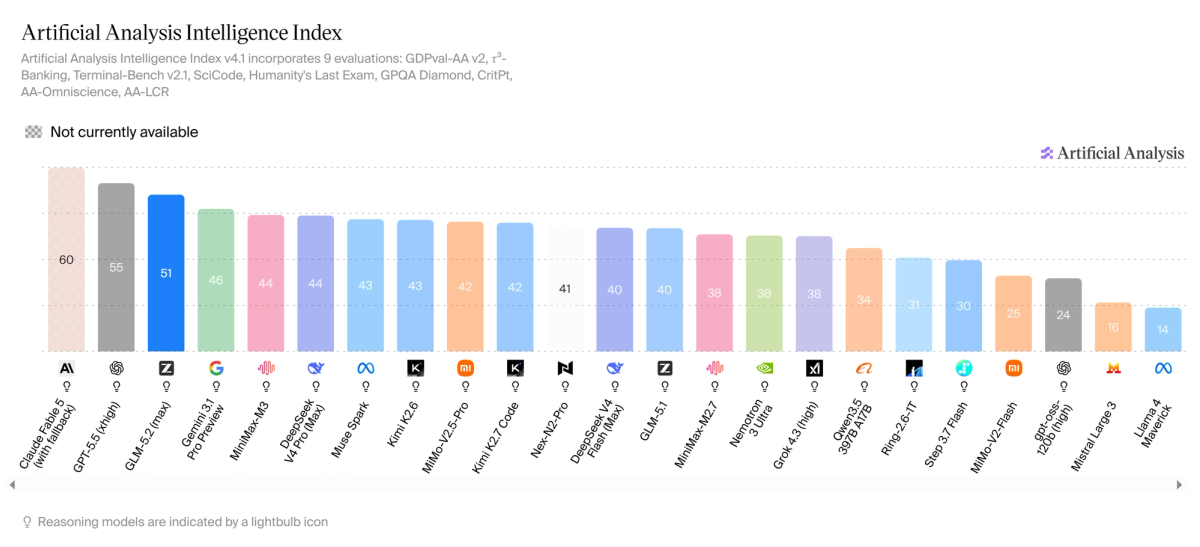
| Metric | Score / Result |
|---|---|
| AA Intelligence Index | 55 |
| Ranking | #1 of 217 models in its pricing tier |
| Output tokens per evaluation | 91M (very verbose — peers average ~23M) |
| Speed | 85.4 tokens/second (above average) |
| Time to first token | 3.49 seconds (slightly slower to start than peers) |
↔️ Scroll horizontally to see all columns
Source: Artificial Analysis, artificialanalysis.ai/models/minimax-m3
One thing worth flagging: M3 generated 91 million tokens across the AA evaluation, compared to an average of 23 million for its peers. It thinks out loud extensively. For complex reasoning tasks that's often an advantage. For production cost, it's a factor you need to account for.
The Long-Horizon Tests (The Most Convincing Ones)
Beyond benchmark percentages, here's what M3 actually did when left to run:
- ICLR paper reproduction: Autonomously replicated the full experimental pipeline of a machine learning research paper in 12 hours from reading the paper to running experiments to producing results
- CUDA kernel optimization: Ran for 24 consecutive hours, made 1,959 tool calls, kept improving performance after multiple plateaus, never reset or lost context
These aren't pass/fail benchmark scores. They're descriptions of real behavior. That kind of sustained, coherent, multi-day agentic work is genuinely hard to fake with benchmark tuning.
MiniMax M3 vs GPT-5.5 vs Claude Opus 4.7
Honest comparison based on sourced data. Where competitor figures weren't available from cited sources, the cell is left blank rather than filled with estimates.
| Dimension | MiniMax M3 | GPT-5.5 | Claude Opus 4.7 |
|---|---|---|---|
| SWE-Bench Pro | 59.0% (vendor) | Below 59% (per MiniMax) | Close to M3 (per MiniMax) |
| BrowseComp | 83.5 | — | 79.3 |
| AA Intelligence Index | 55 (#1 in price tier) | — | — |
| Context Window | 1M tokens | Not published | — |
| Input Modalities | Text + Image + Video | Text + Image | Text + Image |
| Open Weights | Yes (Community License) | No | No |
| API Input Price | $0.30/1M (promo) | ~$10/1M | ~$5/1M |
| API Output Price | $1.20/1M (promo) | ~$30/1M | ~$25/1M |
| Video Input | Yes | No | No |
| Self-Hosting | Yes (license check required) | No | No |
| Cost per Task (est.) | ~$0.03–$0.27 | Significantly higher | Significantly higher |
↔️ Scroll horizontally to see all columns
The honest bottom line: the competitor benchmark comparisons are vendor-reported and run on different infrastructure. What's independently confirmed is the AA ranking, the pricing, the architecture capabilities, and the multimodal features. The cost story is real and significant regardless of exact benchmark margins.
The MSA Architecture Explained Simply
This section explains why M3 can offer a 1 million token context window at $0.30/1M tokens when nobody else can match that. It's worth understanding even if you're not a developer.
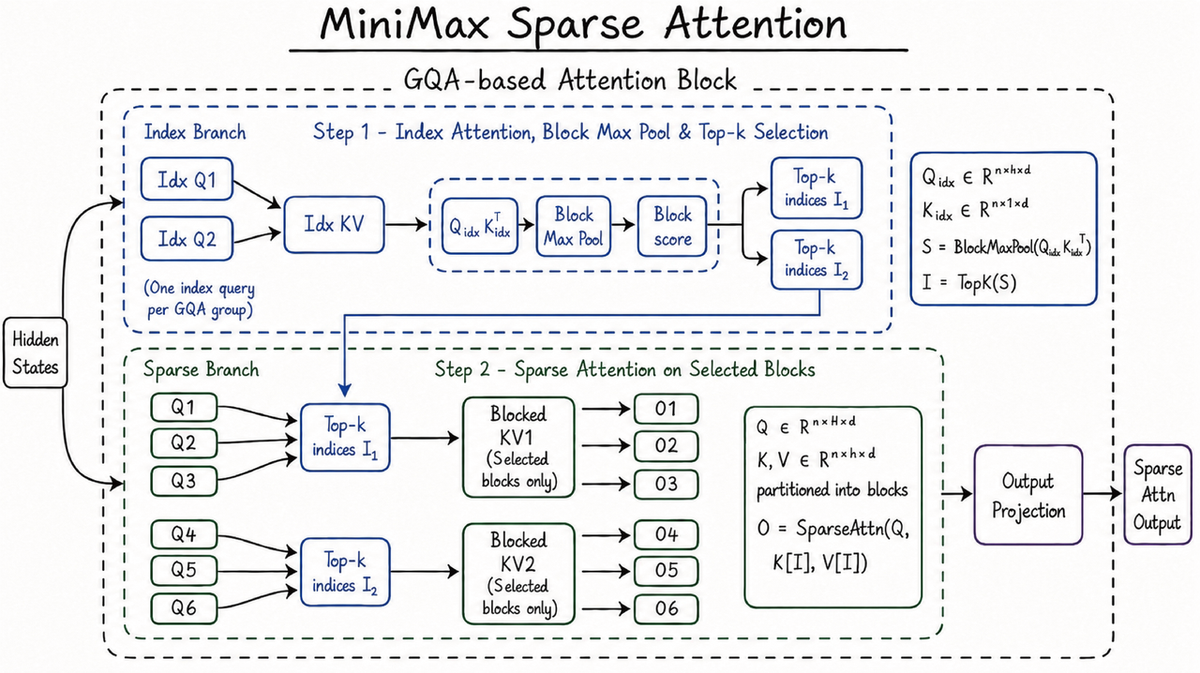
The problem with normal AI attention:
Every standard AI model works by comparing each word (token) it's reading against every other word in the context. This is called "attention." If you have 1 million tokens, that means 1 trillion pairs to compare and the compute required grows quadratically (double the context = 4× the cost). This is why long context has historically been expensive or slow.
What MiniMax Sparse Attention (MSA) does differently:
Think of the difference between searching a library by reading every book vs using a card catalogue. Standard attention reads every book. MSA builds an index first.
M3 groups the key-value memory (all the tokens it's read) into blocks, uses a lightweight index to identify only the relevant blocks for each new question, then runs full precise attention only on those selected blocks ignoring the 99% that aren't relevant.
The results at 1M context vs M3's predecessor (M2):
- 9× faster prefill (loading the context into memory)
- 15× faster decoding (generating the response)
- 1/20th the per-token compute cost
And critically: MiniMax ran this selection on uncompressed, full-precision key-values not a lossy compressed version. The precision is maintained. Only the search scope is narrowed.
One practical note for developers: The GGUF/llama.cpp quantized version of M3 doesn't yet support MSA it falls back to standard dense attention. If you're running locally with llama.cpp, you won't get the long-context speed benefits. Use SGLang or vLLM for full MSA performance.
How to Run MiniMax M3 Locally
This section is for developers with access to data-center grade hardware. If you're an individual developer, skip to the API section — hosted access is more practical.
Hardware Requirements
| Configuration | VRAM Required | Context Supported |
|---|---|---|
| FP8 precision, 4× A100 80GB | ~320GB | Up to ~256K tokens |
| FP8 precision, 8× H100 80GB | ~640GB | Up to 1M tokens |
| INT4 quantized (GGUF) | ~100GB+ | Up to 128K (no MSA) |
↔️ Scroll horizontally to see all columns
M3 has 428B total parameters but only ~23B activate per query. The VRAM requirement is mainly for storing the weights, not running them.
No in-house data center? Most developers rent GPU time to experiment before committing to on-premise hardware. Cloud GPU rental lets you spin up an 8× A100 cluster, run your benchmarks, and pay only for the hours you use.
→ Rent GPU compute on Runpod: https://runpod.io?ref=39rjwy2z) — hourly A100/H100 GPU instances for testing self-hosted MiniMax M3 without long-term hardware commitment.
Disclosure: Referral link. I may earn a commission if you sign up, at no extra cost to you.
SGLang Deployment (Recommended — Only Framework with Full MSA Support)
# Install SGLang
pip install sglang[all]

# Download the weights
huggingface-cli download MiniMaxAI/MiniMax-M3 --local-dir ./MiniMax-M3

# Launch with 8 GPUs and 512K context
python -m sglang.launch_server \
  --model-path ./MiniMax-M3 \
  --tp 8 \
  --context-length 524288 \
  --trust-remote-code
vLLM Deployment
pip install vllm

vllm serve MiniMaxAI/MiniMax-M3 \
  --tensor-parallel-size 8 \
  --max-model-len 131072 \
  --trust-remote-code
Querying Your Local Server
Once SGLang or vLLM is running, it exposes an OpenAI-compatible endpoint on localhost. Use the same OpenAI SDK pattern:
from openai import OpenAI

client = OpenAI(
    base_url="http://localhost:30000/v1",
    api_key="not-needed"
)

response = client.chat.completions.create(
    model="MiniMax-M3",
    messages=[
        {
            "role": "system",
            "content": "You are a helpful assistant built by MiniMax."
        },
        {
            "role": "user",
            "content": "Analyze the performance bottleneck in this codebase and suggest optimizations."
        }
    ],
    temperature=1.0,
    max_tokens=4096
)

print(response.choices[0].message.content)
Quantized (GGUF) — Lower Hardware Option
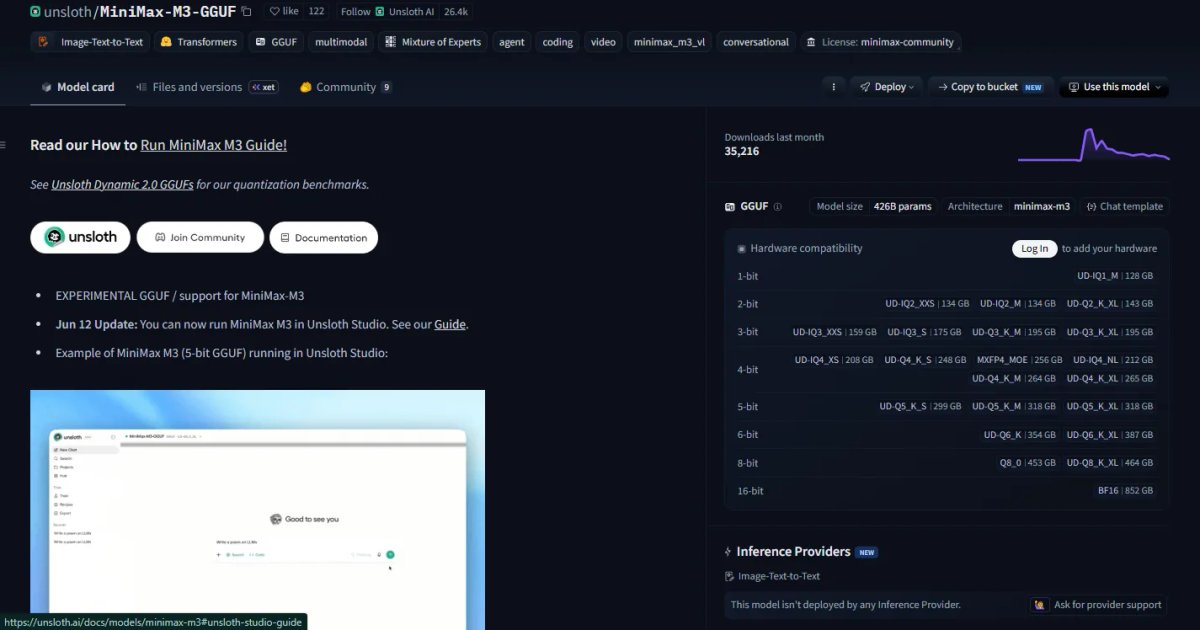
Unsloth has released GGUF quantized versions at huggingface.co/unsloth/MiniMax-M3-GGUF. Note: as of June 2026, llama.cpp doesn't yet support MSA, quantized versions fall back to dense attention, so long-context performance won't match the full model.
git clone https://github.com/ggml-org/llama.cpp
cd llama.cpp
git fetch origin pull/24523/head:minimax-m3
git checkout minimax-m3
cmake -B build -DGGML_CUDA=ON
cmake --build build --config Release -j --target llama-cli llama-server

./build/bin/llama-cli -hf unsloth/MiniMax-M3-GGUF:UD-IQ1_M
MiniMax M3 API Setup — Complete Code Guide
MiniMax M3's API is fully compatible with both the OpenAI SDK and the Anthropic SDK. If you already use either, you only need to change the base URL and model name.
Basic Chat Completion (OpenAI SDK — Recommended)
from openai import OpenAI
import os

client = OpenAI(
    base_url="https://api.minimax.io/v1",
    api_key=os.environ["MINIMAX_API_KEY"]
)

def chat_with_m3(prompt, system_prompt="You are a helpful assistant."):
    response = client.chat.completions.create(
        model="MiniMax-M3",
        messages=[
            {"role": "system", "content": system_prompt},
            {"role": "user", "content": prompt}
        ],
        temperature=1.0,
        max_tokens=4096
    )
    return response.choices[0].message.content

# Example usage
result = chat_with_m3(
    "Write a complete FastAPI app with JWT authentication and PostgreSQL integration.",
    system_prompt="You are an expert software engineer. Always write production-ready code."
)
print(result)
Streaming Responses (Better UX for Long Outputs)
from openai import OpenAI
import os

client = OpenAI(
    base_url="https://api.minimax.io/v1",
    api_key=os.environ["MINIMAX_API_KEY"]
)

def stream_m3(prompt):
    stream = client.chat.completions.create(
        model="MiniMax-M3",
        messages=[{"role": "user", "content": prompt}],
        temperature=1.0,
        stream=True
    )
    for chunk in stream:
        content = chunk.choices[0].delta.content
        if content:
            print(content, end="", flush=True)
    print()

stream_m3("Explain the entire history of neural network architectures in depth.")
Multimodal: Screenshot to Code
One of M3's most practical use cases — give it an image of a UI and ask it to write the code. M3 accepts images as base64 or URL, same format as the OpenAI vision API:
from openai import OpenAI
import base64
import os

client = OpenAI(
    base_url="https://api.minimax.io/v1",
    api_key=os.environ["MINIMAX_API_KEY"]
)

def image_to_code(image_path, instruction):
    with open(image_path, "rb") as f:
        image_b64 = base64.b64encode(f.read()).decode("utf-8")

    response = client.chat.completions.create(
        model="MiniMax-M3",
        messages=[
            {
                "role": "user",
                "content": [
                    {
                        "type": "image_url",
                        "image_url": {
                            "url": f"data:image/png;base64,{image_b64}"
                        }
                    },
                    {
                        "type": "text",
                        "text": instruction
                    }
                ]
            }
        ],
        temperature=1.0,
        max_tokens=8192
    )
    return response.choices[0].message.content

code = image_to_code(
    "ui-mockup.png",
    "Write complete React + Tailwind CSS code to replicate this UI exactly. Include all components."
)
print(code)
Using the Anthropic SDK Format
MiniMax also supports the Anthropic Messages API format, useful if you're already using Claude tooling and want to swap in M3 with minimal changes:
import anthropic
import os

# Configure these environment variables:
# export ANTHROPIC_BASE_URL=https://api.minimax.io/anthropic
# export ANTHROPIC_API_KEY=your_minimax_api_key

client = anthropic.Anthropic()

message = client.messages.create(
    model="MiniMax-M3",
    max_tokens=2048,
    system="You are an expert software engineer.",
    messages=[
        {
            "role": "user",
            "content": "Write a thread-safe connection pool in Python with health checks and automatic reconnection."
        }
    ]
)

print(message.content[0].text)
Via OpenRouter (One API Key for All Models)
If you use OpenRouter, M3 is available immediately with no separate MiniMax account:
from openai import OpenAI
import os

client = OpenAI(
    base_url="https://openrouter.ai/api/v1",
    api_key=os.environ["OPENROUTER_API_KEY"]
)

response = client.chat.completions.create(
    model="minimax/minimax-m3",
    messages=[
        {"role": "user", "content": "Write a thread-safe connection pool in Python."}
    ]
)

print(response.choices[0].message.content)
Note on model string casing: When calling the MiniMax API directly (api.minimax.io/v1), use "MiniMax-M3" (capitalized). When calling via OpenRouter, use "minimax/minimax-m3" (lowercase). This is confirmed in official documentation.
Pricing Breakdown
Understanding M3's pricing requires knowing about the two tiers within the 1M context window.
Pay-As-You-Go API
| Context Length | Input /1M tokens | Output /1M tokens | Cache Read /1M |
|---|---|---|---|
| ≤512K tokens | $0.30 promo / $0.60 standard | $1.20 promo / $2.40 standard | $0.06 |
| >512K tokens | $0.60 promo / $1.20 standard | $2.40 promo / $4.80 standard | $0.12 |
↔️ Scroll horizontally to see all columns
Important: Inputs above 512K tokens are currently access-gated. You need to contact MiniMax directly for access if you need the full 1M window via API.
Monthly Subscription Plans
| Plan | Monthly Price | Token Quota | Best For |
|---|---|---|---|
| Plus | $20/month | ~1.7B tokens | Testing and light production |
| Max | $50/month | ~5.1B tokens | Regular development |
| Ultra | $120/month | ~9.8B tokens | Heavy production workloads |
↔️ Scroll horizontally to see all columns
Verify current pricing at platform.minimax.io before committing — promo rates are time-limited.
Real Cost Comparison
A realistic coding agent task (500K input + 100K output tokens):
| Model | Cost per Task | Notes |
|---|---|---|
| MiniMax M3 (promo) | ~$0.27 | Best current deal |
| MiniMax M3 (standard) | ~$0.54 | After promo ends |
| Claude Opus 4.7 | ~$5.00 | At standard pricing |
| GPT-5.5 | ~$8.00 | At standard pricing |
↔️ Scroll horizontally to see all columns
At promo pricing, M3 costs about 5% of Claude Opus and 3.4% of GPT-5.5 for the same task. Even at standard rates, it's still a fraction of the cost.
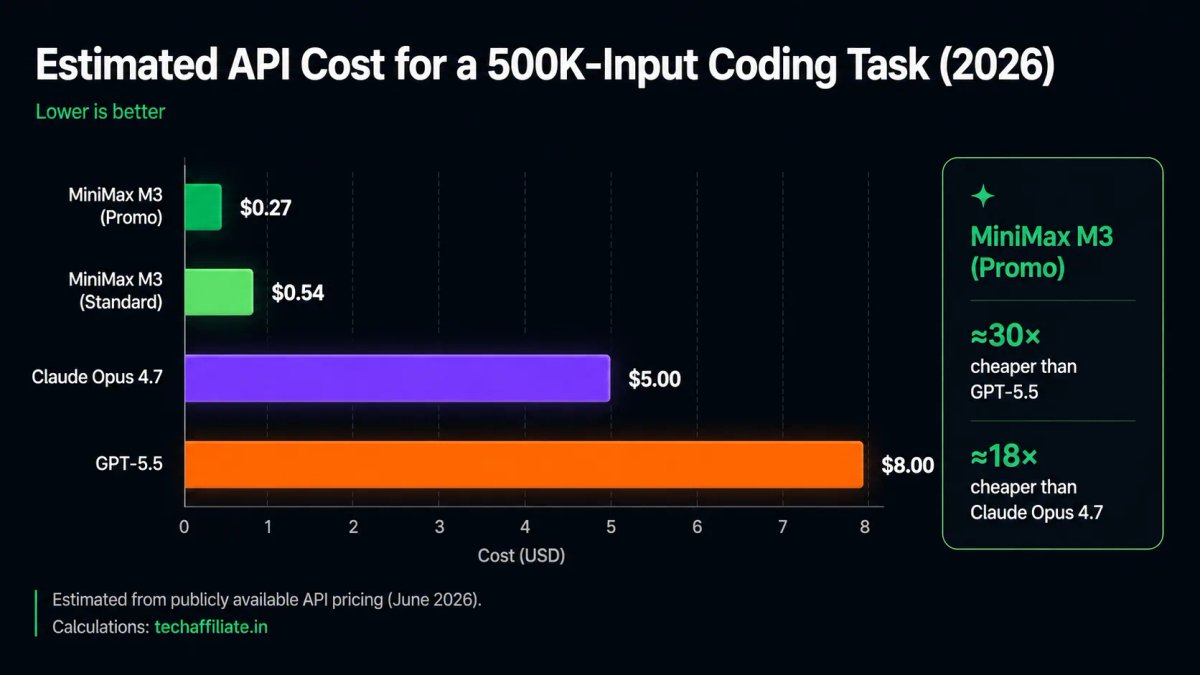
One caveat: because M3 is verbose (~91M output tokens across evaluations vs 23M average), the per-task cost adds up faster than the per-token price alone suggests. Model your actual workload before assuming the savings.
Real-World Use Cases
Large codebase analysis --> Feed an entire enterprise repository to M3 and ask it to identify security vulnerabilities, performance bottlenecks, or architectural improvements. The 1M context window means it can reason about the whole codebase, not just individual files.
Screenshot to working code --> Take a screenshot of any web interface and ask M3 to write the React, Vue, or HTML/CSS code to replicate it. Native multimodal training means it understands visual layout natively — not through a text translation step.
Video debugging --> Record your screen while a bug occurs and upload the video. M3 can watch what happened and suggest the fix without you having to describe it in text.
Autonomous research workflows --> The ICLR paper reproduction result suggests M3 can handle long-horizon research tasks: reading papers, designing experiments, running analysis, and producing results within a single coherent session.
Multi-language codebase work --> MiniMax trained M3 on real production code across 10+ languages: Python, TypeScript, Rust, Go, Java, C++, Kotlin, PHP, Lua, and Dart. Not toy examples, actual production repositories.
Self-hosted inference for data-sensitive workloads --> If your organization can't send code to external APIs (compliance, IP protection, regulated industries), the open weights let you run M3 entirely on your own infrastructure. Budget the hardware honestly and read the Community License carefully.
Which Coding Agent Should You Use in 2026?
This section is for developers actively evaluating coding tools not just M3, but the whole landscape. It's the question I get most after publishing model reviews.
M3's 59.0% SWE-Bench Pro score puts it in direct competition with the model backends powering tools like Cursor and Windsurf. Here's an honest comparison of the full tools model capability plus UX plus pricing:
| Feature | MiniMax Code | Cursor | Windsurf (Codeium) |
|---|---|---|---|
| Underlying Model | MiniMax M3 (native) | User's choice — M3, Claude, GPT | Codeium's models + user choice |
| Best Benchmark (backend) | 59.0% SWE-Bench (M3) | Depends on model chosen | Varies |
| IDE Integration | CLI + web-based | Full VS Code fork | Full VS Code fork |
| Context Window | 1M tokens (M3 native) | Depends on model | Depends on model |
| Video / Image Input | Yes, native (M3) | Yes, via model choice | Limited |
| Free Tier | Yes — daily quota | Yes — limited | Yes — generous |
| Paid Plan Entry | $20/month | $20/month (Pro) | $15/month (Pro) |
| Best For | Long-context agentic work, multimodal input | Teams already in VS Code, model flexibility | Fast autocomplete + low-cost agents |
↔️ Scroll horizontally to see all columns
The honest take:
If you're building long-running agents or need to analyze entire repositories in one pass, MiniMax Code with M3 native is the right call — nothing else gives you 1M context natively at this price.
If you're a developer who lives in VS Code and wants the flexibility to switch between M3, Claude, and GPT depending on the task, Cursor is the better daily driver. The UX is more polished and the IDE integration runs deeper.
If your team wants the most generous free tier before committing to a subscription, Windsurf is worth evaluating first.
The smart order: Start with MiniMax Code free → if you want VS Code integration, add Cursor free → upgrade whichever you actually use every day.
Community Reports and Early Impressions
A few honest observations from developers in the first weeks after launch:
On verbosity: Responses tend to be thorough — sometimes to the point of being longer than necessary. M3 averages about 91M tokens across Artificial Analysis's evaluation suite vs a 23M average for peers. In practice, consider using a lower max_tokens setting and prompting for concise output when brevity matters.
On server availability: Post-launch demand has been high. Some users in the Asia-Pacific region reported timeouts through the official hosted API. Routing through OpenRouter (which distributes across multiple providers) can improve reliability during peak periods.
On the promo pricing: The $0.30/1M input promo rate is time-limited. Standard rates are double ($0.60/$1.20), and the rates above 512K context double again. Model your actual long-context workload costs before committing production workflows to M3.
On the Community License: Unlike GLM-5.2 (MIT) or Qwen3 (Apache 2.0), MiniMax's license has commercial use conditions. If you're building a product on the self-hosted weights, read the full license at huggingface.co/MiniMaxAI/MiniMax-M3 before shipping.
Pros and Cons
What's Great
- First open-weights model combining frontier coding + 1M context + native video input simultaneously
- 59.0% SWE-Bench Pro (vendor-reported) --> strongest open-weights coding score at launch
- Beats Claude Opus 4.7 on BrowseComp (83.5 vs 79.3) independently notable
- MSA architecture makes 1M context genuinely affordabl not just advertised
- Multiple free access paths --> no credit card required for any of them
- Open weights on Hugging Face --> downloadable and self-hostable
- $0.30/$1.20 promo pricing is 5–10% of frontier proprietary model costs
- Compatible with both OpenAI and Anthropic SDK formats --> minimal migration effort
- Natively trained on mixed modalities --> not a text model with vision grafted on
What to Know Before You Commit
- SWE-Bench scores are vendor-reported — independent verification still pending for some benchmarks
- Community License, not MIT or Apache — commercial use conditions apply; read before building products
- Very verbose — ~91M output tokens per evaluation vs ~23M average; production costs can surprise you
- Full 1M context via API is access-gated above 512K — not self-serve yet
- GGUF/llama.cpp versions don't support MSA — true long-context performance requires SGLang or vLLM
- Server congestion after launch — expect some API reliability issues under high demand
- Requires data-center hardware for local deployment — not consumer-grade
- Chinese company data privacy considerations for cloud API use
Who Should Use MiniMax M3?
M3 is the right choice if you:
- Are a developer who wants frontier-level coding AI at a fraction of the cost — at promo pricing, it's the most capable model per dollar for coding tasks right now
- Need to analyze large codebases end-to-end — the 1M context window is the only way to hold an entire enterprise repo in a single context
- Work with UI mockups, screenshots, or design files — native vision means you can go from screenshot directly to production code
- Are building long-running AI agents — the 24-hour autonomous run capability is matched by very few models at any price
- Need open weights for compliance or data residency — self-hostable (read the Community License first)
- Are cost-sensitive but unwilling to compromise on capability — the per-task math is genuinely compelling
Consider a different model if you:
- Need a pure MIT license with no commercial restrictions → use GLM-5.2
- Need the absolute lowest per-task cost → DeepSeek V4 Flash (~$0.05/task) is cheaper
- Work primarily with text-only coding without multimodal needs → Kimi K2.7 Code is more efficient
- Need maximum abstract reasoning → frontier proprietary models still lead here
- Don't have GPU infrastructure and need local deployment → M3's 428B parameters aren't consumer hardware friendly even quantized
Frequently Asked Questions
Is MiniMax M3 free?
Yes, in several ways. MiniMax Chat at chat.minimax.io offers free access with daily limits — no credit card needed. MiniMax Code at code.minimax.io has a free tier for coding tasks. NVIDIA NIM at build.nvidia.com/minimaxai/minimax-m3 provides a confirmed free API endpoint — just a free NVIDIA developer account required, no MiniMax account needed. OpenRouter provides free trial credits. The official MiniMax API at platform.minimax.io is pay-as-you-go (no guaranteed free credits — check current onboarding). The model weights are free to download on Hugging Face under the Community License. The $20/month Plus plan is the cheapest paid option if you exceed free limits.
What does 428 billion parameters mean?
Parameters are the internal numbers the model has learned during training — they represent its knowledge and reasoning capability. M3 has 428 billion of them in total, but only activates about 23 billion per query (using a design called Mixture-of-Experts). More parameters generally means more capable — but also bigger files and more computing power to run. For reference, GPT-3 had 175 billion.
Is MiniMax M3 open source?
It's open-weights, which is different from fully open source. The model files are publicly downloadable, but the MiniMax Community License has commercial use conditions. "Open weights" means you can download and inspect the model. "Open source" (like MIT or Apache) means you can use it commercially with no restrictions. M3 is the former, not the latter. Read the license before building a commercial product on the weights.
How does it compare to GLM-5.2?
Both are strong open-weights models from Chinese labs released in June 2026. GLM-5.2 (Z.ai) has a pure MIT license — more permissive for commercial use — but is text-only. MiniMax M3 has better multimodal capabilities (images + video) and a slightly different strength profile. For pure coding with unrestricted commercial licensing, GLM-5.2 is likely the safer pick. For multimodal and agentic workflows, M3 is the better fit.
Can I use M3 without a credit card?
Yes. chat.minimax.io, platform.minimax.io free credits, and OpenRouter trial credits all require only an email address. No credit card is needed for any of the free access methods in this article.
What hardware do I need to run it locally?
For full model inference with MSA at long context: minimum 4× A100 80GB GPUs (FP8). For quantized GGUF inference: ~100GB+ VRAM across multiple GPUs. M3 is not runnable on consumer hardware even at heavy quantization. If you don't have data-center grade hardware, use the hosted API or rent GPU compute by the hour via services like Runpod.
What happened to M2.7?
M2.7 (229B parameters) is still available via API and on Hugging Face. M3 is a generational upgrade — it brings back sparse attention that M2 had removed, adds native video input, and significantly improves coding. M2.7 is faster and cheaper per token; it's a viable option for workloads where M3's specific capabilities (1M context, video, frontier coding) aren't required.
Which SDK should I use — OpenAI or Anthropic?
Both work with M3. Use the OpenAI SDK (base_url="https://api.minimax.io/v1", model "MiniMax-M3") if you're building new integrations — it's the primary path. Use the Anthropic SDK (ANTHROPIC_BASE_URL=https://api.minimax.io/anthropic) if you're coming from Claude tooling and want minimal code changes. On OpenRouter, use "minimax/minimax-m3" (lowercase) regardless of SDK.
Final Verdict
MiniMax M3 is not the most powerful AI model in the world. Proprietary models from Anthropic and OpenAI still lead on abstract reasoning and certain benchmarks.
What's genuinely remarkable is the combination at this access level and price. A 428B open-weights model that understands video, holds 1 million tokens of context, ran autonomously for 24 hours making nearly 2,000 tool calls — downloadable free from Hugging Face, usable through a free browser interface with no credit card.
Two years ago, that capability combination would have been the exclusive property of an expensive proprietary subscription. Today it's a free download.
That's the real story. Not the exact benchmark percentages. The access.
If you just want to try it, start with Method 1 — you'll be chatting with M3 in under two minutes. If you're a developer who wants instant API access with no MiniMax account, Method 4 (NVIDIA NIM) gets you a working API key in five minutes. If you're evaluating M3 alongside other models, Method 3 (OpenRouter) gives you a single key that switches between providers. If you're building something commercial and need direct billing, Method 5 (MiniMax Official API) is the production path. And if you have data residency requirements, Method 6 (self-hosted weights) is the answer — just budget the hardware honestly, consider cloud GPU rental for initial testing, and read the Community License carefully.
Recommended Stack
| Use Case | Tool | Link |
|---|---|---|
| Try M3 free, no setup | MiniMax Chat | chat.minimax.io |
| Coding agent, free | MiniMax Code | code.minimax.io |
| API access, compare models | OpenRouter | openrouter.ai |
| Free API, no MiniMax account | NVIDIA NIM | build.nvidia.com/minimaxai/minimax-m3 |
| Official API + commercial use | MiniMax Platform | platform.minimax.io |
| GPU compute for local testing | Runpod | runpod.io |
| Model weights | Hugging Face | huggingface.co/MiniMaxAI/MiniMax-M3 |
↔️ Scroll horizontally to see all columns
Use MiniMax M3 free right now:
- Chat interface: chat.minimax.io
- Coding agent: code.minimax.io
- Free API (no MiniMax account): build.nvidia.com/minimaxai/minimax-m3
- API (commercial): platform.minimax.io
- Model weights: huggingface.co/MiniMaxAI/MiniMax-M3
- OpenRouter: openrouter.ai/minimax/minimax-m3
Affiliate Disclosure
TechAffiliate may earn a commission if you purchase through our links. This helps support our work but does not influence our reviews. We always provide honest assessments of all products.
Related Articles
 AI & Machine Learning
Jun 18, 2026 • 18 min read
GLM-5.2 Review (2026): Benchmarks, Free Access & How to Use It
GLM-5.2 is the leading open-weights AI model from Z.ai. Explore benchmarks, pricing, MIT licensing, 1M-token context, and learn how to use GLM-5.2 for free.
 Cybersecurity
Feb 7, 2026 • 24 min read
How to Check if a URL is Safe: Complete Guide 2026
Learn how URL structure works, identify the real registered domain, and avoid phishing links using public suffix rules.
 AI & Machine Learning
Jan 4, 2026 • 19 min read
Zero Code? Indians Making ₹80K/Month With AI "Vibe Coding"
1.8 million developers worldwide pay for AI to write code. Indians earning ₹80K/month with vibe coding zero traditional programming needed. Complete 2026 guide inside.
Comments (0)
Leave a Comment
No comments yet
Be the first to share your thoughts!