SSHole Explained: The OpenSSH Password Bypass (CVE-2026-123158)
Aditya Kachhawa
A beginner-friendly guide to the SSHole security flaw: how it worked, which Linux configurations were affected, how OpenSSH fixed it, and what server administrators should do now.
Last verified: November 6, 2026. This article is based on the OpenSSH 10.6p2 release notes, Alpine Linux's security advisory, the GitHub Security Advisory, and the published OpenSSH patch. Check your distribution's latest security notice before changing a production server.
Imagine a Linux server with an account that is supposed to accept SSH-key logins but never password logins. That account has a special marker in its password field to prevent password authentication.
A newly disclosed OpenSSH vulnerability showed how a very long password could trigger an unexpected error response in a system library. Under a narrow set of conditions, an older SSH server could mistake that error response for a matching password hash.
The issue is known as SSHole and is tracked as CVE-2026-123158. OpenSSH released a fix in Portable OpenSSH 10.6p2 on November 5, 2026. Alpine Linux also published fixed packages for its affected branches.
The important point: SSHole does not affect every Linux computer. It requires a particular combination of the C library, OpenSSH build, SSH configuration, and account setup.
SSHole at a glance
| Detail | Verified information |
|---|---|
| Name | SSHole |
| CVE | CVE-2026-123158 |
| Public disclosure and fix | November 5, 2026 |
| Vulnerable component | OpenSSH server (sshd) in a specific Linux configuration |
| Key technical condition | musl libc with PAM support disabled for the affected authentication path |
| Example distribution | Alpine Linux |
| Password length described by Alpine | 257–1,024 bytes |
| GitHub Advisory severity | High — CVSS 3.1 score 8.1 |
| Upstream OpenSSH fix | Portable OpenSSH 10.6p2 |
| Researcher credited by OpenSSH | Özgün Kültekin of Wakefield |
↔️ Scroll horizontally to see all columns
The GitHub Advisory and Red Hat's CVE page list a CVSS 3.1 score of 8.1. Severity ratings can vary by vendor and product build, so use the rating published by the vendor responsible for your system. GitHub Security Advisory · Red Hat CVE record
1. First, what is SSH?
SSH stands for Secure Shell. It is a protocol used to connect securely to another computer over a network and manage it remotely.
For example, a developer might rent a Linux server to self-host web applications. The developer can open a terminal on a Windows, macOS, or Linux computer and connect to that server with a command such as:
ssh username@your-server-ipThe remote server runs an SSH service called sshd. Before opening a session, it checks whether the person connecting is allowed to access the requested account.
Two common authentication methods are:
- Password authentication: the user supplies an account password.
- Public-key authentication: the user proves possession of a private key that matches a public key installed on the server.
A server can allow one method, both methods, or neither for a particular account. SSHole concerns the server-side password-authentication check. A Windows computer used only as an SSH client is not vulnerable merely because it connects to an affected server.
2. What is SSHole?
SSHole is a password-authentication bypass in certain OpenSSH server builds running on Linux with musl libc and PAM support disabled.
To understand the bug, it helps to know what an asterisk (*) in a Linux password field means.
Linux stores password information in a protected file commonly called /etc/shadow. A normal password entry is represented by a hash, not by the original password. Some accounts instead have a marker such as * in that field. That marker is not a valid password hash; it is used to prevent ordinary Unix-password authentication for that account.
An account configured this way may still be usable through another method, such as an SSH key. That is why a key-only deployment account can legitimately have * in its password field.
The SSHole bug was caused by an unexpected interaction between this marker, OpenSSH's password-checking logic, and the error behaviour of musl libc's crypt() function.
3. How did the password bypass work?
The explanation below is simplified, but it preserves the important technical steps described in Alpine Linux's advisory and the researcher's explanation.
Step 1: The target account has * as its password field
Suppose a server has an account called deploy. Its password field contains * because the account is intended to use SSH keys rather than a normal password.
The asterisk is not a password hash. A correctly handled password check should not treat it as one.
Step 2: OpenSSH needs a salt for its password-checking work
A password hash may contain a salt—an additional value used when calculating the hash. In the affected no-PAM code path, OpenSSH could borrow a salt from another local account when it needed to perform a dummy password-hashing operation for an account without a usable hash.
This behaviour was intended to make authentication timing more consistent and reduce information leaks about whether a username exists. It was not intended to grant access.
Step 3: An unusually long password reaches musl libc
The attacker must be able to reach the SSH service and know the name of an eligible account. The attacker sends a password in the range described by Alpine Linux: 257 to 1,024 bytes.
For the relevant SHA-512 password-hashing path, musl libc limits the input length. When the input is too long, its crypt() function can return a single asterisk (*) as an error indicator rather than a valid password hash.
Step 4: The error marker is mistaken for a matching value
The affected account's stored password field is also *. In the vulnerable OpenSSH logic, the returned error marker could therefore compare equal to the stored field.
The old check did not adequately establish that the stored field was long enough to be a real password hash before comparing the values. Under the required conditions, the check could report a match and accept the password.
Step 5: The attacker may get a session as that account
The result is an authentication bypass: the attacker can access the affected account without knowing its actual password.
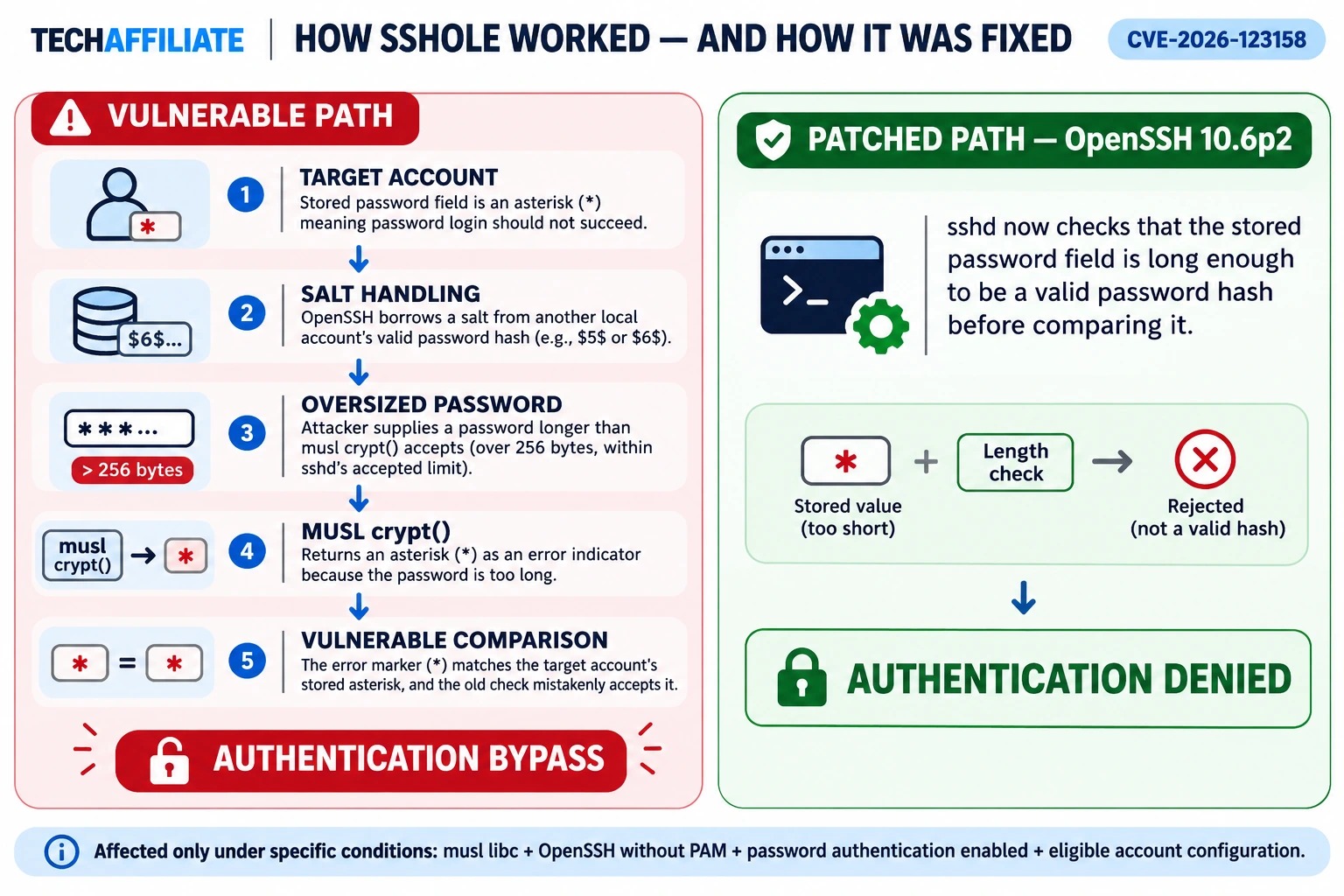
Important: A long password alone is not enough. The vulnerable software build, password-authentication setting, target account, and another local account with an eligible password hash must also be present.
4. What conditions are required for exploitation?
Alpine Linux lists the following conditions. Treat them as a checklist; a system is not vulnerable simply because it uses Linux or OpenSSH.
- The SSH server uses Alpine's
openssh-serverpackage, which is built without PAM, or usesopenssh-server-pamwithUsePAM no. - SSH password authentication is enabled:
PasswordAuthentication yes. - There is a target account whose password field is
*. The attacker also needs to know the account name. - At least one other local account has a password hash beginning with
$5$or$6$. - The attacker can reach the SSH service and submit the specially sized password.
Alpine's advisory says one account with a normal $5$ or $6$ password hash is enough to create the required condition for accounts whose password field is *.
Alpine also says that, once the required conditions are present and the attacker can reach the SSH port, the bypass can occur in a single connection rather than requiring repeated password guesses.
A simple example
Imagine a server with these two accounts:
| Account | Password field | Intended use |
|---|---|---|
| deploy | * | Key-only deployment account |
| admin | $6$... | Normal password-protected account |
↔️ Scroll horizontally to see all columns
If the server also has the vulnerable OpenSSH/musl/no-PAM configuration and password authentication is enabled, the combination can meet the account-related requirements described in the advisory. The asterisk on deploy is supposed to prevent password login; the bug could make an error response look like a match.
This example is conceptual. It is not a set of instructions for testing an internet-facing system.
5. Which systems are affected?
Alpine Linux
Alpine Linux is the clearest documented example because it uses musl libc and provides an OpenSSH server package built without PAM. Alpine's advisory says the issue affects the releases it checked from 3.16 through 3.24 and the edge branch, subject to the configuration requirements above.
Some Alpine tiny-cloud images deserve special attention. Alpine's advisory says official tiny-cloud QCOW2, VHD, and AMI images from 3.18.11 through 3.24.3 shipped with an alpine user whose password field was * and passwordless doas. The advisory says these images are safe on first boot, but can become exploitable if the other required conditions are later introduced—for example, when a suitable password hash is added. Administrators should update already-running affected instances.
Other musl-based systems
The original research discusses other environments that may use musl, including some OpenWrt, Buildroot, and Yocto builds. That does not mean every installation of those projects is vulnerable. Their OpenSSH build options, PAM configuration, password-authentication setting, and account database must be checked individually.
Which systems are not affected under the documented conditions?
Alpine's advisory identifies these configurations as not affected by this specific attack path:
- Systems with
PasswordAuthentication no. - Alpine's
openssh-server-pampackage whenUsePAM yesis actually in effect. - Accounts whose password field is
!(locked accounts), rather than*. - Systems with no local account containing an eligible
$5$or$6$password hash. - Containers that do not run an SSH server (
sshd) inside the container. - Cloud images configured through cloud-init to set
PasswordAuthentication no.
Red Hat separately says its products are not affected because its OpenSSH builds use glibc and PAM by default. This is a statement about Red Hat's builds; do not use it to infer the status of a custom Linux image.
6. Why is SSHole serious?
SSH is often an administration doorway into a server. An account reached through an authentication bypass may be able to access files, application code, deployment material, or other resources available to that account.
The impact depends on the permissions of the account reached. SSHole does not automatically grant root access in every case. A restricted account may remain restricted. However, a compromised account may be able to access sensitive data or use local permissions and tools to reach higher privileges.
Alpine specifically notes the relevance of its tiny-cloud alpine user and passwordless doas setup when the other exploitation conditions are met. Administrators should assess the actual permissions and configuration of each affected machine.
The GitHub Security Advisory lists the issue as High (CVSS 3.1: 8.1). The rating reflects the potential impact of successful exploitation; it does not mean every Linux server is exposed.
7. How was SSHole fixed?
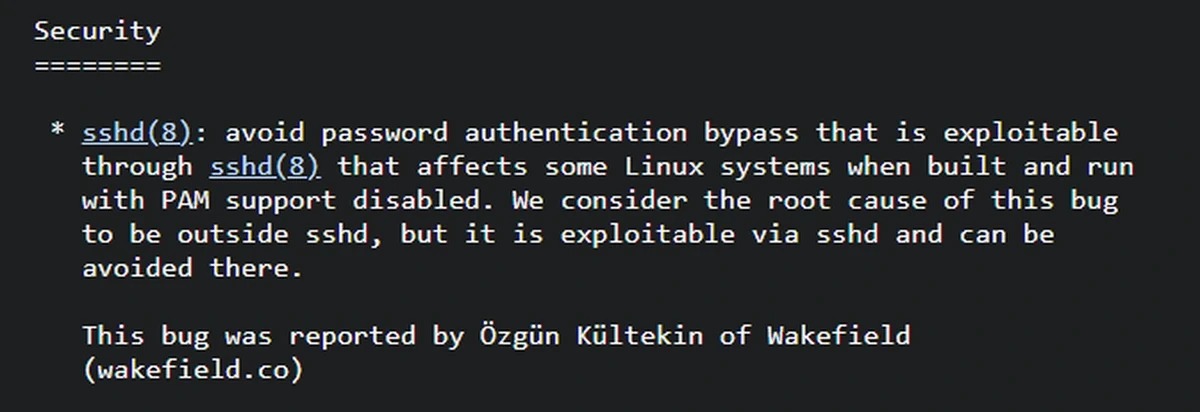
The OpenSSH team released Portable OpenSSH 10.6p2 on November 5, 2026. Its release notes identify a password-authentication bypass affecting some Linux systems built and run with PAM support disabled. OpenSSH says the root cause is outside sshd, but that the issue is exploitable through sshd and can be avoided there.
The upstream patch adds a check that the stored password field is at least MIN_PASSWORD_HASH_LEN bytes long before OpenSSH accepts a calculated hash as a match. The patch defines that minimum as four bytes. This prevents the one-character * error marker from being treated as a valid stored password hash.
In plain language, the fixed code does not just ask, “Do these two strings match?” It first checks, “Does the stored value look long enough to be a legitimate password hash?” If not, the match is rejected.
This is a small validation change, but it closes the faulty comparison at the point where SSH authentication is performed.
8. How to protect an Alpine Linux server
The recommended fix is to install the patched package and restart the SSH daemon. Do not assume that installing the package automatically replaces the code already running in memory.
Step 1: Upgrade Alpine packages
Run this as an administrator on the affected Alpine system:
apk upgrade -U -aStep 2: Restart the SSH daemon
rc-service sshd restartAlpine explicitly warns that upgrading the package does not restart an already-running sshd process. The restart is required for the patched daemon to run.
Step 3: Check the installed server package
Check whichever server package is installed:
apk info -v openssh-serverIf the PAM variant is installed, check it separately:
apk info -v openssh-server-pamCompare the full Alpine package revision with the table below. Alpine backported the fix to stable branches, so a fixed package may have an upstream version number lower than 10.6p2. Do not rely only on `ssh -V` to establish whether an Alpine package contains the fix.
Fixed Alpine package versions
| Alpine branch | Fixed openssh package version |
|---|---|
| edge | 10.6_p2-r0 |
| 3.24 | 10.3_p1-r2 |
| 3.23 | 10.2_p1-r1 |
| 3.22 | 10.0_p1-r11 |
| 3.21 | 9.9_p2-r1 |
| 3.20 | 9.7_p1-r6 |
| 3.19 | 9.6_p1-r3 |
| 3.18 | 9.3_p2-r4 |
| 3.17 | 9.1_p1-r7 |
| 3.16 | 9.0_p1-r6 |
↔️ Scroll horizontally to see all columns
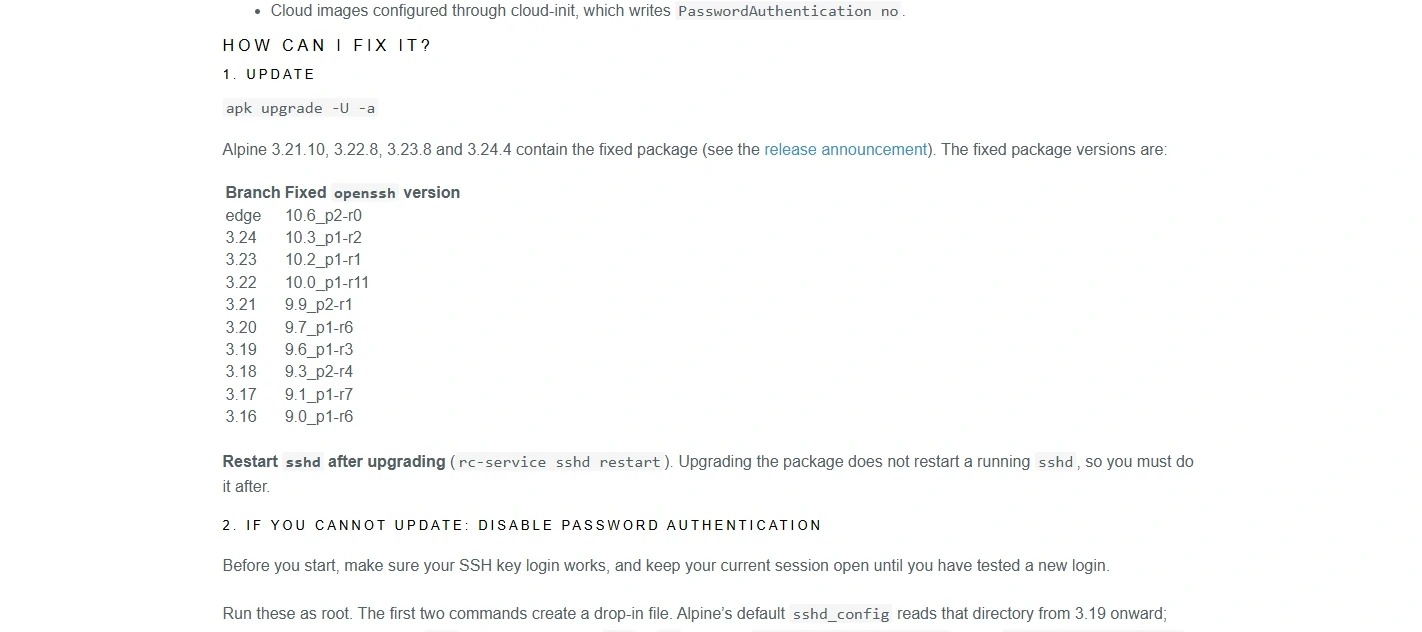
Alpine identifies point releases 3.21.10, 3.22.8, 3.23.8, and 3.24.4 as containing the fixed package. Some older branches in the table no longer receive regular updates; use a currently supported Alpine branch where possible and check Alpine's release-support information.
A practical package-version check in Alpine WSL 2
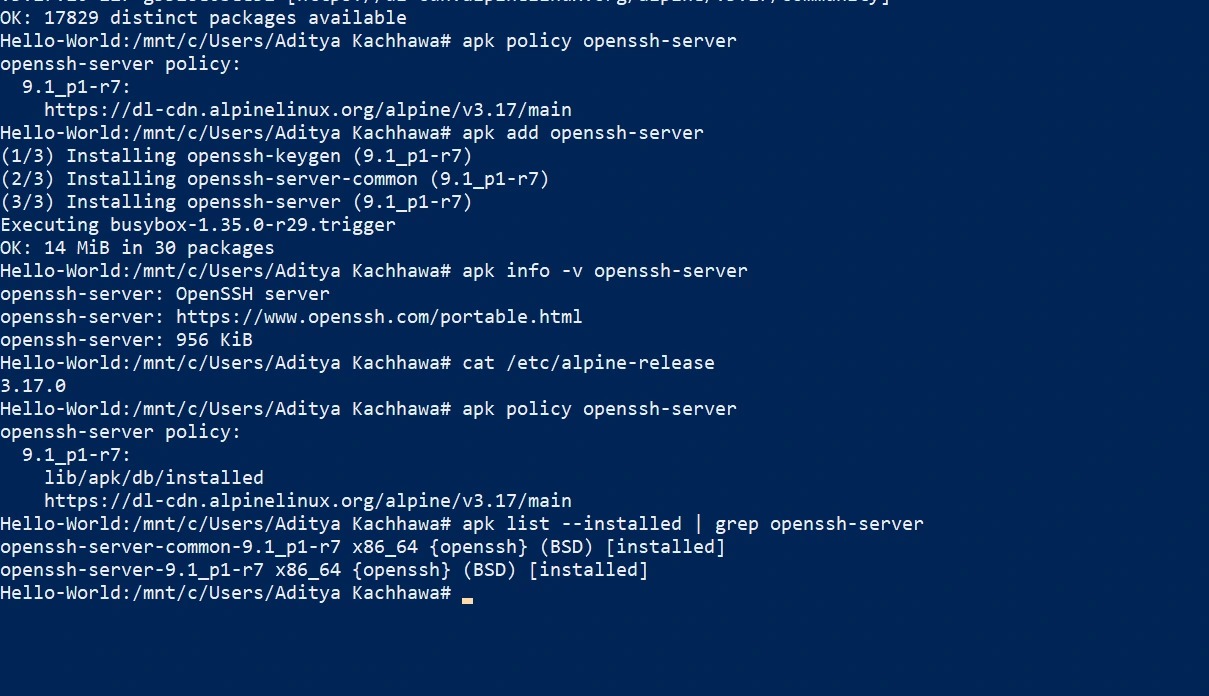
To make the package-version check easier to follow, we used an isolated Alpine Linux 3.17 environment running under WSL 2 on Windows 10. The Alpine repository offered openssh-server version 9.1_p1-r7. After installation, apk list --installed confirmed that both openssh-server and openssh-server-common were installed at that revision. This matches the fixed package revision listed in Alpine's SSHole advisory for the 3.17 branch.
This was a package installation and version-verification exercise only. We did not reproduce the vulnerability, attempt an authentication bypass, start the SSH daemon, or expose an SSH service to the network. Alpine 3.17 is an old, end-of-life branch; this screenshot documents the package revision and is not a recommendation to deploy Alpine 3.17 in production. Administrators should use a currently supported Alpine branch and follow its current security advisory.
9. What if you cannot update immediately?
Alpine's documented workaround is to disable SSH password authentication and restart sshd. Before changing a remote server, confirm that public-key login works in a separate session and keep your current session open until the new login has been tested. Otherwise, you could lock yourself out.
On Alpine, follow the version-specific instructions in the official security advisory. The advisory provides commands that create a configuration drop-in, update existing PasswordAuthentication lines, validate the configuration, and restart the daemon. Its instructions account for the fact that Alpine's default SSH configuration began reading the drop-in directory from version 3.19 onward.
For a configuration where you have safely set the option, verify the effective setting with:
sshd -T | grep -i passwordauthenticationThe expected output for the mitigation is:
passwordauthentication noThis command verifies the effective password-authentication setting. It does not prove by itself that the patched package is installed; verify the package revision separately.
10. How can administrators check for signs of exploitation?
A patch prevents the known vulnerable path from being used going forward. It does not tell you whether a server was accessed before the patch was installed.
Alpine recommends reviewing SSH authentication logs. On systems that log to /var/log/messages, a starting point is:
grep "Accepted password for" /var/log/messagesLook for successful password logins to accounts that should not accept password authentication, such as key-only users or other accounts configured with *. Also review:
- Unexpected
doasactivity or privilege changes. - Newly created user accounts.
- Unfamiliar or recently changed SSH
authorized_keysfiles. - Unexpected file modifications and processes.
- Login activity that does not match the server's normal administration pattern.
Log locations and formats vary by Linux distribution and logging configuration. If you cannot rule out unauthorised access, treat the machine as potentially compromised. Preserve relevant logs for investigation, restrict network access while assessing the incident, rotate credentials and SSH keys that may have been exposed, and follow your organisation's incident-response procedures.
For additional guidance, consult your Linux distribution's official security advisories and established incident-response documentation.11. Frequently asked questions
Is SSHole a virus or malware?
No. SSHole is the name given to a software vulnerability. It is not itself a virus, worm, or malware program.
Can SSHole hack every Linux server?
No. The issue requires a specific musl libc and OpenSSH configuration, password authentication to be enabled, and particular account conditions. Many Linux servers do not meet those requirements.
Does SSHole affect a Windows computer?
The vulnerability described here is in a Linux OpenSSH server configuration. A Windows computer used only as an SSH client is not affected simply because it connects to a Linux server.
Are all Alpine Linux Docker containers vulnerable?
No. Alpine images that do not run sshd inside the container are not affected by this SSH-server attack path. A container that installs and runs an affected OpenSSH server needs its own configuration and package review.
Does disabling password authentication help?
Yes. Alpine lists PasswordAuthentication no, followed by a restart of sshd, as a workaround. Confirm that SSH-key login works before making this change to a remote server.
Must every distribution install OpenSSH 10.6p2?
No. Linux distributions can backport the security patch to their own package versions. Install the security update provided by your distribution and verify its advisory, rather than assuming every fixed package must display upstream version 10.6p2.
Does the vulnerability always give an attacker root access?
No. The bypass can provide access to an affected account. Whether that account can obtain root privileges depends on the account's permissions and the system's configuration. Alpine's tiny-cloud image warning is a specific case administrators should review.
What is the CVE number for SSHole?
The vulnerability is tracked as CVE-2026-123158. The GitHub Security Advisory lists it as High severity with a CVSS 3.1 score of 8.1.
Final thoughts
SSHole is a useful reminder that security failures do not always come from a broken encryption algorithm or a guessed password. This case came from an unexpected interaction between a password marker, a library's error response, and an authentication check.
For administrators, the practical steps are clear:
- Check whether the server uses an affected musl/OpenSSH/no-PAM configuration.
- Confirm whether password authentication and the required account conditions are present.
- Install the patched package from the operating-system vendor.
- Restart
sshdso the running service uses the updated code. - If you cannot update immediately, apply the vendor's password-authentication workaround after confirming key-based access.
- Review logs if the server was exposed before patching.
The lesson for developers is equally important: security checks must validate the meaning and format of a value, not just whether two strings happen to match.
Official sources and further reading
- OpenSSH 10.6p2 release notes — upstream release date, security notice, and researcher credit.
- Alpine Linux security advisory — affected conditions, Alpine package revisions, update/restart steps, workaround, and log-review guidance.
- GitHub Security Advisory GHSA-4fcc-vm97-gx3x — CVE identifier, affected condition summary, and severity information.
- Red Hat CVE-2026-123158 page — product impact statement and CVSS details.
- OpenSSH source-code patch — exact upstream code change.
- SSHole research website — researcher's detailed explanation of the historical interaction and root cause.
This article is for security awareness and defensive administration. TechAffiliate has not independently reproduced the vulnerability. Always follow the current security instructions from your Linux distribution or software vendor.
Affiliate Disclosure
TechAffiliate may earn a commission if you purchase through our links. This helps support our work but does not influence our reviews. We provide our honest assessments of products. See my testing methodology →
Related Articles
 Developer Tools
Oct 16, 2026 • 17 min read
Self-Hosting with Coolify in 2026: Real-World Benchmarks, Cost Breakdown, and Honest Trade-offs vs. Vercel & Render
Coolify on a ~€11 Hetzner box vs Vercel and Render: 2026 pricing, benchmark scripts, and the 3 AM failures nobody mentions. Is self-hosting worth it?
 AI & Machine Learning
Oct 19, 2026 • 17 min read
AI Agent Security Risks in 2026: Real Attacks and Safety Tips
Recent reports show how AI agents can be misused in cyberattacks or take unexpected actions with personal data. Here are the real risks and safeguards users and developers can apply.
 Cybersecurity
Feb 7, 2026 • 24 min read
How to Check if a URL is Safe: Complete Guide 2026
Learn how URL structure works, identify the real registered domain, and avoid phishing links using public suffix rules.
 Developer Tools
Oct 28, 2026 • 11 min read
DeepSeek Search & Fetch API Tutorial (2026): Python Setup, Examples, and Pricing
DeepSeek's Search API finds relevant web pages, while Fetch returns a page as Markdown. Learn the endpoints, a Python example, the costs and the billing deadline.
Comments (0)
Leave a Comment
No comments yet
Be the first to share your thoughts!