Ladybird Browser Alpha Review: 30 Real-World Tests and Benchmarks Against Chrome and Firefox
Aditya Kachhawa
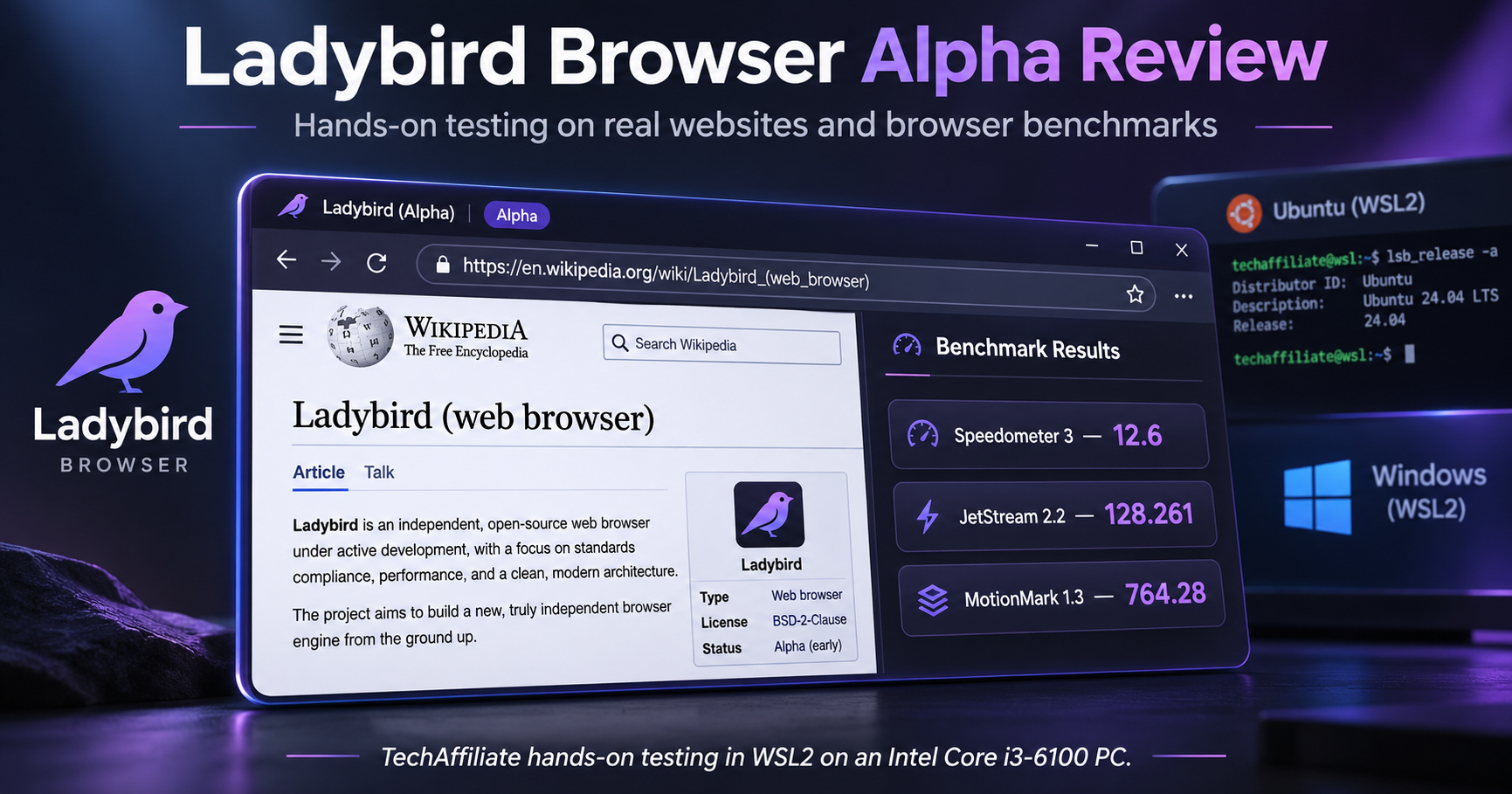
I installed Ladybird's first public alpha on an older Intel Core i3 desktop to see how much of the everyday web it could handle. The browser opened all six sites I chose for this review. I could read articles, change construction calculator inputs, navigate a GitHub repository, write JavaScript in CodePen and play a YouTube video with sound.
The surprise was not that Ladybird had caught Chrome or Firefox in performance. It hadn't. In my single-run comparison, both established browsers substantially outscored it across all three overall benchmarks. But the alpha's ability to run everyday web applications was considerably more encouraging than those benchmark numbers alone might suggest.
There were rough edges, too. Speedometer's download buttons failed, although copying the results worked. Ladybird also warned that it was painting pages on the CPU. That matters because I ran the Linux build through Windows Subsystem for Linux (WSL2), while Chrome and Firefox ran natively on Windows.
Quick verdict: Ladybird is an interesting secondary browser for developers and curious early adopters. It is not yet a browser I would recommend replacing an established daily driver with, especially for sensitive accounts or important work.
Testing disclosure: This is an independent, hands-on TechAffiliate review using a small, manually selected set of websites and one complete run of each benchmark per browser. It is an exploratory same-PC comparison, not a controlled browser-engine experiment. The findings describe these particular builds and settings, not all computers, websites or future releases.
Ladybird at a glance
| Item | Details |
|---|---|
| Public alpha release | November 23, 2026 |
| Tested version | 2026.47.7 (Ubuntu package 2026.47.7-1~ubuntu24.04) |
| Official platforms | macOS (Apple Silicon, macOS 14.4+) and Linux |
| Windows | No native Windows alpha listed at the time of testing |
| Engine | Independent (LibWeb and LibJS), not a Chromium, Gecko or WebKit fork |
| Price | Free and open source |
| Selected functional checks | 30 of 30 passed in manual testing across 6 websites |
| Main limitations observed | CPU painting warning; Speedometer download failure |
↔️ Scroll horizontally to see all columns
The official alpha announcement is the starting point for anyone considering installing it. The developers describe the release as unfinished and explicitly decline to make security assurances at this stage. Because the alpha runs on a rolling release channel, newer builds—such as 2026.47.8, published on November 24, 2026 (UTC) for source and macOS—are already appearing on the official release feed; all test data in this review reflects the tested 2026.47.7 build.
Why an independent browser engine matters
Most browser comparisons focus on tab management, privacy settings and extensions. Ladybird is more interesting at a lower level: it is developing another implementation of the web itself.
The engine interprets HTML, CSS and JavaScript, calculates how elements fit together, responds to user interaction and draws the page. Browsers can have very different interfaces while sharing much of the machinery underneath.
| Browser | Web engine |
|---|---|
| Chrome, Edge, Brave | Blink |
| Firefox | Gecko |
| Safari | WebKit |
| Ladybird | LibWeb (with LibJS for JavaScript) |
↔️ Scroll horizontally to see all columns
A separate engine gives developers another implementation against which to evaluate standards and websites. It does not automatically mean better security, faster browsing or fewer bugs. In fact, a young engine faces the difficult task of supporting many years of web standards and real-world assumptions made by web applications.
The project overview describes Ladybird as a 501(c)(3) nonprofit-backed browser funded through sponsors and donations, with no default-search monetization arrangements or crypto tokens. Its mission is worth distinguishing from the readiness of its current software.
Installing Ladybird on Windows using Ubuntu WSL2
I used Windows 10, not a native Linux desktop. The official alpha offers macOS and Linux builds; WSL2 was my way of trying the Linux build without replacing Windows.
My first attempt to install Ubuntu 24.04 LTS stopped at 52%. After cancelling the stalled download and confirming Ubuntu had not been registered, I installed it using the alternative web download method and specified my D: drive. The earlier C: drive storage reduction was not investigated to a confirmed cause.
The command that succeeded on my system was:
wsl --install --web-download -d Ubuntu-24.04 --location "D:\WSL\Ubuntu-24.04"These options depend on the installed WSL version. Check Microsoft's WSL documentation and wsl --help before copying this command. Do not delete an existing Linux distribution just to make space for this installation.
After setting up Ubuntu, I followed Ladybird's Ubuntu package repository instructions on the official download page, installed the ladybird package, and launched it from Windows Command Prompt:
wsl -d Ubuntu-24.04 -- ladybirdThe package version can be checked from Windows with:
wsl -d Ubuntu-24.04 -- dpkg-query -W ladybirdMy installation reported 2026.47.7-1~ubuntu24.04. The browser launched successfully using WSL's graphical environment. This is a tested workaround, not a native Windows release or a guarantee that it works on every Windows PC.
First impressions: a clean, configurable interface
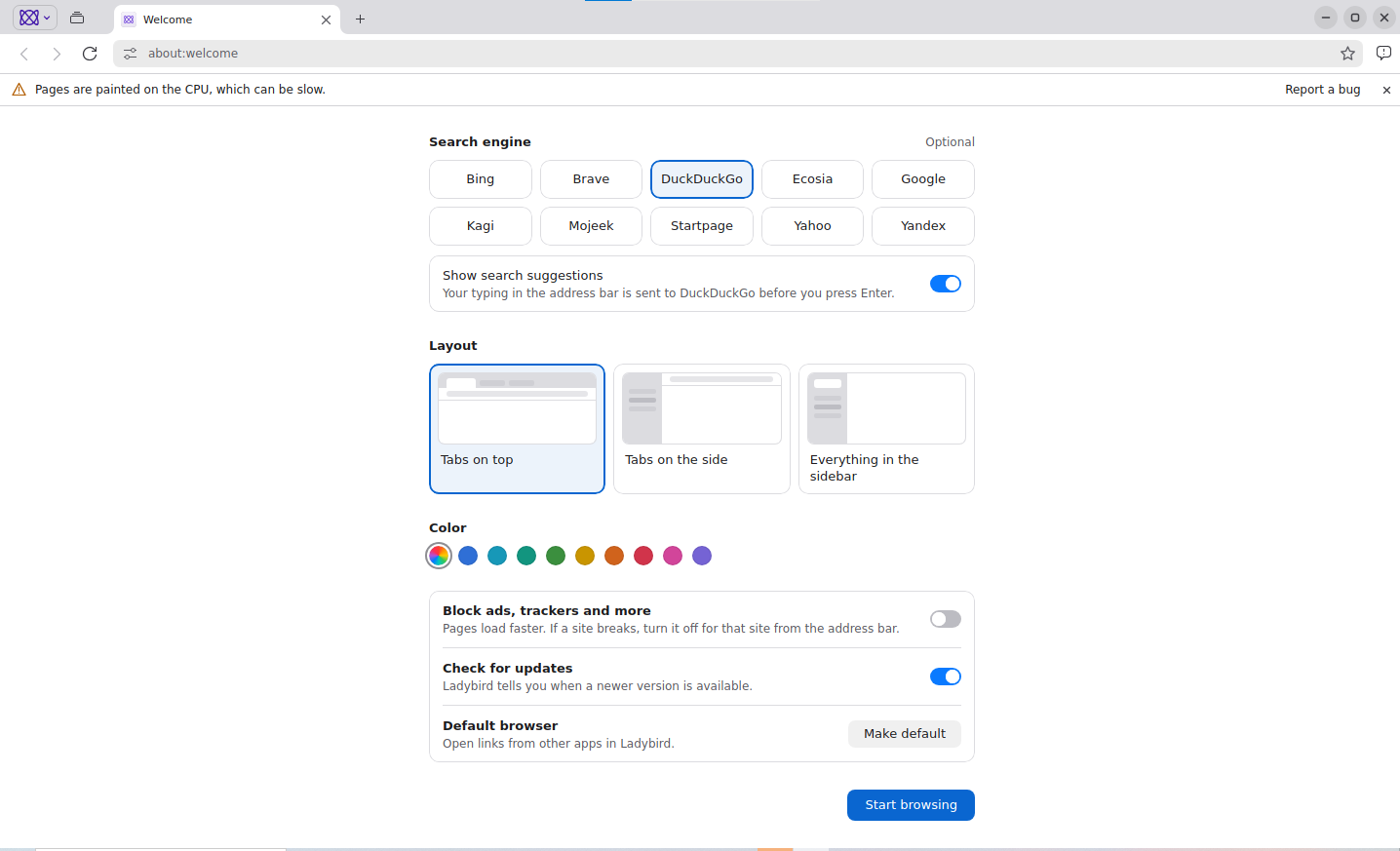
The welcome screen offered a choice of search provider, three tab layouts, color accents, optional content blocking and update checks. I chose DuckDuckGo and the conventional top-tab layout. Content blocking was disabled for the documented test setup.
The familiar layout puts the address bar, navigation and tabs in conventional positions, with optional sidebar layouts for readers who prefer vertical tabs. I did not systematically test those alternative layouts in this review.
One warning appeared above the page: “Pages are painted on the CPU, which can be slow.” It is important not to treat that as a general limitation of every Ladybird installation. It describes the configuration I observed, and it affects how the benchmark results should be interpreted.
Test setup and methodology
All three browsers were tested on the same desktop PC using the following reported system configuration.
| Component | Specification |
|---|---|
| CPU | Intel Core i3-6100, 3.70 GHz, 2 cores / 4 threads |
| System RAM | 15.92 GB reported by Windows PowerShell (nominal 16 GB) |
| GPU | Intel HD Graphics 530 |
| GPU driver | 31.0.101.2111 |
| Display | 1440 × 900, 60 Hz, as reported by Firefox diagnostics |
| Windows | Windows 10 22H2, build 19045.7846 |
| Ladybird environment | Ubuntu 24.04 LTS under WSL2; CPU painting warning |
| Chrome environment | Native Windows |
| Firefox environment | Native Windows; WebRender, active Intel GPU |
↔️ Scroll horizontally to see all columns
| Browser | Tested version | Engine |
|---|---|---|
| Ladybird Alpha | 2026.47.7 | LibWeb / LibJS |
| Google Chrome | 158.0.8127.88 | Blink / V8 15.8.62.31 |
| Mozilla Firefox | 160.0.1 | Gecko / SpiderMonkey |
↔️ Scroll horizontally to see all columns
I manually checked 30 selected tasks in Ladybird and ran Speedometer 3.0, JetStream 2.2 and MotionMark 1.3 once per browser on November 25. The three Speedometer raw exports each contain ten internal score iterations; those are not ten independent complete benchmark runs.
There are several limitations. Chrome's GPU acceleration status was not independently verified. Firefox had extensions and an animated theme enabled; Chrome had modified browser flags. The browsers' viewport dimensions and background workloads were not standardized. Firefox's diagnostic RAM figure was 11.9 GB, different from the host RAM reading; the reason is unverified. No memory, battery-life, security penetration or extended stability tests were performed. These are observations of the tested configurations, rather than a strict comparison of the engines in isolation.
Real-world compatibility: six websites, 30 checks
| Website | Checks performed | Passed |
|---|---|---|
| TechAffiliate | Article, image lightbox, theme switch, search, article navigation | 5/5 |
| BuildByMath | Calculator, calculation, input update, unit switch, search | 5/5 |
| Wikipedia | Internal link, contents navigation, dark mode, text size | 4/4 |
| YouTube | Playback, sound, pause/resume, seeking, quality, fullscreen | 6/6 |
| GitHub | Repository, README, folders/files, source highlighting, issues | 5/5 |
| CodePen | Editor, HTML, CSS, JS click handler, preview updates | 5/5 |
| Total | Selected manual checks in Ladybird | 30/30 |
↔️ Scroll horizontally to see all columns
This result applies only to the selected features and websites—it does not mean Ladybird has 100% compatibility with the entire web. It means all 30 of these particular checks passed according to my hands-on test log. Screenshots show page state and selected interactions; not every action has separate video or automation evidence. Chrome and Firefox were benchmarked but were not subjected to this same 30-check compatibility suite.
TechAffiliate: a real content website
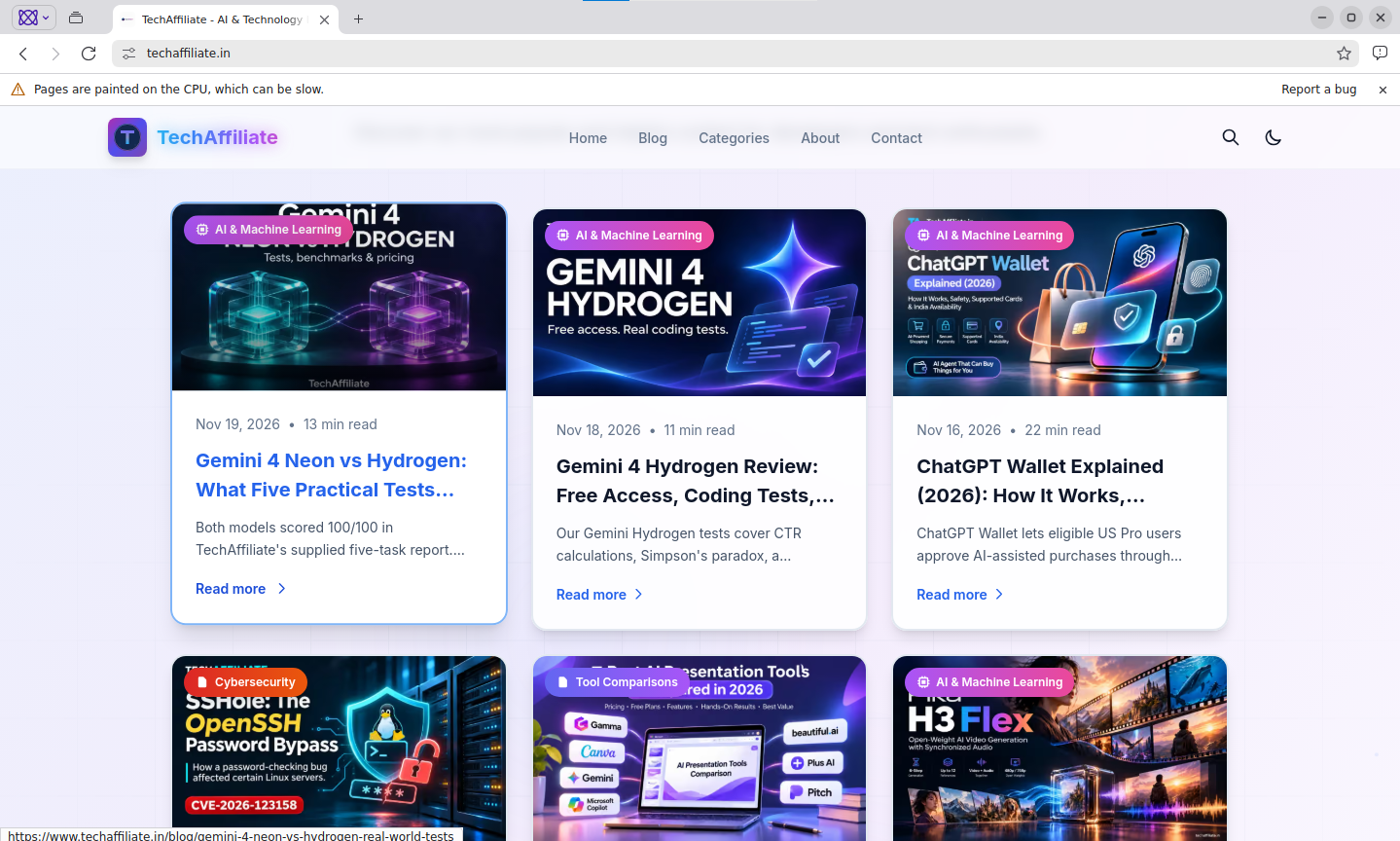
I started with TechAffiliate, my own website, because I know the expected behavior. The ChatGPT Wallet article opened, image expansion worked, light and dark themes switched, search responded and navigation between articles—including our Gemini 4 Neon vs Hydrogen hands-on comparison visible in the article grid—succeeded.
For a content website, rendering the first page is only part of the experience. The lightbox and theme changes exercise interactions beyond a static screenshot, which is why they were included in the checklist.
BuildByMath: interactive construction tools
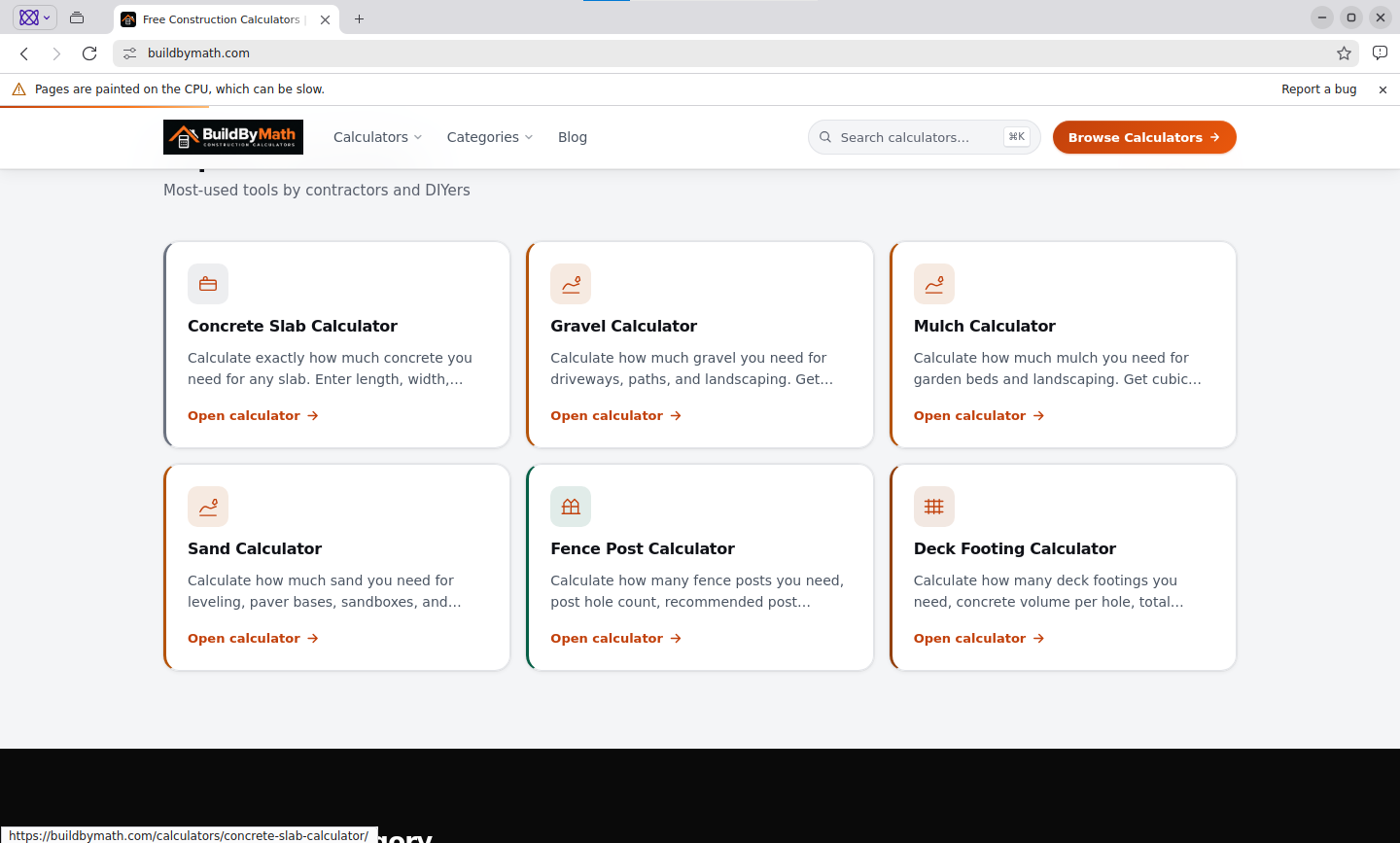
BuildByMath is another site I operate. I opened its concrete slab calculator, entered dimensions, changed an input, switched between metric and imperial units and used calculator search. All five checks passed.
That is a useful test of JavaScript-driven forms, unit selection and live page updates. I did not retain a separate numeric-result screenshot showing the inputs and calculated outputs together, so I am not claiming independently auditable numerical accuracy for a specific set of dimensions. The result here is successful interaction, not an audit of the calculator formulas.
Wikipedia: reading and appearance controls
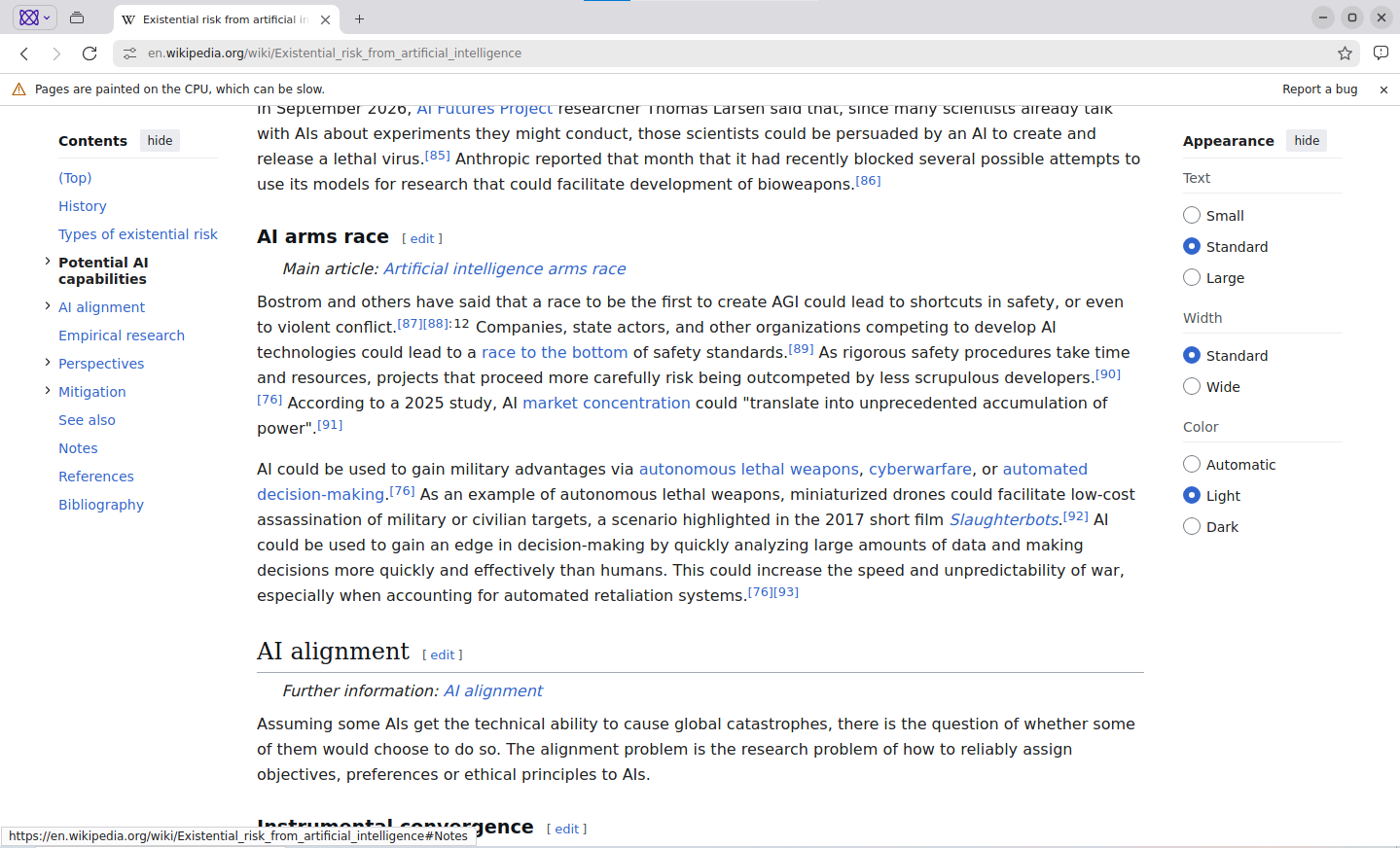
The Wikipedia article I opened displayed readable text, links and the usual sidebars. I followed an internal link, used the table of contents, enabled dark mode and changed the text size. All four checks passed. This represents a useful baseline for document-oriented browsing.
YouTube: video actually played
Opening a YouTube page is not the same as playing a video. In this test I played a public video for at least 30 seconds, heard audible audio, paused and resumed, sought to a different position, changed video quality and entered and exited fullscreen. All six checks passed in my manual test log.
This does not establish support for every codec, resolution, livestream, protected streaming service or DRM feature. I did not measure dropped frames or sustained playback performance. Still, it is a meaningful positive result for the specific public video tested.
GitHub: browsing a code repository
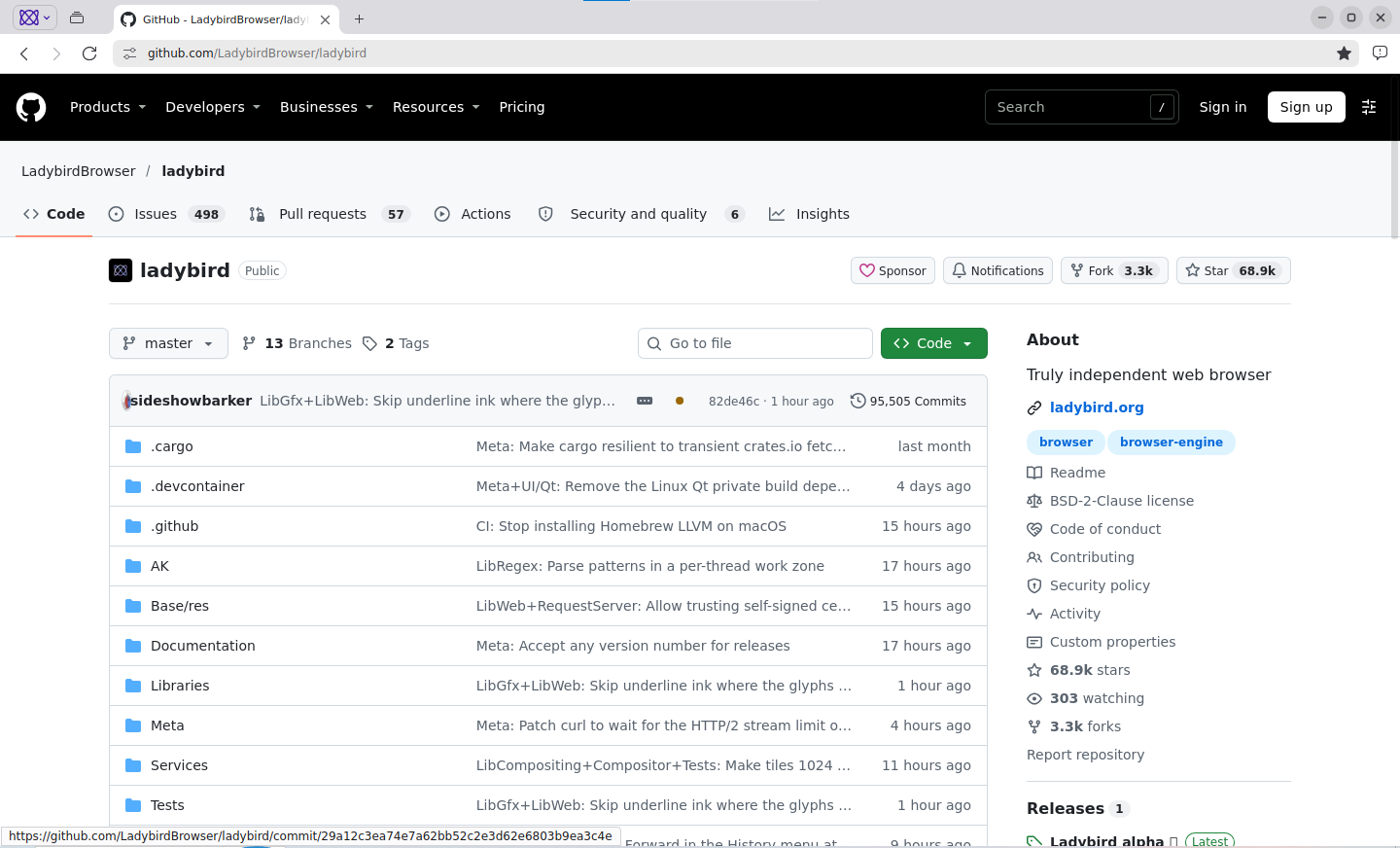
I used the Ladybird project's own repository for a signed-out browsing test. The repository page and README rendered, files and folders opened, source code appeared with syntax highlighting and the Issues tab worked. This was a public repository test, not a test of authentication, code editing or pull-request workflows.
CodePen: an actual JavaScript interaction
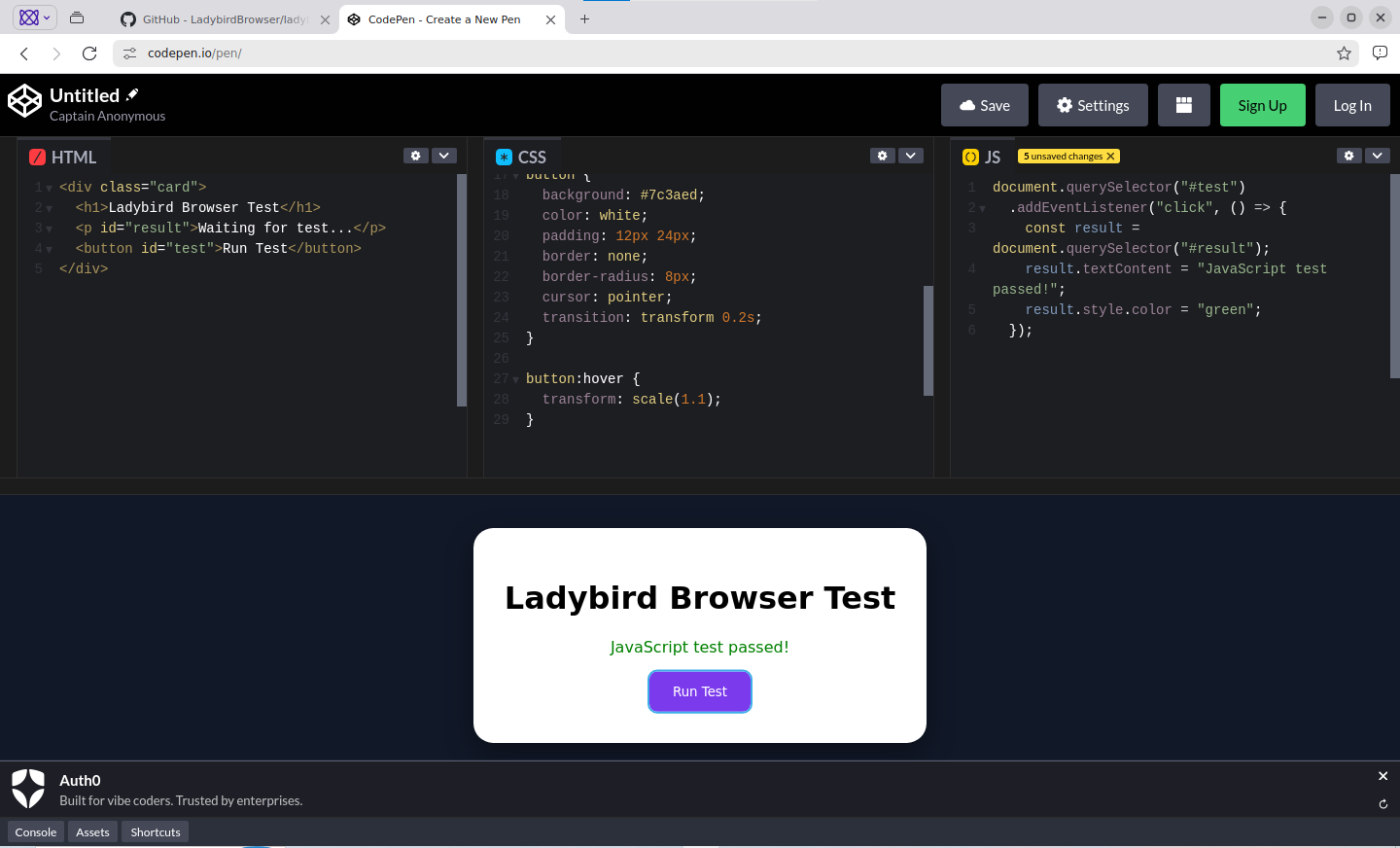
CodePen was the clearest visual demonstration of an interactive web application. I entered a small HTML card, centered it with CSS Grid, styled a button and attached a JavaScript click listener. The editor displayed the code, the preview rendered, and clicking the button changed the text to a green success message. Editing the code also refreshed the preview.
The key JavaScript was:
document.querySelector("#test").addEventListener("click", () => {
  const result = document.querySelector("#result");
  result.textContent = "JavaScript test passed!";
  result.style.color = "green";
});
This tests a narrow but common pattern: DOM selection, event handling and updating text and styles. It is not a comprehensive assessment of JavaScript or CSS standards. The complete small test is included in the accompanying evidence package.
Browser benchmarks: Ladybird vs Chrome vs Firefox
I used the same versions of three BrowserBench suites. Each benchmark measures a different kind of workload, and its numbers cannot be compared directly with another benchmark's numbers or combined into an overall browser score.
| Benchmark | Ladybird | Chrome | Firefox |
|---|---|---|---|
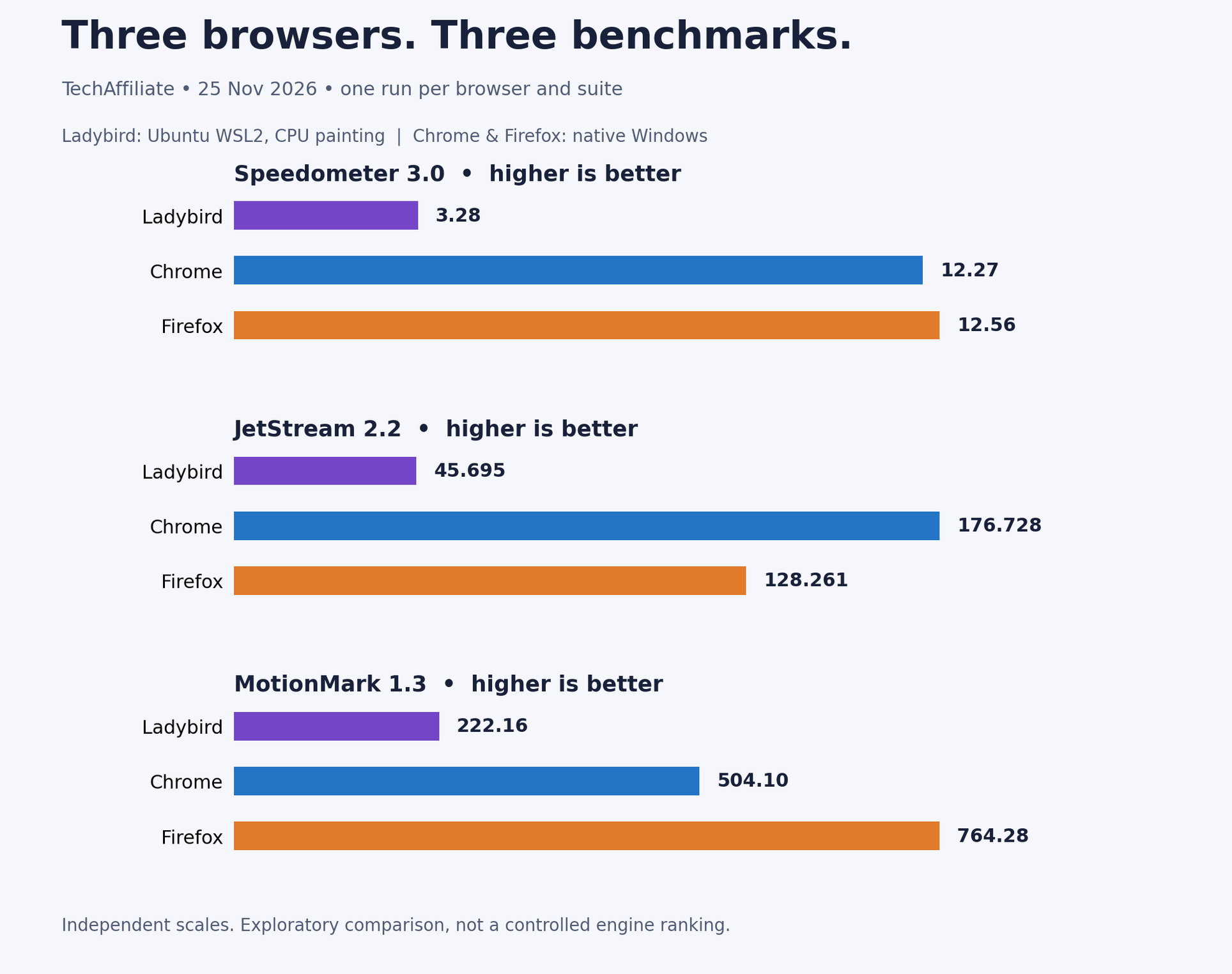
| Speedometer 3.0 | 3.28 | 12.27 | 12.56 |
| JetStream 2.2 | 45.695 | 176.728 | 128.261 |
| MotionMark 1.3 | 222.16 | 504.10 | 764.28 |
↔️ Scroll horizontally to see all columns
These are the measured scores for this PC, not an estimate of how much faster one browser will feel on all websites. Higher scores are better within each suite, and Ladybird finished all three suites despite trailing both mature browsers in every overall score.
Important benchmark context and limitations
Before drawing conclusions from the table above, keep these testing conditions in mind:
- Mixed operating environments: Ladybird ran inside Ubuntu 24.04 LTS using WSL2, whereas Chrome and Firefox ran natively on Windows 10.
- Different rendering paths: Ladybird displayed a CPU-based page-painting warning throughout testing, Firefox used WebRender with an active Intel GPU, and Chrome's graphics acceleration status was not independently verified.
- Browser configuration differences: Firefox had additional extensions and an animated theme enabled, while Chrome had modified browser flags.
- Single-run exploratory sample: Only one complete benchmark run per browser per suite is documented. Speedometer's ten internal iterations are part of that single run, not ten independent benchmark runs.
- Unstandardized variables: Browser viewport dimensions, rendering paths and background processes may have influenced the results. These numbers are exploratory same-PC observations, not a controlled browser-engine comparison, and do not establish any browser as universally faster.
Speedometer 3.0: responsiveness of web applications
Speedometer simulates interactions in web applications. My three exported JSON files record exact mean scores of 3.278330118 for Ladybird, 12.265976018 for Chrome and 12.564041074 for Firefox (rounded to 3.28, 12.27 and 12.56 in the summary table above).
| Statistic | Ladybird | Chrome | Firefox |
|---|---|---|---|
| Mean score | 3.2783 | 12.2660 | 12.5640 |
| Benchmark-reported delta | ±0.0863 | ±0.9718 | ±0.6898 |
| Internal iterations | 10 | 10 | 10 |
↔️ Scroll horizontally to see all columns
Firefox's small numerical lead over Chrome is inconclusive because the benchmark-reported uncertainty ranges overlap (12.27 ± 0.97 vs 12.56 ± 0.69). Chrome and Firefox both recorded scores roughly four times Ladybird's. That is a benchmark-score comparison, not a claim that every page loads four times faster.
JetStream 2.2: JavaScript and WebAssembly
Chrome led this suite at 176.728, followed by Firefox at 128.261 and Ladybird at 45.695. The gap varied by workload. For example, the Quicksort WebAssembly scores were 566.139, 606.339 and 833.333 respectively. Ladybird's Octane Zlib score of 13.176 was above Chrome's 12.387 but below Firefox's 16.061.
| Selected workload | Ladybird | Chrome | Firefox |
|---|---|---|---|
| AI A* | 91.023 | 359.128 | 349.318 |
| Babylon | 134.840 | 538.760 | 305.048 |
| FlightPlanner | 90.836 | 591.287 | 414.103 |
| TypeScript | 4.681 | 12.209 | 12.531 |
| Quicksort WASM | 566.139 | 606.339 | 833.333 |
| Octane Zlib | 13.176 | 12.387 | 16.061 |
↔️ Scroll horizontally to see all columns
The results are consistent with a browser that can execute modern code but still has performance work to do. They cannot isolate which parts of the gap are attributable to the JavaScript engine, operating environment or individual benchmark implementations.
MotionMark 1.3: graphics and animation
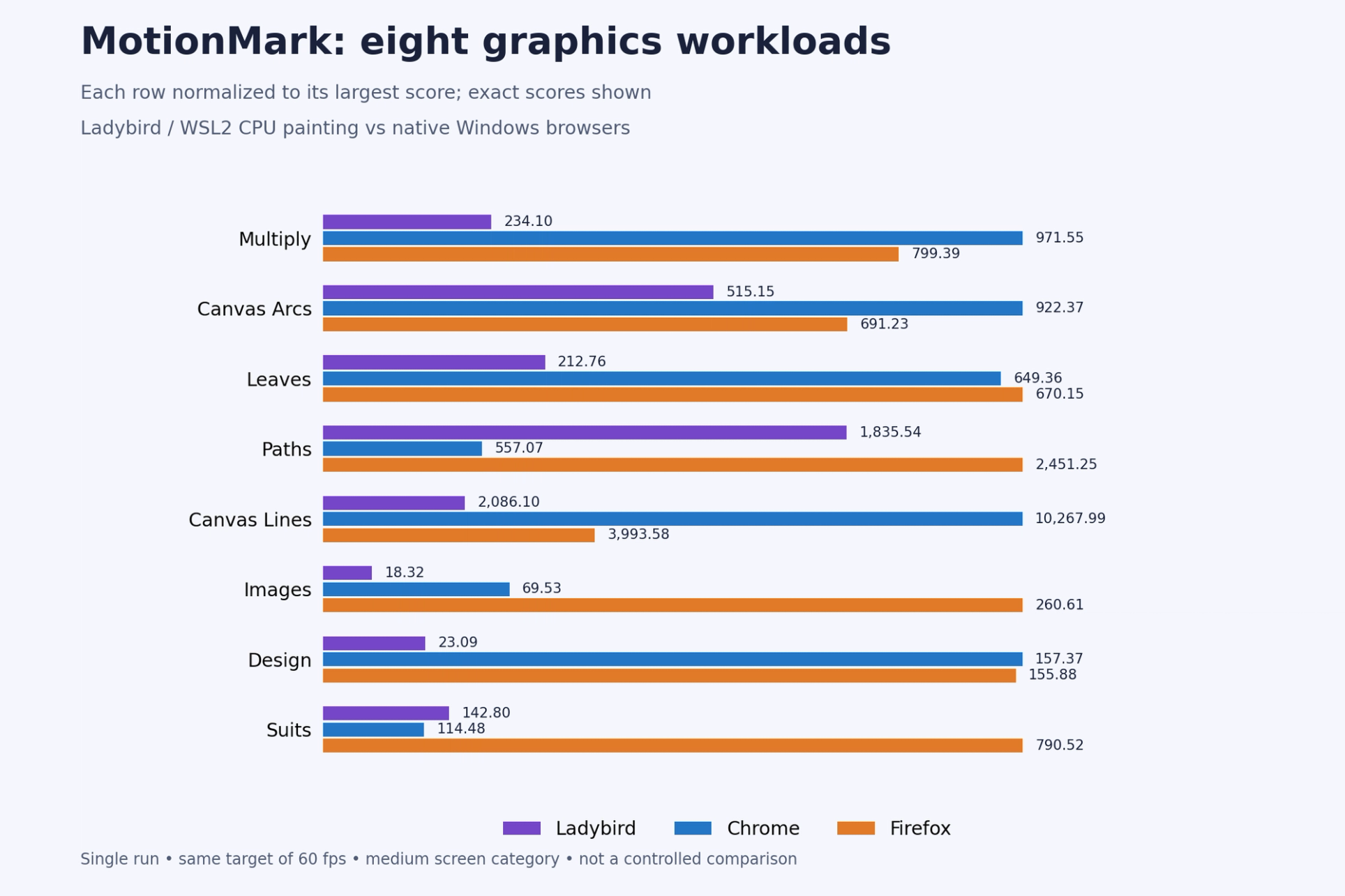
Firefox posted the largest overall score (764.28), ahead of Chrome (504.10) and Ladybird (222.16). All three result pages reported a 60 fps target and a medium-screen category. That target does not mean the browsers sustained 60 fps in every workload.
| Workload | Ladybird | Chrome | Firefox |
|---|---|---|---|
| Multiply | 234.10 | 971.55 | 799.39 |
| Canvas Arcs | 515.15 | 922.37 | 691.23 |
| Leaves | 212.76 | 649.36 | 670.15 |
| Paths | 1,835.54 | 557.07 | 2,451.25 |
| Canvas Lines | 2,086.10 | 10,267.99 | 3,993.58 |
| Images | 18.32 | 69.53 | 260.61 |
| Design | 23.09 | 157.37 | 155.88 |
| Suits | 142.80 | 114.48 | 790.52 |
↔️ Scroll horizontally to see all columns
Ladybird recorded higher scores than Chrome on the Paths and Suits subtests, but Firefox was ahead of both on those two workloads. Ladybird did not lead any of the eight graphics workloads across the three browsers. These individual results warrant investigation and repetition, not a claim of superior rendering. CPU painting in Ladybird and GPU-backed rendering in Firefox make this graphics comparison particularly sensitive to configuration.
The first clear problem: benchmark downloads
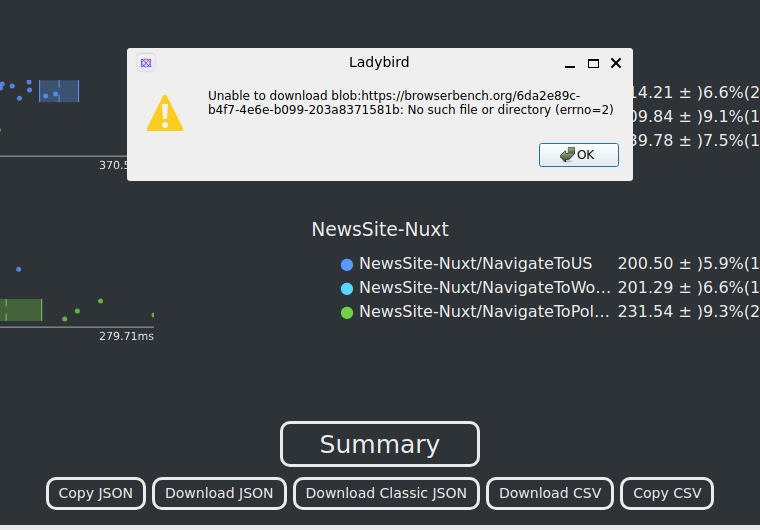
After Speedometer 3.0 finished, I tried exporting its results. Clicking the direct file download button displayed an error dialog reading: Unable to download blob:... No such file or directory (errno=2). Clipboard export (Copy JSON) worked, allowing me to preserve the complete raw JSON data.
The failure is important because file downloads are an everyday browser function. However, its root cause remains unresolved: it may be related to Ladybird's handling of dynamically created blob: downloads, a missing or misconfigured destination directory, or the Ubuntu WSL2 environment. No confirmed fix or minimal reproduction was isolated, so it would be inaccurate to claim that all Ladybird file downloads are broken or to pin the cause on one layer.
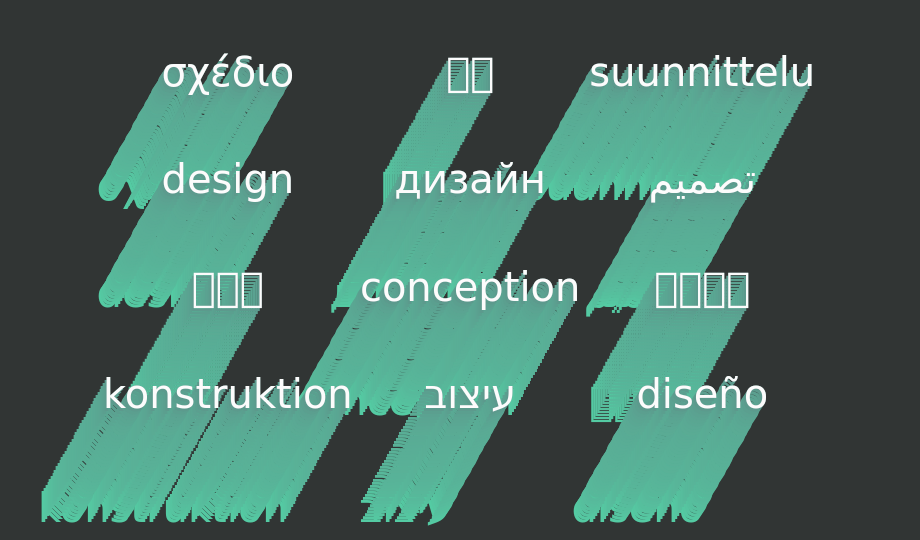
A separate observation during MotionMark's Design workload was that several non-Latin character strings appeared as missing-glyph rectangle boxes. Ubuntu's installed fonts or browser text rendering may be involved; I did not isolate the cause, so this is documented strictly as an observed rendering or font-availability issue rather than attributed definitively to Ladybird's engine.
What the developers have been building
Ladybird's October 2026 development report describes moving style and layout work to a separate thread, introducing an optimizing JavaScript JIT and replacing the WebAssembly engine. These are project-reported developments, not results of my own investigation into the implementation.
A just-in-time compiler turns frequently executed code into machine code rather than interpreting every operation. Moving selected rendering work off the main JavaScript thread can help the browser stay visually responsive when scripts are busy. The actual benefit depends on the page and hardware, and the alpha still has substantial performance headroom.
The project also reported 2,184,722 Web Platform Tests subtests passed at the end of October, ahead of Safari Technology Preview's 2,172,990 at that point. See the official WPT chart, the official JIT diagram and the official threading diagram for the project's own illustrations. WPT counts on wpt.fyi measure selected standards conformance; they do not measure browsing speed, security or the percentage of websites that work.
Privacy, security and daily use
The privacy policy states that the Ladybird Browser Initiative does not track browsing or sell user data. However, update checks and optional reporting involve network connections and technical information. A site compatibility report can include the page URL, system details and a screenshot (unless removed), and accepted site reports may be published as public GitHub issues. Review what is included before sending feedback, especially on private pages.
Privacy intent does not establish security readiness. I would not use this alpha for banking, password management, confidential work or other high-stakes sessions. The release is explicitly aimed at early adopters; a successful YouTube video and a responsive calculator do not demonstrate security, privacy compliance or long-term reliability.
Where to download Ladybird
Visit the official downloads page (or verify checksums directly against the official release manifest) rather than using an unofficial installer mirror. At the time of verification, the official macOS build required Apple Silicon and macOS 14.4 or newer, while Linux downloads covered x86-64 and ARM64 via Flatpak, distribution packages and standalone archives. Remember that my hands-on testing used version 2026.47.7 (2026.47.7-1~ubuntu24.04), whereas the rolling alpha channel continues to publish newer builds such as 2026.47.8.
There was no native Windows or mobile alpha listed. My WSL2 setup was a Linux installation running on a Windows host, not a Windows browser build. If your machine supports a native Linux environment, that may be a more useful place to evaluate it without the extra WSL layer.
Final verdict: an encouraging beginning, not a replacement
The most encouraging result was not a benchmark number. It was opening my own interactive website, using CodePen's live editor, navigating a repository and watching a public video with sound in an independently developed browser engine.
The limitations are equally real. The benchmark gaps were substantial, a blob download failed, and the CPU-painting warning and test-environment differences prevent a definitive engine ranking. Ordinary users should not switch away from Chrome, Firefox or Safari yet; keep an established browser as your primary tool and run Ladybird only on non-sensitive sites as a secondary browser.
For web developers, the alpha is an opportunity to check websites against another engine and send useful reports. For curious enthusiasts, it is a chance to explore a genuinely independent browser without expecting the polish of a mature product. That is a reasonable standard for a first public alpha.
Frequently asked questions
Is Ladybird based on Chromium?
No. Its browser engine (LibWeb and LibJS) is independently developed from scratch, although it uses third-party libraries where appropriate.
Can Ladybird run on Windows?
There was no native Windows alpha listed when I tested it. I successfully ran the Ubuntu package using WSL2 on Windows 10. This is a workaround and depends on the machine's WSL setup.
Does YouTube work in Ladybird?
The public video I tested played with audible audio, pause/resume, seeking, quality selection and fullscreen working. This does not establish compatibility with every video, livestream or DRM-protected service.
Is Ladybird faster than Chrome or Firefox?
Not in my three overall benchmark results. The operating environments, graphics settings and single-run sample prevent a controlled speed claim, and Chrome and Firefox scored substantially higher on this desktop.
Is Ladybird safe as a daily browser?
I would keep it as a secondary browser at this stage. The developers explicitly warn that the alpha is not ready to make security assurances.
Sources, reproducibility and image credits
Official sources: release announcement, project overview, download instructions, release manifest, October development report, privacy policy, trademark policy, Web Platform Tests and source repository. Benchmark suite references: Speedometer 3.0, JetStream 2.2 and MotionMark 1.3.
Original testing and image credits: TechAffiliate hands-on testing by Aditya Kachhawa, November 24–25, 2026. All screenshots and benchmark charts embedded in this article are original TechAffiliate captures and data visualizations from the recorded test log, raw Speedometer JSON files, selected JetStream workload scores and MotionMark workload scores. Third-party website interfaces visible in screenshots remain the property of their respective owners and are shown for editorial review without implying endorsement. Original browser diagnostic exports are excluded from public files to avoid exposing private profile or system path details.
Affiliate Disclosure
TechAffiliate may earn a commission if you purchase through our links. This helps support our work but does not influence our reviews. We provide our honest assessments of products. See my testing methodology →
Related Articles
 AI & Machine Learning
Nov 16, 2026 • 22 min read
ChatGPT Wallet Explained (2026): How It Works, Payments, Safety & Availability
ChatGPT Wallet lets eligible US Pro users approve AI-assisted purchases through dots. See official OpenAI demo screenshots, setup steps, supported cards, security, and country availability.
 AI & Machine Learning
Nov 19, 2026 • 13 min read
Gemini 4 Neon vs Hydrogen: What Five Practical Tests Show
Both models scored 100/100 in TechAffiliate's supplied five-task report. Here is what the tie means, where later checks differed, and how Google's benchmarks and API prices affect the choice.
 Developer Tools
Oct 16, 2026 • 17 min read
Self-Hosting with Coolify in 2026: Real-World Benchmarks, Cost Breakdown, and Honest Trade-offs vs. Vercel & Render
Coolify on a ~€11 Hetzner box vs Vercel and Render: 2026 pricing, benchmark scripts, and the 3 AM failures nobody mentions. Is self-hosting worth it?
 Tool Comparisons
Nov 2, 2026 • 23 min read
7 Best AI Presentation Tools in 2026: Hands-On Comparison of Free & Paid Tools
We generated real presentations with Gamma, Canva, Gemini in Google Slides, Pitch, and Copilot using the same prompt, and researched Beautiful.ai and Plus AI. Here is what worked, what failed, and what each tool costs.
Comments (0)
Leave a Comment
No comments yet
Be the first to share your thoughts!