ChatGPT Wallet Explained (2026): How It Works, Payments, Safety & Availability
Aditya Kachhawa
For years, AI assistants could help you choose what to buy. ChatGPT Wallet takes the next step: an eligible AI agent can prepare a merchant checkout and submit a purchase using a payment credential linked to your credit card, after you review and approve the transaction. OpenAI announced the feature on November 13, 2026.
Availability matters wherever you read this: As of November 16, 2026, Wallet is gradually rolling out through dots to eligible ChatGPT Pro users aged 18 or older in the United States, with qualifying US-issued credit cards and US billing addresses. The initial rollout does not include users in other countries, and even eligible US users may not yet see the feature. OpenAI has not announced dates for an international rollout. These restrictions come from OpenAI's Wallet Help Center.
This guide explains the payment flow, card compatibility, biometric approval, privacy boundaries, and what happens when checkout fails. It also examines three screenshots supplied from OpenAI's official launch demonstration—a product recommendation, a purchase-approval panel, and the agent's checkout result. These visuals show more than promotional artwork, but they are demonstration material, not an independent TechAffiliate purchase test.
Editorial disclosure (research updated November 16, 2026): TechAffiliate reviewed OpenAI's announcement, Help Center, Wallet Terms, and Wallet Privacy Notice. We have not independently added a payment card or bought anything with ChatGPT Wallet. The three attributed screenshots come from the official OpenAI launch demonstration and were supplied for editorial illustration. They do not show a transaction performed by TechAffiliate. The other two graphics are original TechAffiliate conceptual illustrations, not product screenshots.
ChatGPT Wallet: the essentials
| Question | Answer as of November 16, 2026 |
|---|---|
| What is ChatGPT Wallet? | A payment feature for eligible agents, using a credential linked to a saved card. |
| Official announcement | November 13, 2026. |
| Initial rollout | Gradual, for eligible US ChatGPT Pro users via dots. |
| Available outside the United States? | Not in the initial rollout; no international expansion date announced. |
| Minimum age | 18 years. |
| Accepted card types | Certain US-issued credit cards; eligibility varies by card/issuer. |
| Named card networks/issuers | Eligible American Express, Chase, Mastercard, and Visa cards. |
| Debit or separately issued virtual cards? | Not supported at launch. |
| Approval | Review the purchase and complete biometric verification on a compatible device. |
| Does approval guarantee delivery? | No. Confirm the order with the merchant. |
↔️ Scroll horizontally to see all columns
Sources: OpenAI launch announcement and official Wallet setup guide.
What is ChatGPT Wallet, exactly?
ChatGPT Wallet is not a bank account, a prepaid balance, a money-transfer app, or a replacement for your card issuer. Its job is to give an eligible ChatGPT agent a way to pay a merchant using a substitute payment credential instead of your actual card number. The money is still charged to the linked card account, and the merchant remains responsible for the sale, shipment, returns, and refunds. OpenAI states these boundaries in its Wallet Terms.
The key distinction is between an AI that recommends a product and an AI that can help complete checkout. A regular recommendation might end with a product link and leave you to finish the payment yourself. Wallet enables an eligible dot—OpenAI's agent experience—to take checkout steps on your behalf while you retain control over purchase approval.
This is one application of agentic AI: software that can perform steps toward a user's goal, not merely produce an answer. However, having ChatGPT does not mean having a dot, and having a dot does not automatically mean having Wallet access. Wallet is not currently supported in ordinary Chat, Work, or standalone Codex threads. Source: OpenAI Help Center.
How does ChatGPT Wallet work? The five-stage purchase flow
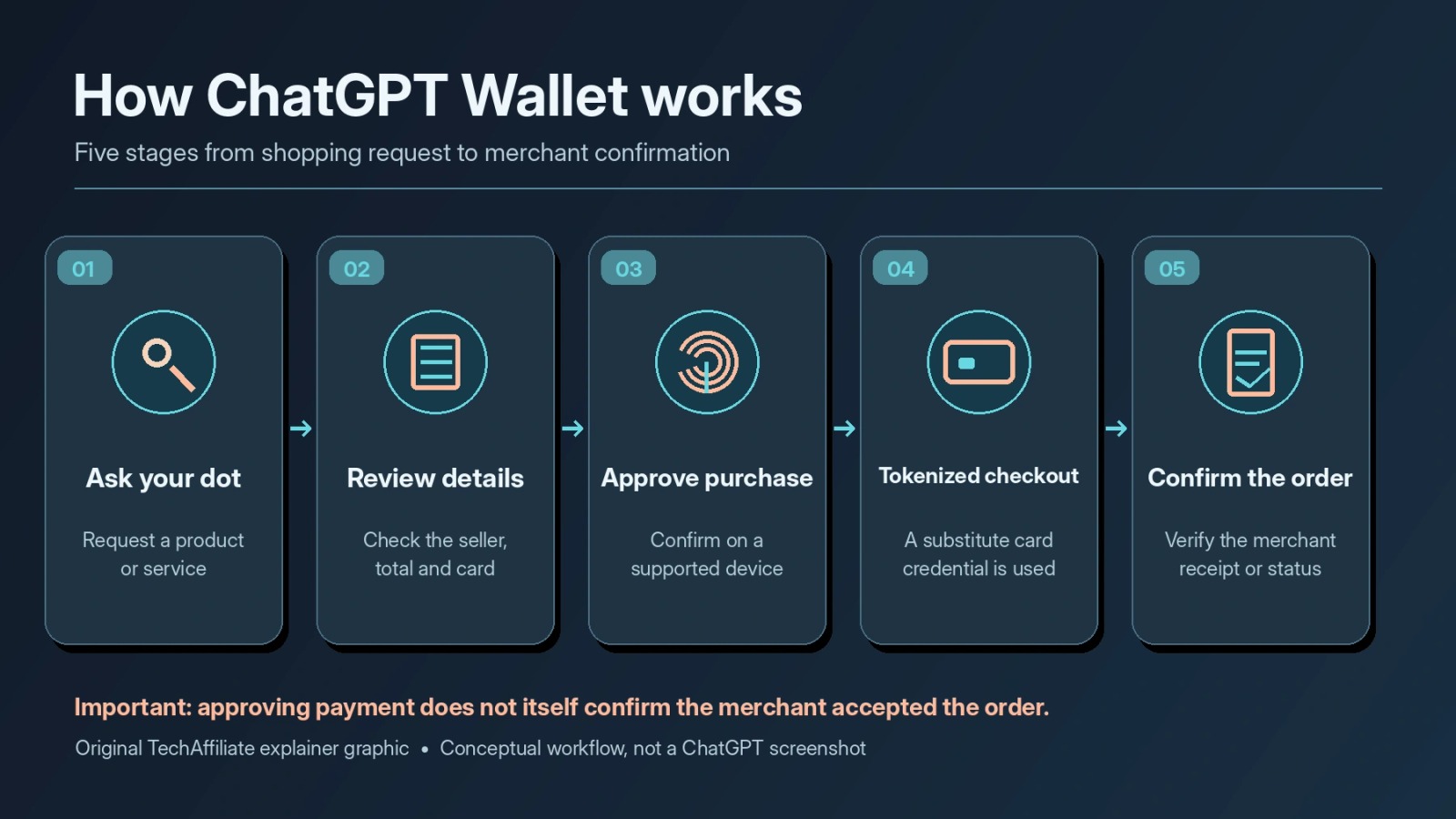
OpenAI's published process can be understood as five stages. The graphic below is an original TechAffiliate explanation rather than a screenshot of the actual Wallet application.
- Ask the dot for help. Explain the item or service, budget, preferences and delivery constraints. The agent can research options and prepare a merchant checkout where supported.
- Review the purchase request. Wallet presents the available merchant, item, price, selected card and relevant delivery or recurring-charge details. The amount at checkout can differ from the initial product listing.
- Approve on a supported device. In the current documented flow, purchase approval involves a biometric check such as Face ID or Touch ID. If necessary, OpenAI documents a handoff to a compatible device.
- Pay with a substituted credential. A payment provider or network supplies a tokenized or virtual credential linked to the selected credit card. The agent and merchant do not receive the actual physical card number.
- Check the merchant result. A payment authorization, an AI response, and an accepted merchant order are not necessarily the same event. Look for the merchant receipt or order status before retrying if anything is unclear.
These steps are based on OpenAI's launch explanation and purchase guidance. Some stores may block automated checkout or reject a payment, even when the user has approved it.
What the official OpenAI demonstration actually shows
OpenAI's launch demonstration gives a concrete illustration of what the process can look like. We are showing three editorial screenshots from that demonstration in sequence. Do not mistake demonstration footage for proof that every account, merchant or product supports Wallet.
Screenshot 1: Rufus recommends a $59.97 gift box
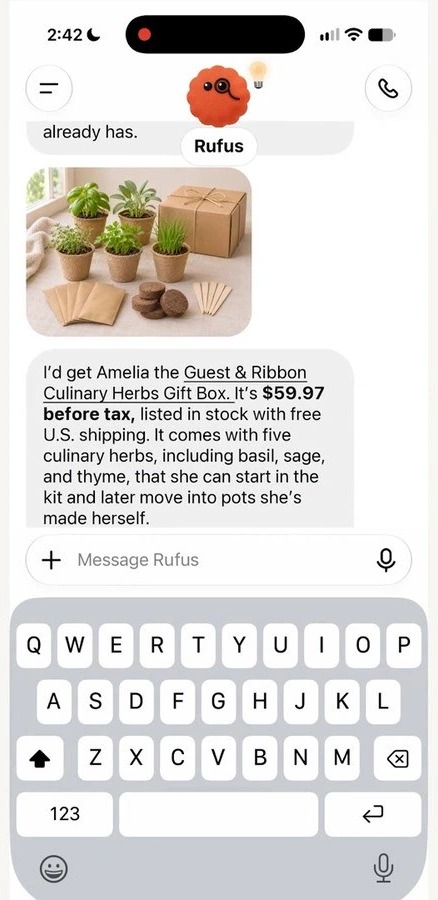
In the first frame, the dot called Rufus suggests a Guest & Ribbon Culinary Herbs Gift Box and describes what is included. The suggestion says the product costs $59.97 before tax, is in stock, and includes free US shipping. The assistant also explains why the gift might suit the recipient.
What this frame teaches: the shopping recommendation is a separate step from final payment. The displayed product price should not be treated as the all-in total until checkout details are shown.
Screenshot 2: The buyer reviews the $66.30 payment request
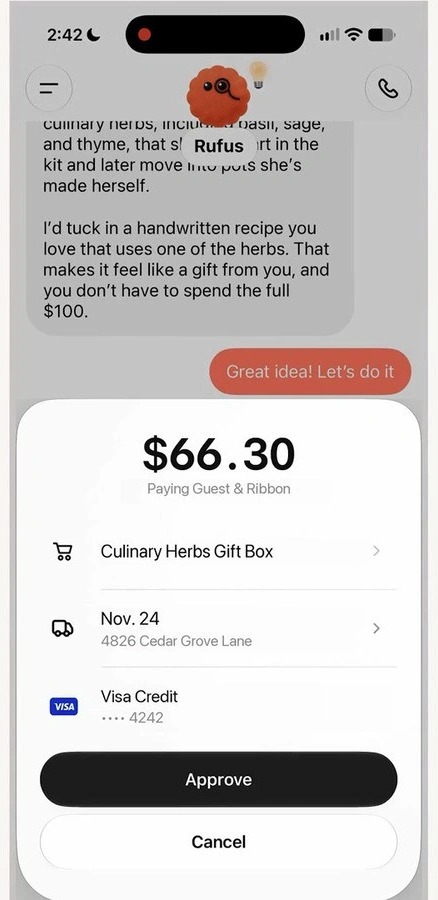
The next frame shows a $66.30 total for Guest & Ribbon, with the product, delivery information, a selected Visa credit card ending in 4242 and two clear choices: Approve or Cancel. The earlier $59.97 amount was explicitly before tax; the later $66.30 checkout total is the relevant amount to review. We should not assume the exact breakdown of taxes or other charges unless the merchant's full breakdown is visible.
What this frame teaches: the user is not simply granting a blank check to an agent. The displayed merchant and final amount matter. Check the card, delivery information and any recurring terms before approving. The card digits and address visible in this launch-demo frame are demonstration details; they are not TechAffiliate account information.
Screenshot 3: Rufus reports the checkout result
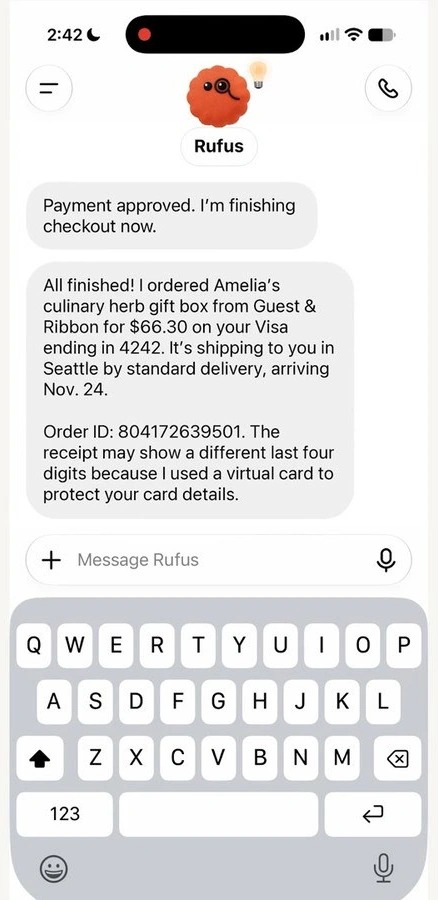
The third frame shows Rufus reporting that the gift box was ordered for $66.30. It also explains that the merchant receipt might display a different set of final card digits because the agent used a virtual payment credential rather than the physical card number.
That is useful context, but a chatbot's message is not a substitute for the merchant's own order confirmation. If you do not have a clear merchant confirmation after a checkout error or interruption, verify the order before placing it again. OpenAI's official troubleshooting guidance makes this distinction explicit.
Image attribution: The three images above are screenshots supplied from OpenAI's official ChatGPT Wallet launch demonstration, November 13, 2026. Source: OpenAI — Introducing ChatGPT Wallet. They have been cropped only to remove empty outer margins for readability; no on-screen text, prices or controls were changed. Original supplied frames are retained in the accompanying editorial source package. Screenshot reuse should be reviewed under applicable rights and permissions before publication.
How to set up ChatGPT Wallet if you're eligible
OpenAI describes two routes for adding a card, but neither is available to every ChatGPT account. Before attempting setup, confirm you are an eligible US Pro user with access to dots and Wallet. These steps were checked against the official Help Center.
Option A: Ask your dot to add a card
- Open a conversation with your dot and ask: “Help me add a card to Wallet.”
- Open the secure card-setup request or link provided by the dot.
- Enter your credit card number, expiry and security code only inside the secure form, never into the conversation.
- Review the Wallet Terms and Privacy Notice, then select Add card.
- Complete any issuer verification and wait for confirmation that the card was added.
Option B: Use the Wallet section in Settings
On a supported mobile device, OpenAI documents a path through Settings → Wallet → Add Card. The menu may be absent if Wallet has not yet rolled out to your account. Having a Pro subscription alone does not guarantee immediate availability.
What happens when you approve your first order?
When your agent presents a purchase request, check the merchant name, items, quantity, total or maximum amount, selected card, recipient or shipping details, and whether there are recurring charges. Choose Approve only if those details are correct. Complete biometric verification on a supported device. After the dot attempts checkout, confirm the result with the merchant.
Security tip: Never paste a full card number, CVV, banking password, or one-time bank verification code into a ChatGPT conversation or support message. Use the secure provider form or issuer process that OpenAI describes.
Which payment cards are supported?
OpenAI says the initial Wallet rollout supports eligible US-issued credit cards, including certain American Express, Chase, Mastercard and Visa cards. That is not a guarantee that every card on those networks will work: eligibility can also depend on the issuer, account, merchant, bank verification and rollout status.
| Card/payment method | Status at initial rollout | Important nuance |
|---|---|---|
| Eligible US-issued credit card | Supported when account/issuer permits | US billing address and other eligibility checks still apply. |
| Eligible American Express, Mastercard or Visa | Named in official guidance | Not every card is automatically eligible. |
| Eligible Chase credit card | Supported with additional requirements | Chase primary cardholder and app verification are required. |
| Debit card | Not supported | OpenAI explicitly excludes debit cards. |
| User-provided virtual card | Not supported at launch | Different from the virtual token Wallet creates during checkout. |
| Non-US-issued cards or UPI | Not included in initial rollout | The announced launch requires eligible US-issued credit cards; no UPI support has been announced. |
↔️ Scroll horizontally to see all columns
The card saved in Wallet is also separate from any card used to pay for the ChatGPT subscription. Source: OpenAI Wallet Help Center.
Where is ChatGPT Wallet available? Countries and eligibility
As of November 16, 2026, the announced initial rollout is US-only. This guide is written for readers worldwide, but the feature itself is not yet globally available. OpenAI has not announced a schedule for expanding access to other countries. Always check the official Wallet eligibility guide before trying to add a card.
United States: who can use Wallet at launch?
OpenAI's initial criteria include US residency and use within the United States, a ChatGPT Pro account, a minimum age of 18, access to a supported dot, an eligible US-issued credit card, and a US billing address. Access is rolling out gradually, so meeting these requirements does not guarantee that the Wallet menu will already appear. A standard ChatGPT Plus or Free account is not included in the launch. Source: OpenAI launch announcement.
Outside the United States: India, Europe, Singapore and elsewhere
Readers in India, Singapore, European countries and other locations outside the US are not included in the initial announced rollout. OpenAI has not provided individual launch dates for these regions. Support for India's UPI payment system or non-US-issued cards has not been announced. This is a product-eligibility restriction, not a statement about whether ordinary ChatGPT is available in those countries.
Be cautious of unverified tutorials promising to activate Wallet with a VPN, fabricated billing information or third-party card-selling services. The published requirements involve residency, billing, card issuance and location of use. For any country, rely on official OpenAI updates rather than assuming availability from demonstrations or social posts.
Is ChatGPT Wallet safe? Security, privacy and limitations
The design introduces valuable safeguards, but “tokenized” does not mean “risk-free”. There are at least four separate questions to consider: who sees your card data, who authorizes the purchase, who stores transaction information, and who handles problems with the order.
Your actual card number is not given to the agent or merchant
OpenAI says the card details are entered into a secure form controlled by its payment service provider. OpenAI receives a tokenized credential and limited card information—not the full number or security code. A virtual or substitute credential is supplied for checkout, so a merchant receipt can show different last four digits from the original card.
This is a payment-data safeguard, not a guarantee that every retailer is trustworthy or that every agent selection is correct. Do not assume that tokenization prevents all card disputes, merchant fraud, repeated charges or failed fulfillment. Source: Wallet Privacy Notice.
The current checkout process includes human approval
The product's published initial design asks the user to review important purchase information and perform a security check before an order is sent. A user can decline a request with incorrect details. OpenAI's longer-term plan for purchases delegated under preset limits should be distinguished from the initial purchase-by-purchase approval experience. Source: OpenAI announcement.
OpenAI still processes purchase and transaction information
The privacy notice makes a distinction between not receiving your full card number and not receiving any payment-related information. OpenAI says it may process merchant names, amounts, dates, items, discounts, addresses, order status, selected-card information and records of approvals or rejected requests. A payment provider may retain underlying card details where required. Removing a saved card does not automatically erase transaction records or cancel previous orders.
For a payments article, this nuance is more useful than the simplistic claim that “OpenAI cannot see your payment information.” Source: Wallet Privacy Notice.
Refunds and disputes still belong to the appropriate parties
The merchant is the seller. Contact the merchant for delivery, returns, cancellations and refunds. Contact your credit card issuer for declined, unauthorized or disputed charges. OpenAI Support can help with Wallet setup, account-security incidents or approval-flow errors. These responsibilities are laid out in the Wallet Terms and Help Center.
Recurring-payment agreements deserve special attention: if a merchant's disclosed terms allow future charges, deleting a card from Wallet does not necessarily cancel that merchant agreement. Review subscriptions or ongoing charges directly with the merchant.
ChatGPT Wallet vs Google Pay, Apple Pay and other payment apps
These services overlap in the broad world of digital payments but are not equivalent products. ChatGPT Wallet focuses on payments initiated in an AI agent's shopping workflow. Google Pay, Apple Pay and region-specific payment systems such as UPI serve different mobile-payment and bank-transfer needs; availability and supported methods vary by country and service.
| Question | ChatGPT Wallet | Conventional digital payment apps |
|---|---|---|
| Main role | Payment credential for eligible agent-assisted merchant checkout | Consumer payment initiation through supported apps, devices or merchants |
| Who researches the product? | The dot can help research and prepare checkout | Typically the user, merchant app or another service |
| Approval | User reviews agent's transaction and verifies on a supported device | Depends on app, device, payment rail and local policy |
| Geographic availability | Limited to eligible US users at launch | Varies widely by service, country and payment method |
| Can it transfer money like a bank app? | Not a bank or money-transfer service | Depends on the specific app and rail |
↔️ Scroll horizontally to see all columns
The comparison is about function, not a claim that one product is universally cheaper, more secure or faster. For related context on the changing commerce ecosystem, see our analysis of Google's Universal Commerce Protocol, which is a separate system rather than an identical Wallet feature.
What can go wrong when an AI agent pays?
Wallet's current limitations are important enough to evaluate before treating it as a universal checkout method:
- Merchant incompatibility: some sites restrict automation, or their fraud tools might decline a legitimate agent purchase.
- Issuer verification: the bank may request further confirmation when a card is enrolled or used.
- Mistaken product or terms: an AI can select the wrong variant or misunderstand shipping and recurring-charge conditions; check the actual approval panel.
- Unclear order status: an error after approval can leave a pending hold or uncertain result; inspect merchant confirmation before submitting payment again.
- Restricted rollout: supported devices, account status, geography, card type and product access all matter.
- No automatic refund from OpenAI: the seller remains responsible for the merchandise, while the card issuer handles card charge disputes.
OpenAI's own merchant guidance notes that storefronts and payment-risk systems are still adapting to agent-initiated purchases. The correct takeaway is not that the technology is useless; it is that real-world compatibility needs careful measurement before anyone promises that it works everywhere.
Frequently asked questions
Is ChatGPT Wallet free?
OpenAI introduced Wallet to eligible US ChatGPT Pro users, so it is not available to the general free tier at launch. Avoid claiming a separate Wallet transaction fee is zero or universal unless OpenAI explicitly confirms current pricing and any applicable merchant charges.
Can ChatGPT Wallet work with ChatGPT Plus?
Not in the initial announced rollout. Access is limited to qualifying ChatGPT Pro users with supported accounts, cards and devices.
Which countries support ChatGPT Wallet at launch?
OpenAI's initial launch is limited to eligible US users. Other countries are not included in the announced initial rollout; check the current Wallet Help Center for later changes.
Are debit cards supported?
No. OpenAI specifically says debit cards are not supported at launch.
Why does the receipt show different card digits?
Wallet can use a substituted virtual payment credential linked to your selected credit card. The merchant receipt may display that credential's last four digits rather than those printed on the card you carry.
Does clicking Approve mean the order has been placed?
No. Approval authorizes the agent's submission attempt, but the merchant still has to accept the order. Check the actual merchant confirmation before retrying.
Can Wallet buy from every online store?
No. Some sites or payment systems may not support agent-driven checkout, and issuer or fraud controls can still reject a transaction.
Who handles a refund or defective product?
The merchant handles orders and refunds. Contact your card issuer about unrecognized or disputed charges; contact OpenAI Support for Wallet-specific errors.
Does OpenAI store my complete card number?
OpenAI says the secure payment provider collects the card details and OpenAI receives tokenized and limited card information. OpenAI still processes purchase and authorization-related metadata; see the Privacy Notice.
When will ChatGPT Wallet launch in other countries?
As of November 16, 2026, OpenAI has not announced dates for an expansion outside the United States, including India, Europe or Singapore. Future access and local payment methods should be verified through OpenAI's official release notes and Wallet Help Center.
Final verdict: a meaningful payment experiment, not universal checkout yet
ChatGPT Wallet shows how AI assistants may move from recommendations to transactions without gaining access to a user's underlying card number. The real launch demonstration makes the appeal clear: Rufus recommends a product, Wallet shows the final amount for human approval, and the agent reports the checkout result.
For now, the advantages are balanced by narrow eligibility, merchant compatibility questions and the need to verify order status. Readers outside the US should view this as a US-first release, not an immediately available global payment service.
The more interesting long-term development will be whether agent shopping becomes reliable across merchants without weakening buyer approval, recourse and transparency. That is worth tracking through official updates and actual independent transaction tests—not marketing screenshots alone.
Sources and methodology
The article was researched on November 16, 2026 using OpenAI's primary documentation. The screenshots were supplied from OpenAI's official November 13 launch demonstration and are explicitly attributed; they were not taken during a TechAffiliate test.
- OpenAI — Introducing ChatGPT Wallet (November 13, 2026)
- OpenAI Help Center — Making purchases with ChatGPT Wallet
- OpenAI — ChatGPT Wallet Terms (effective November 12, 2026)
- OpenAI — ChatGPT Wallet Privacy Notice (effective November 12, 2026)
- OpenAI — ChatGPT release notes
Affiliate Disclosure
TechAffiliate may earn a commission if you purchase through our links. This helps support our work but does not influence our reviews. We provide our honest assessments of products. See my testing methodology →
Related Articles
 Tool Comparisons
Nov 2, 2026 • 23 min read
7 Best AI Presentation Tools in 2026: Hands-On Comparison of Free & Paid Tools
We generated real presentations with Gamma, Canva, Gemini in Google Slides, Pitch, and Copilot using the same prompt, and researched Beautiful.ai and Plus AI. Here is what worked, what failed, and what each tool costs.
 AI & Machine Learning
Jun 18, 2026 • 27 min read
GLM-5.2 Review (2026): Benchmarks, Free Access & GLM-5.3 Comparison
A sourced guide to GLM-5.2's 1M-token context, MIT-licensed weights, benchmarks and API access, with GLM-5.3 comparisons and a same-prompt coding comparison.
 AI & Machine Learning
Oct 19, 2026 • 17 min read
AI Agent Security Risks in 2026: Real Attacks and Safety Tips
Recent reports show how AI agents can be misused in cyberattacks or take unexpected actions with personal data. Here are the real risks and safeguards users and developers can apply.
Comments (0)
Leave a Comment
No comments yet
Be the first to share your thoughts!