TorchNeuron: Run PyTorch on AWS Trainium
Aditya Kachhawa

If you've used PyTorch on a GPU, you know the familiar line: move the model and its tensors to cuda, then train or run inference. For teams using AWS Trainium, the equivalent device can now be neuron — and the change can be smaller than a full port.
That is the promise behind TorchNeuron, an open-source native PyTorch backend for AWS Trainium. Announced on 19 October 2026 and made available in public beta from 20 October, it aims to let developers reuse more of their existing PyTorch code while taking advantage of Trainium hardware.
There is an important caveat, though: minimal code changes do not mean every model will work unchanged or run faster. TorchNeuron is in public beta, operator coverage is still evolving, and performance depends on the model, the supported operations, the instance, and how the workload is compiled and measured.
This guide explains what TorchNeuron is, who it is for, how to get a first model running, and what to check before moving a real workload.
What is TorchNeuron?
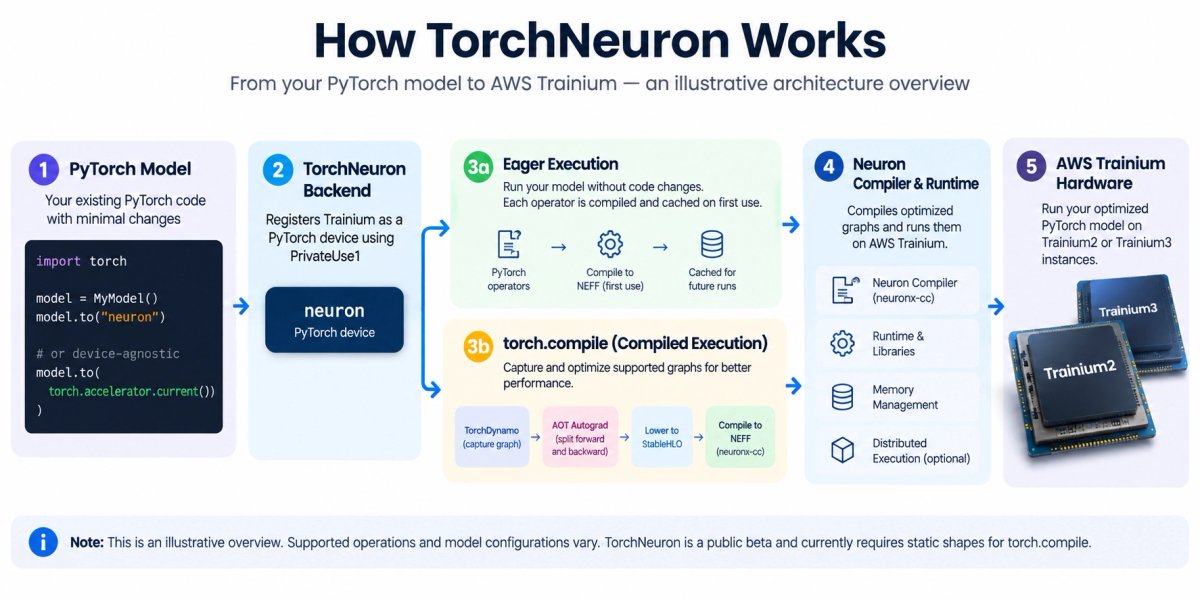
TorchNeuron is an open-source backend that registers AWS Trainium as a device in PyTorch. It uses PyTorch's PrivateUse1 extension mechanism, allowing supported operations to run on a neuron device through familiar PyTorch APIs.
The first public-beta release is part of AWS Neuron SDK 2.33.0 and supports Trainium2 and Trainium3 instances. It is not a general-purpose accelerator backend for a local Windows PC, and it does not turn an ordinary CPU or consumer GPU into Trainium. You need access to a supported Trainium instance and its Neuron system software.
The project is available at the official AWS Neuron GitHub repository. The announcement says the project is released under the Apache 2.0 license.
Why does it matter?
PyTorch is used across model training, fine-tuning, and inference. Historically, using a new accelerator can involve adapting code, learning device-specific APIs, and checking compatibility with model libraries and distributed-training tools.
TorchNeuron's goal is to reduce that adaptation work. For a basic model, the device-placement change may be as simple as moving a model from .to("cuda") to .to("neuron"). Code already written with PyTorch's device-agnostic torch.accelerator APIs may need fewer device-specific edits.
That makes TorchNeuron interesting for developers who want to evaluate Trainium without immediately rewriting their application around a completely different framework. It is also relevant to teams that use standard PyTorch training loops, torch.compile, distributed APIs, or supported Hugging Face workflows.
Still, treat portability as something to validate, not a blanket compatibility guarantee. A model can contain operations, shapes, extensions, or CUDA-specific assumptions that need changes or are not supported by the current backend.
How TorchNeuron works
TorchNeuron has several execution paths. The right choice depends on whether you are exploring a model, debugging it, or trying to optimize a production workload.
Eager execution: a practical first step
Eager mode runs operations as Python executes them. This is useful for initial validation because you can use familiar control flow, print intermediate values, and debug the model without first compiling the whole graph.
In the native backend, supported operations are dispatched to Neuron and compiled as needed. The first use of an operation can include compilation work; matching compiled artifacts are then cached. Eager mode is convenient for bring-up, but calling individual operations separately may leave performance on the table.
torch.compile: optimize supported graphs
TorchNeuron provides a backend for torch.compile. A typical call looks like this:
compiled_model = torch.compile(model, backend="neuron", dynamic=False)This directs PyTorch's compilation pipeline to the Neuron backend. The backend captures supported parts of the model graph and lowers them for execution on Trainium. Compilation can take time the first time a new graph or input signature is seen; later runs may reuse the cache.
For the public-beta release described in AWS's documentation, compiled workloads should use static shapes (dynamic=False). Native dynamic-shape support is still in development, and new input shapes can require separate compilation. If your workload receives highly variable inputs, padding or bucketing may help, but confirm the recommended technique in the current docs for your use case.
Custom kernels with NKI
For developers who need more control, AWS provides the Neuron Kernel Interface (NKI) for writing custom operations. This is an advanced path, not a requirement for every TorchNeuron user. Start with standard PyTorch operations and profiling; consider custom kernels only when measured bottlenecks justify the additional engineering work.
Before you install: what do you need?
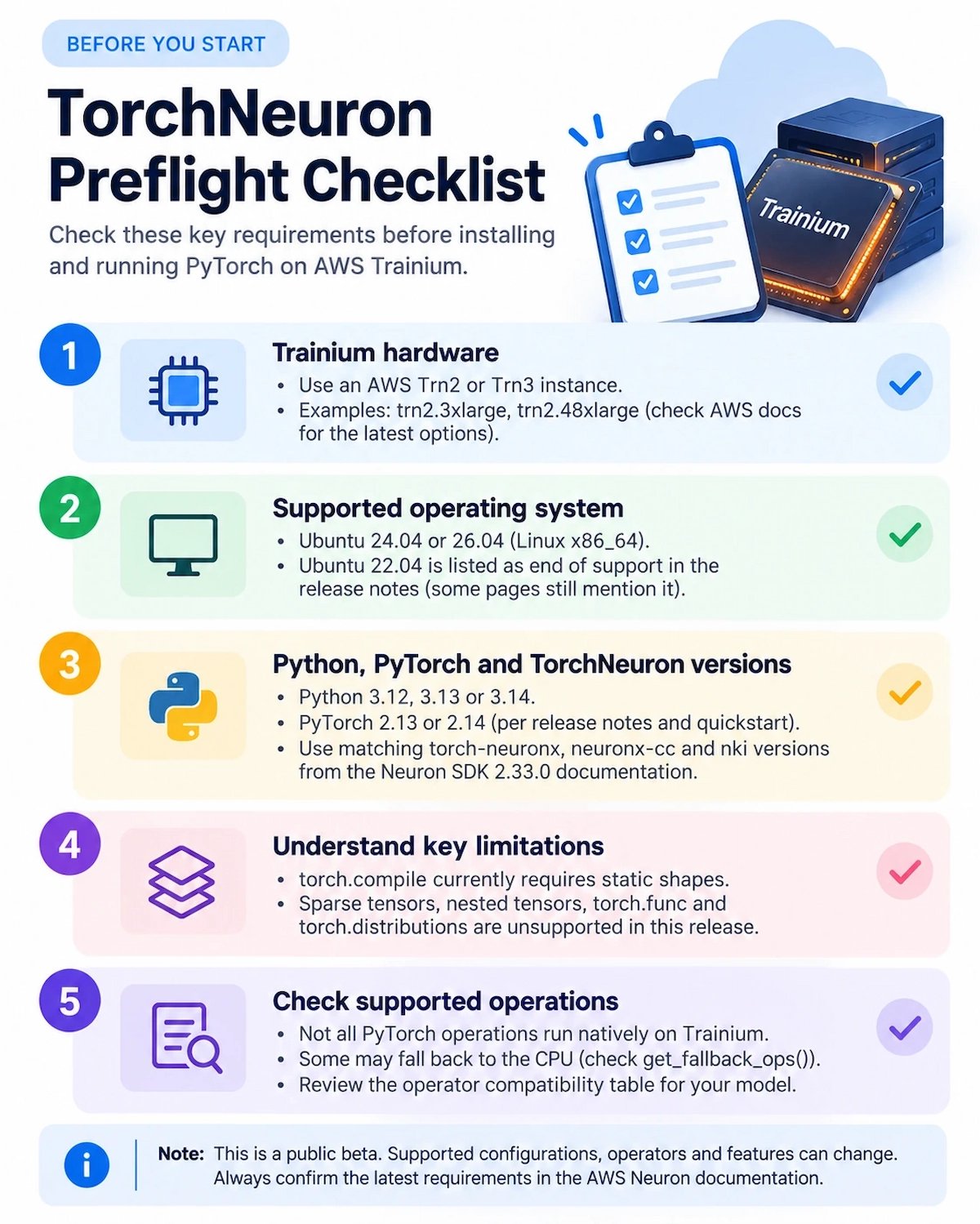
TorchNeuron runs on supported AWS Trainium infrastructure, not simply on any machine where you can install PyTorch. According to the current Neuron documentation checked for this draft, the public-beta support matrix includes:
- Hardware: AWS Trainium2 or Trainium3 instances.
- Platform: Linux x86_64. The current support matrix lists Ubuntu 24.04 and Ubuntu 26.04; Ubuntu 22.04 is marked end of support for the current release.
- Python/PyTorch pairing: the current 2.14 package family pairs with PyTorch 2.14 and Python 3.12, 3.13, or 3.14. The release notes also list a 2.13.3 package family for PyTorch 2.13. Re-check the compatibility matrix before installation because beta packages can change.
- System software: a Neuron Base DLAMI or a supported Ubuntu image with the required Neuron driver, runtime, compiler, and related system packages.
- Access: SSH or equivalent access to a correctly configured Trainium instance.
If you are new to AWS, budget time for instance setup and understand the cost of leaving accelerator instances running. Do not launch an expensive instance just to copy a tutorial command without checking the current instance price, region, and prerequisites.
Install TorchNeuron on a supported Trainium instance
The steps below summarize the official quickstart for the 2.14 package family. They assume you have already launched a supported Trainium instance and installed the required Neuron system packages. Follow the official quickstart for the current AMI and driver setup rather than treating this excerpt as a complete cloud provisioning guide.
First, check Python and create an isolated environment:
python3 --version
python3 -m venv ~/torch-neuronx-venv
source ~/torch-neuronx-venv/bin/activate
python -m pip install --upgrade pip
Install the matching package family and compiler dependencies:
python -m pip install "torch-neuronx==2.14.*" \
  "neuronx-cc==2.*" nki \
  --extra-index-url https://pip.repos.neuron.amazonaws.com \
  --extra-index-url https://download.pytorch.org/whl/cpu
The official quickstart says this installs the matching PyTorch 2.14 CPU wheel and torch-neuronx package from the appropriate repositories. Do not combine arbitrary versions of PyTorch, torch-neuronx, and the Neuron SDK. If you prefer PyTorch 2.13, follow the corresponding 2.13 package instructions instead.
Check that the instance exposes Neuron devices:
neuron-lsIf no Neuron device appears, verify that you are on a supported Trn2/Trn3 instance and that the system-level Neuron driver and runtime are installed correctly.
Official installation reference: AWS Neuron — install and verify torch-neuronx.
Run a small PyTorch model
Once the software and hardware setup is complete, start with a small model. This example follows the shape of the official TorchNeuron release example; it is a smoke test, not a performance benchmark.
import torch

model = torch.nn.Linear(16, 8).to("neuron").eval()
inputs = torch.randn(4, 16, device="neuron")

with torch.no_grad():
    eager_output = model(inputs)
    compiled_model = torch.compile(model, backend="neuron", dynamic=False)
    compiled_output = compiled_model(inputs)

print("Eager output shape:", tuple(eager_output.cpu().shape))
print("Compiled output shape:", tuple(compiled_output.cpu().shape))
This tiny example checks that a simple layer can run in eager mode and through the compilation backend. The first compiled call can take longer because compilation may occur. Do not use the elapsed time of this first call as a steady-state performance number.
For a correctness check, compare the Trainium output with a CPU reference using the same weights and inputs, with a tolerance appropriate for the dtype and workload. For larger models, follow the official quickstart and tutorial for the exact verification pattern. Save the environment details alongside test results: instance type, Neuron SDK version, PyTorch version, package versions, model revision, input shape, dtype, and whether the reported time includes compilation.
What is supported — and what still needs checking?
The current documentation describes support for eager execution, torch.compile, standard PyTorch APIs, mixed-precision workflows, and distributed APIs such as DDP, FSDP2, tensor parallelism, and pipeline parallelism, subject to the release's documented details.
That does not mean the full PyTorch API is available on every operation. The release notes explicitly list limitations, including unsupported APIs such as sparse operations, torch.func, nested tensors, and torch.distributions in this release. Some unsupported operations in eager mode may fall back to CPU. A CPU fallback can preserve correctness while hurting performance, so successful execution alone does not prove that the workload is using Trainium efficiently.
Compiled execution also has constraints. Static shapes are required for the documented beta path, and first-run compilation can affect latency. Some CUDA-specific settings or assumptions must be removed or replaced, such as CUDA graph-related options that do not apply to the Neuron backend.
Before porting a meaningful workload, use this checklist:
- Check the official operator and API compatibility information for the operations your model actually uses.
- Run correctness tests against your existing baseline before measuring speed.
- Inspect whether key operations execute on Neuron or fall back to CPU.
- Test realistic input shapes and production batch sizes, not only toy tensors.
- Separate cold-start compilation time from steady-state measurements.
- Profile bottlenecks before investing in NKI custom kernels.
- Re-test after changing the model, package family, input shapes, or Neuron SDK release.
Will TorchNeuron make AI workloads cheaper?
It may help some workloads make better use of Trainium, but the software alone cannot guarantee a lower bill. Total cost depends on instance pricing, region, utilization, throughput, latency target, model size, sequence length, compilation behavior, data movement, and engineering time.
The PyTorch announcement quotes Deepgram as reporting about 60% more input audio seconds per dollar than its own prior GPU baselines in the benchmarks it evaluated. That is a company-reported result for a specific audio workload and comparison setup — not a promise that every PyTorch model will be 60% cheaper. Do not transfer that figure to unrelated workloads without testing.
For a fair evaluation, benchmark the same task and quality target on both systems. Include warm-up and compilation behavior, multiple steady-state runs, throughput, end-to-end latency, memory use, and the actual price of the instances you compare. Calculate cost per useful unit of work rather than comparing accelerator-hour prices alone.
Who should try TorchNeuron?
TorchNeuron is worth evaluating if you already work in PyTorch, have access to Trainium2 or Trainium3, and are willing to check compatibility and benchmark your specific workload. It may be especially interesting for teams exploring training or inference at scale, Hugging Face workflows, supported distributed training, or custom-kernel optimization.
You may want to wait if your code is tightly coupled to CUDA-specific features, depends heavily on unsupported operators, needs unrestricted dynamic shapes in the compiled path, or requires a production stability guarantee before adopting a public-beta backend. You also need to include the cost and operational complexity of running AWS accelerator infrastructure in the decision.
Common questions
Is TorchNeuron free?
The TorchNeuron project is open source under Apache 2.0 according to the announcement. However, running it on AWS Trainium instances is not free by default. Check current AWS pricing, available credits, and your region before launching hardware.
Can I use TorchNeuron on my Windows PC or NVIDIA GPU?
The documented beta targets Linux x86_64 on AWS Trainium2 and Trainium3 instances. It is not a drop-in way to make an ordinary Windows PC or NVIDIA GPU act like Trainium hardware.
Does it require rewriting a PyTorch model?
For supported operations, some models may require only a small device-placement change, such as switching .to("cuda") to .to("neuron"). Your actual changes depend on CUDA-specific code, unsupported operators, shapes, third-party extensions, and the chosen execution mode. Validate your own model rather than assuming it will run unchanged.
Is TorchNeuron production-ready?
As checked on 20 October 2026, the current release is described as a public beta. Teams should review release notes and limitations, run correctness and performance tests, and assess beta software against their reliability requirements before adopting it for production.
What is the difference between eager mode and torch.compile?
Eager mode runs operations as Python executes them and is useful for debugging and first-run validation. torch.compile captures supported graphs for compilation and optimization, but can add compilation latency and has static-shape requirements in the documented beta release.
The takeaway
TorchNeuron makes AWS Trainium easier to explore from a familiar PyTorch workflow. The ability to use a neuron device, eager execution, torch.compile, and standard distributed APIs could reduce the friction of evaluating another accelerator platform.
But the smart approach is to treat it as an engineering evaluation, not a magic one-line speedup. Check compatibility, verify correctness, inspect CPU fallbacks, separate compilation from steady-state timing, and compare total cost on your own workload. If the model you care about works well on the supported stack, TorchNeuron gives you a practical route to test Trainium without beginning with a complete rewrite.
Sources and further reading
- PyTorch: Introducing TorchNeuron — Native PyTorch backend for AWS Trainium — announcement, capabilities, licensing, example code, partner-reported result, coverage methodology, and limitations.
- AWS Neuron: TorchNeuron documentation — current overview and technical documentation.
- AWS Neuron: Install and verify torch-neuronx — prerequisites, system packages, Python environment, package installation, and verification.
- AWS Neuron: Release notes for TorchNeuron — current version matrix, new features, breaking changes, known limitations, and support matrix.
- AWS Neuron: Best practices for TorchNeuron — execution-mode choices, compilation, profiling, and performance guidance.
- AWS Neuron: Build your first model — end-to-end beginner tutorial.
- Official repository: aws-neuron/torch-neuronx — source code and current project status.
Affiliate Disclosure
TechAffiliate may earn a commission if you purchase through our links. This helps support our work but does not influence our reviews. We provide our honest assessments of products. See my testing methodology →
Related Articles
 AI & Machine Learning
Oct 19, 2026 • 17 min read
AI Agent Security Risks in 2026: Real Attacks and Safety Tips
Recent reports show how AI agents can be misused in cyberattacks or take unexpected actions with personal data. Here are the real risks and safeguards users and developers can apply.
 AI & Machine Learning
Aug 20, 2026 • 14 min read
Ox Alpha Explained: It Was GLM-5.3-Flash (vs GLM-5.3)
The mystery model Ox Alpha was revealed as Z.ai's GLM-5.3-Flash. Here's how it compares with GLM-5.3, what the benchmarks can tell you, and where to check current pricing.
 AI & Machine Learning
Oct 7, 2026 • 32 min read
5 AI Website Builders, One Prompt: Lovable, v0, Bolt.new, Replit & Base44
I tested Lovable, v0, Bolt.new, Replit, and Base44 by giving them all the exact same prompt to build a personalized AI stack generator. Here are the results.
Comments (0)
Leave a Comment
No comments yet
Be the first to share your thoughts!